


You're backing into a tight parking space when the warning beeps start getting faster. The car behind you is close, but how close? Is the sensor reacting to the other vehicle, a curb, or something beside the bumper?
A backup camera answers a different question. It shows the area behind your vehicle, allowing you to see the parking-space markings, nearby cars, curbs, and other visible obstacles.
Both technologies are useful, although they provide different information.
Parking sensors estimate proximity and warn you as an obstacle gets closer. Backup cameras provide a live image so you can see what is behind the vehicle.
That difference becomes important when parking around children, low obstacles, narrow posts, bicycles, or objects that do not appear clearly in mirrors.
It also affects how the systems perform in heavy rain, darkness, and tight spaces—and how much work is required to install them on an older vehicle.
This guide compares ultrasonic parking sensors with rearview cameras, including their strengths, limitations, installation costs, and the situations where using both makes sense.
Quick Navigation
Parking safety reminder: Neither parking sensors nor backup cameras can reliably detect every person, child, animal, or obstacle. Before reversing, check the area around the vehicle, make sure children and pets are clear and appropriately supervised, and continue using mirrors and direct observation. Stop whenever visibility or a warning becomes uncertain.
How Do Parking Sensors and Backup Cameras Work?
Parking sensors and cameras both assist with low-speed maneuvering, but they use different technologies.
Ultrasonic Parking Sensors Measure Proximity
Most conventional parking sensors use ultrasonic sound waves.
Small sensors installed in the front or rear bumper emit high-frequency sound. When sound reflects from an object, the system uses the returning echo to estimate how close that object is.
The driver usually receives an audible warning.
A typical parking-sensor sequence works like this:
- An obstacle enters the sensor's detection area.
- The system begins sounding intermittent beeps.
- The beeps become faster as the detected distance decreases.
- A continuous tone may sound when the object is very close.
Some systems also show a graphic or approximate distance indication on the vehicle display.
The exact warning distances vary by vehicle and sensor kit.
For example, certain factory systems use different detection ranges for front-center, front-corner, rear-center, and rear-corner sensors.
The sensors provide information about objects within their designated detection areas. They generally cannot tell the driver what the object is.
A warning might come from a wall, parked car, pole, or another detectable obstacle.
Backup Cameras Show the Actual Rear Scene
A backup camera uses a rear-facing lens to capture video and send it to a display inside the vehicle.
Depending on the installation, the display may be:
- the factory infotainment screen
- a standalone dashboard monitor
- a rearview mirror display
- another compatible screen
The camera can show objects, parking lines, people, nearby vehicles, and the layout of the space behind the vehicle when they fall within its field of view.
Many cameras also display colored parking guidelines.
These guidelines are visual references based on the camera's position and system configuration.
Parking lines do not mean that the camera is measuring the distance to an obstacle.
A camera with ordinary static guidelines cannot determine that a curb is exactly 12 inches from the bumper. The driver interprets the image and uses the guidelines as approximate references.
They Provide Different Types of Information
| Feature | Parking Sensors | Backup Cameras |
|---|---|---|
| Main function | Estimate proximity to detectable obstacles | Show a live image behind the vehicle |
| Driver feedback | Beeps, tones, or distance graphics | Video image and optional guidelines |
| Object identification | Generally does not identify the object | Driver can visually interpret objects within the image |
| Distance information | Approximate proximity based on sensor detection | Visual judgment and guideline references |
| Operating range | Usually short-range areas around bumpers | Depends on camera field of view and mounting angle |
| Driver attention | Audible alerts can be heard while looking elsewhere | Requires looking at the display |
In a narrow parking space, the combination can be especially practical.
The camera shows the layout and visible objects while the sensors provide additional proximity warnings for obstacles they detect.
Key difference: Sensors help answer "How close is a detected obstacle?" Cameras help answer "What can I see behind the vehicle?"
Parking Sensors vs. Cameras: Which Performs Better in Real Situations?
Neither technology performs equally well with every obstacle.
Vehicle height, camera angle, sensor placement, lighting, weather, and the shape of an object can all change the result.
| Parking Situation | Parking Sensors | Backup Cameras |
|---|---|---|
| Backing toward a wall | Can provide useful proximity warnings | Shows wall position and surrounding space |
| Parallel parking | Useful for nearby bumper obstacles | Shows parking lines, curbs, and visible vehicle positions |
| Low curb or parking block | May miss low or unusually shaped objects | May show the object if within the camera's field of view |
| Thin pole or narrow object | Detection depends on shape and sensor position | May be visible, depending on image clarity and angle |
| Children or pedestrians | Detection is not guaranteed | Can improve visibility, but people can remain outside the frame or move suddenly |
| Dark parking garage | Ultrasonic detection does not require visible light | Image quality depends on camera and available lighting |
| Rain, snow, or mud | Contamination and heavy weather can affect detection | Water, dirt, and glare can reduce image clarity |
| Large truck or RV | Short-range sensors may leave significant areas unmonitored | Camera placement can provide selected rear and side views |
Children, Pedestrians, and Low Obstacles
This is one of the most important comparisons.
Children can be difficult to see behind vehicles, especially larger SUVs, pickups, and vans.
A rearview camera can significantly expand the area visible to the driver compared with relying on mirrors and direct rearward sight alone.
However, the image still has boundaries.
A small child may be outside the camera's field of view, hidden near a rear corner, or enter the area after the driver has already looked at the display.
Ultrasonic sensors have different limitations.
Some objects can be difficult for them to detect because of:
- low height
- narrow shape
- soft or sound-absorbing materials
- unusual angles
- position outside the detection pattern
Manufacturer guidance also warns that certain pedestrians may not be detected reliably, depending on clothing, posture, movement, and operating conditions.
Research into rear visibility has found that cameras can substantially reduce the area where child-height targets are not visible. Parking sensors sometimes detect objects in nearby areas that remain outside the camera's image.
That is one reason the two technologies can complement each other.
Neither can confirm that a child is absent.
Before backing out of a driveway or parking space, physically check the area and make sure children and pets are clear and supervised. A spotter may be appropriate when visibility is restricted.

Curbs, Parking Blocks, and Overhanging Objects
A low parking block can be a difficult target for ultrasonic sensors because it may fall below the intended detection area.
A rear camera may show it more clearly, particularly when the camera is angled downward toward the road surface.
The camera still needs to be mounted appropriately.
A high-mounted camera aimed far behind the vehicle can provide less detail immediately below the bumper.
Overhanging objects create another challenge.
Examples include:
- a low tree branch
- a loading-dock edge
- a bicycle extending from a rack
- a horizontal barrier
- a truck tailgate or cargo accessory
An ultrasonic sensor mounted at bumper height may not detect an object extending toward the vehicle above its detection area.
A backup camera may show the obstacle if it appears within the frame.
Both systems require direct clearance checks when the object extends beyond the normal bumper-level reference.
Darkness, Rain, and Snow
Ultrasonic sensors have an advantage in darkness because they do not need visible light to detect reflected sound waves.
This can be useful in dim parking garages and nighttime parking situations.
However, weather and contamination can affect ultrasonic sensors.
Potential problems include:
- ice covering a sensor
- snow buildup
- mud or dirt
- continuous water flowing over the sensor
- strong wind or certain environmental interference
These conditions may cause incorrect warnings or temporarily reduce detection capability.
A camera has different weather limitations.
At night, the image depends on camera sensitivity, available lighting, and image processing.
Bright headlights or reflected light can reduce contrast.
Rain droplets, snow, mud, and road spray can obscure the lens, even when the camera itself has a high waterproof rating.
Check both sensor surfaces and camera lenses regularly, especially after poor weather.
False Beeps and Objects That Are Too Close
Parking sensors can sometimes warn when the driver cannot see an obvious obstacle.
This may happen around:
- curved curbs
- metal grates
- uneven ground
- nearby barriers
- towing equipment
- bike racks
The system may be responding to a surface within its detection area or to an environmental condition.
Some ultrasonic systems can also have difficulty when an obstacle is extremely close to a sensor.
Depending on the design, warning behavior can change or an object may fall outside the useful measurement range.
Do not assume that silence from the sensors means the bumper has clear space.
Likewise, a clean-looking camera image does not guarantee that every obstacle is visible.
Real-world rule: Cameras generally provide more information about what an obstacle looks like. Sensors provide additional proximity cues. Each technology can miss objects outside its effective viewing or detection area.
Installation and Cost: Parking Sensors vs. Backup Cameras
The total price depends on the equipment, vehicle, display, and amount of installation work.
A basic aftermarket camera kit can be straightforward to install when it includes its own monitor.
Ultrasonic parking sensors can require several mounting holes in the bumper, a control module, wiring, and an audible or visual warning unit.
The installed cost of either system can increase when factory integration or vehicle-specific work is required.
| Installation Type | Main Work Required | Cost Considerations |
|---|---|---|
| Rechargeable wireless camera | Camera mounting, monitor power, pairing | Low permanent-installation requirement |
| Fixed wireless camera | Rear camera power, mounting, monitor setup | Less video wiring, but electrical work remains |
| Wired rear camera | Camera mounting and front-to-rear wiring | Longer cable routing increases labor |
| Four-sensor ultrasonic kit | Sensor placement, possible bumper drilling, controller and buzzer wiring | Labor depends on bumper construction and installation method |
| Factory-integrated camera or sensors | Vehicle-specific hardware, wiring and possible configuration | Compatibility and additional electronics can increase costs |
| Camera + sensor combination | Two systems installed and tested | Higher initial cost, with complementary functions |
What Does Professional Installation Cost?
For a U.S. price reference, a major electronics retailer currently lists a standard backup-camera installation service at approximately $150 in labor, with camera hardware and vehicle-specific materials purchased separately.
A rearview-mirror display combined with a backup camera can cost more to install because the mirror and associated wiring are part of the job.
The price of ultrasonic-sensor installation is less standardized.
A simple aftermarket kit may be relatively inexpensive to purchase, but professional installation can involve:
- removing bumper trim
- marking multiple sensor positions
- drilling correctly sized holes
- mounting sensors at the required angles
- routing a sensor harness
- installing the buzzer or display
- connecting power and reverse activation
- testing each detection area
If the bumper is painted, curved, reinforced, or fitted with existing factory sensors, installation can require additional planning.
Ask for a complete quote covering both hardware and labor.
Which Is Easier to Install Yourself?
For many owners, a rechargeable wireless camera with a standalone monitor is one of the simpler DIY options.
For example, Solar3A Plus uses a rechargeable camera with a license-plate mounting arrangement and a separate 5-inch display.
A wireless backup camera can reduce front-to-rear video wiring, although fixed models may still need vehicle power.
Ultrasonic kits can also be installed by experienced DIY owners, but bumper drilling and sensor alignment introduce more opportunities for installation errors.
Before drilling, confirm the exact positions specified by the kit manufacturer and check what is behind the bumper.
Incorrect sensor spacing, height, or angle can affect detection.

Combining Systems and Repair Costs
Installing both a camera and parking sensors creates two sets of components to maintain.
A camera may eventually need lens cleaning, bracket adjustment, cable repair, or replacement.
Ultrasonic sensors may require cleaning, replacement, or recalibration after bumper damage.
A combined installation may cost more initially, but it avoids relying on one type of parking information.
If your vehicle already has working factory parking sensors, adding a camera may be a relatively straightforward upgrade.
If it already has a usable rear camera, adding compatible ultrasonic sensors may provide a useful additional distance-warning function.
Cost rule: Compare the complete installed price. Camera systems differ by mounting, power, and display. Sensor systems differ by sensor count, bumper work, wiring, and calibration requirements.
Should You Choose Parking Sensors, a Backup Camera, or Both?
The best choice depends on what information is currently missing when you park.
If you struggle to see what is directly behind the vehicle, a rear camera can provide a substantial improvement in visual information.
If you can already see the area but find it difficult to judge how close the bumper is to a wall or another car, proximity warnings may be useful.
If you frequently park in confined spaces, using both may provide a more complete picture.
| Vehicle or Situation | Useful Starting Point | Why |
|---|---|---|
| Small car without parking assistance | Rear camera | Adds direct rear visibility and parking-space context |
| Car with a working factory camera | Compatible parking sensors | Adds proximity warnings to the existing image |
| Car with working factory sensors | Rear camera | Shows which visible objects are behind the vehicle |
| Large SUV or family vehicle | Camera, with compatible sensors where useful | Addresses rear visibility and close-range detection needs |
| Pickup truck | Rear camera plus appropriate proximity assistance | Helps with rear visibility and selected close parking obstacles |
| RV or trailer | Rear or multi-camera system | Provides views farther behind and around a larger vehicle |
| Frequent tight urban parking | Camera + parking sensors | Combines visual alignment with close-range warnings |
For Cars and SUVs: Start With Rear Visibility
A rear camera is particularly useful if the vehicle has a high rear window, thick pillars, or other body features that restrict direct visibility.
It allows the driver to interpret the layout of the parking space and recognize visible obstacles.
Ultrasonic sensors can supplement that view by producing audible alerts as a detectable obstacle gets closer to the bumper.
In a crowded parking garage, this combination can be useful because the driver can keep scanning the mirrors and surroundings while still receiving proximity warnings.
For Trucks, RVs, and Trailers: Camera Position Matters More
Larger vehicles often have longer distances between the driver's seat and the rear bumper.
A backup camera for truck use can provide rear visual context that bumper-level sensors alone cannot show.
For RVs and trailers, a high-mounted rear camera may show the road behind the vehicle, while a second camera can cover another selected area such as a rear corner or hitch.
Ultrasonic sensors fitted to the towing vehicle generally monitor their own designed detection zones. They should not be assumed to cover the full length of an attached trailer.
Some factory systems change or disable rear sensor functions when towing equipment is connected.
Check the vehicle's towing and parking-assistance instructions before relying on the alerts.
Using Both During a Tight Parking Maneuver
A sensible parking routine combines the information without allowing either system to replace basic observation.
- Check the area around the vehicle before entering reverse.
- Confirm children, pets, and other people are clear of the intended path.
- Use mirrors and direct observations while beginning the maneuver slowly.
- Glance at the camera to assess visible obstacles and parking-space alignment.
- Listen for proximity warnings from the parking sensors.
- Stop if the image, warnings, or actual surroundings do not agree.
- Get out and check directly when clearance is uncertain.
There is also a separate category of parking technology worth understanding: rear automatic emergency braking.
Ordinary ultrasonic parking sensors generally provide warnings. Rear automatic braking systems can apply the brakes under specified conditions when a potential collision is detected.
These systems have their own sensors, operating limits, and eligibility requirements.
Do not assume that an aftermarket sensor kit or backup camera includes automatic braking.
Choosing rule: A camera is often the more informative first upgrade when rear visibility is poor. Sensors are useful for additional close-range warnings. Using both can provide complementary information during parking.
AUTO-VOX Backup Camera Options for Different Parking Needs
AUTO-VOX offers several rear-camera configurations that provide visual assistance during parking.
These systems should be distinguished from conventional ultrasonic parking sensors, which measure proximity using reflected sound waves.
| Product | Camera Configuration | Parking Use |
|---|---|---|
| Solar3A Plus | Rechargeable camera + 5" monitor | Compact rear view with adjustable parking guidelines |
| W7 Pro | Fixed wireless camera + 5" monitor | Vehicle-powered reversing view with configurable guidelines |
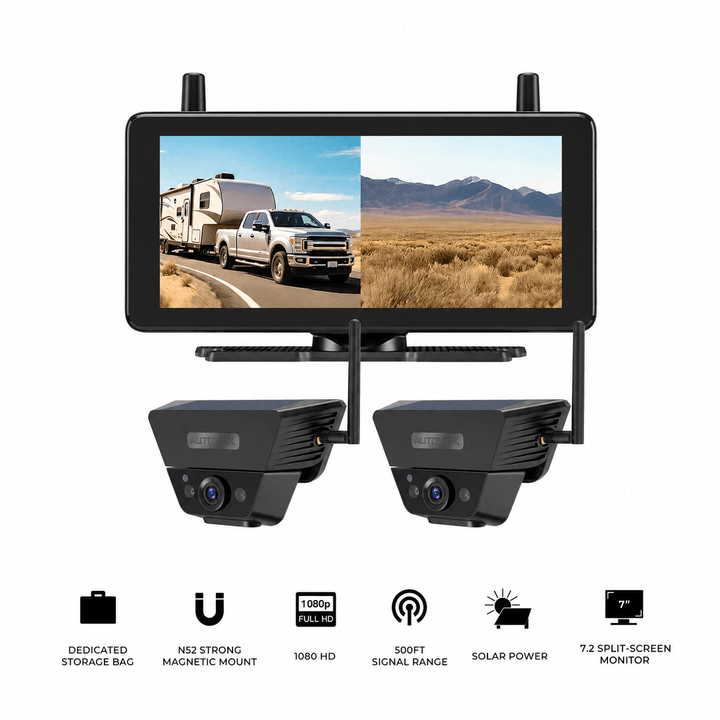
| Solar5B Dual-Camera Kit | 2 magnetic cameras + 7.2" monitor | Main rear view plus another selected angle |
| Solar5B AI | Magnetic camera + Smart Reversing Assist | Rear view with supported visual and audible detection cues |
Solar3A Plus and W7 Pro: Straightforward Rear Visibility
Solar3A Plus uses a rechargeable wireless camera with a 5-inch IPS anti-glare display.
Its adjustable parking guidelines help the driver align the visual references with the installed camera position.
The rechargeable design reduces permanent wiring requirements, making it practical for compatible cars, SUVs, and other vehicles where a straightforward rear view is the priority.
W7 Pro uses a fixed rear camera with wireless video transmission to a 5-inch monitor.
The camera connects to a supported vehicle power source and offers six customizable parking-guideline settings.
W7 Pro can suit drivers who prefer a permanently mounted rear camera without running a long video cable to the front of the vehicle.
Neither system uses its parking guideline overlay to measure actual distance to an obstacle.
Solar5B Dual: Two Selected Views
Solar5B Dual-Camera Kit pairs two rechargeable magnetic cameras with a 7.2-inch monitor.
One camera can provide the main rear view while the second covers another selected area, depending on the vehicle and mounting position.
Possible applications include:
- rear plus passenger-side rear corner
- rear plus hitch area
- rear plus selected trailer view
The larger monitor supports dual-camera viewing, which can be useful on pickups, RVs, and trailers.
Camera images remain visual references, and solar charging provides supplemental battery charging only.
Solar5B AI: Smart Reversing Assist Is Different From Ultrasonic Sensors
Solar5B AI adds Smart Reversing Assist to a magnetic wireless rear-camera system.
The feature is designed to recognize people and vehicles within the parking-guideline area.
In single-screen mode, supported detection can produce visual highlighting and audible alerts.
In dual split-screen mode, visual boxes remain available, while the audible warning is unavailable.
This feature works differently from traditional ultrasonic parking sensors.
It does not provide ultrasonic distance measurement and should not be relied on to identify every object.
Solar5B AI is not designed to recognize animals, and curbs, branches, small obstacles, or other objects may remain unrecognized.
Recognition of people also does not guarantee detection of every pedestrian or child.
The driver remains responsible for observing the complete reversing area and controlling the vehicle.
Backup Camera Options for Parking and Reversing



Prices and configurations may change. Confirm the current product page, selected package, vehicle compatibility, mounting method, power requirements, and available assistance features before purchase. These are camera-based systems rather than conventional ultrasonic parking sensor kits.
Frequently Asked Questions
Are parking sensors better than backup cameras?
Parking sensors are useful for proximity warnings when detectable obstacles enter their operating area. Backup cameras are useful for seeing the rear scene and interpreting visible objects. The better first upgrade depends on whether the vehicle needs improved rear visibility or additional close-range distance warnings. Both can be useful together.
Can parking sensors detect children or small objects?
Detection is not guaranteed. Ultrasonic sensors may miss low, narrow, unusually shaped, soft, or moving objects depending on their position and operating conditions. Children can also enter the reversing area unexpectedly. Check the surroundings directly and keep children clear and supervised before moving the vehicle.
Do backup cameras measure distance accurately?
Ordinary backup cameras provide a visual image and may display approximate parking guidelines. They do not directly measure the distance to an obstacle. Camera height, lens perspective, slopes, and vehicle accessories can affect how close objects appear on screen.
Do parking sensors work in rain and snow?
They can operate without visible light, but heavy rain, water flowing over a sensor, mud, ice, or snow buildup may affect performance. Some systems may give incorrect warnings or temporarily become unavailable. Keep the sensors clean and follow the manufacturer's guidance.
Is it expensive to install parking sensors and a backup camera together?
The combined cost depends on the hardware and installation. Camera installations may require rear mounting, display setup, and wiring. Ultrasonic kits may require multiple bumper holes, control-module wiring, and sensor alignment. A professional installer can provide an itemized quote for the complete system.
Do parking sensors automatically stop the car?
Conventional ultrasonic parking sensors generally provide audible or visual warnings. Rear automatic emergency braking is a separate driver-assistance function that may apply the brakes under specified conditions. Do not assume a parking sensor kit includes automatic braking.
Final Thoughts: Cameras and Sensors Work Better When Their Roles Are Clear
Parking sensors and backup cameras provide two different types of information.
Ultrasonic sensors estimate the proximity of obstacles within their supported detection areas. The warnings can be useful when the driver is concentrating on mirrors and surrounding traffic.
Backup cameras show the area behind the vehicle, making it easier to recognize visible obstacles and understand the parking-space layout.
Each technology has limits.
Low or narrow objects may be missed by sensors. Cameras may miss objects outside the lens view or below the visible frame. Poor weather, contamination, installation, and vehicle geometry can affect both systems.
Before deciding which system to install, ask:
- Do I need to see more of the area behind my vehicle?
- Do I mainly need additional proximity warnings in tight spaces?
- Are low obstacles, rear corners, or large-vehicle blind areas the main concern?
- Does my vehicle already have a working camera or sensor system?
- Would adding the missing technology provide more value than replacing existing equipment?
For vehicles with poor rear visibility, a backup camera is often a useful first upgrade.
For vehicles with an adequate rear image but limited close-range feedback, compatible parking sensors may provide additional information.
Using both can provide visual context and proximity warnings during the same maneuver.
Choose the technology that addresses the information you are missing, and continue checking the actual surroundings every time you park or reverse.


