


Backing a Chevy Express into a loading dock, narrow driveway, or crowded parking lot can be challenging, especially when the rear windows are blocked by cargo or passengers.
The Express is a large van with substantial bodywork behind the driver's seat. Shelving, tool storage, partitions, and passenger seating can further restrict the view through the rear doors.
A rear camera gives the driver another perspective, but choosing the right Chevy Express backup camera involves several vehicle-specific details.
The van uses swing-out rear doors, which affect camera mounting and cable routing. Its license-plate area provides a practical lower mounting location, while third-brake-light camera designs offer a higher rear perspective. Regular and extended-wheelbase versions also have different cable-length requirements.
Factory equipment is another consideration.
Many recent Express models include a Rear Vision Camera that displays the area behind the vehicle when reverse is selected. For 2025, Chevrolet also introduced an available dealer-installed Rearview Camera Mirror option, offering a different way to view the rear area during driving.
Older vans and vehicles with aftermarket equipment may have different configurations.
This guide explains how to evaluate the factory camera, compare rear-door and third-brake-light mounting positions, choose between wired and wireless upgrades, and select a display that fits the way your Express is used.
Quick Navigation
Installation reminder: Verify the exact Chevy Express year, body style, factory equipment, and electrical configuration before modifying the vehicle. Camera installation must preserve rear-door movement, brake lights, license-plate visibility, weather sealing, and required vehicle equipment. Cameras supplement mirrors and direct observation; they do not provide exact clearance measurements or guarantee that the reversing path is clear.
Does the Chevy Express Already Have a Backup Camera?
Many recent Chevrolet Express vans include a factory Rear Vision Camera, commonly called the RVC.
According to Chevrolet owner documentation, the factory rear camera is positioned above the license plate on applicable Express configurations.
When the vehicle is shifted into reverse, the system displays an image of the area behind the van.
The exact display arrangement and available features depend on the model year and equipment package.
Factory Rear Vision Camera vs. Rearview Camera Mirror
These are two different viewing functions.
Rear Vision Camera: Primarily provides the rear image when reverse gear is selected.
Rearview Camera Mirror: Provides a camera-based rearward view through a mirror-format display during supported normal driving operation.
The 2025 Chevy Express introduced an available dealer-installed Rearview Camera Mirror option identified by RPO code 5BJ.
This option was offered alongside the conventional Rear Vision Camera.
It is especially relevant to cargo vans because an optical interior mirror may have limited usefulness when the van has solid rear doors, shelving, or a full-height partition.
However, mirror-based camera equipment and reversing displays can vary by model year and installed option. Some backup-video mirror arrangements are designed to display the camera only while reversing.
Check the actual vehicle's build information and owner's manual to confirm whether its display supports continuous rear viewing.
| Camera System | Primary Function | What to Verify |
|---|---|---|
| Factory Rear Vision Camera | Rear image during reversing | Camera location, display, guidelines, working condition |
| Rearview Camera Mirror | Camera-based rearward mirror view | Model-year availability, installed option, operating modes |
| Aftermarket rear camera | Selected rear or reversing view | Mounting, power, monitor, transmission, compatibility |
| Aftermarket dual-camera system | Main rear plus another selected perspective | Two mounting points, display channels, power and signal |
When Should You Keep the Factory Camera?
If the original camera provides a clear rear view and activates normally, it may already meet your parking needs.
Consider an upgrade when:
- the factory image is too limited for a particular task
- you want continuous rear viewing
- cargo or external equipment changes the useful camera angle
- you regularly tow a trailer
- you want an additional rear-corner or hitch view
An additional backup camera with its own monitor can provide another perspective without requiring changes to the factory display.
That can be useful for work vans carrying rear equipment or camper conversions with bike racks and cargo carriers.

What if the Factory Camera Is Not Working?
A missing or distorted image should be diagnosed before deciding that the camera itself needs replacement.
Common causes of camera problems can include:
- dirty or obstructed lens
- damaged camera housing
- loose or corroded connectors
- damaged wiring
- display or electronic system faults
- electrical supply problems
Start with a visual inspection of the lens and accessible camera housing.
If the image is intermittent, check for visible wiring damage around the rear door and other accessible routing areas without disturbing factory electrical connections.
A persistent black screen, repeated system warning, or damaged harness may require diagnosis with appropriate Chevrolet service equipment.
Repairing an existing factory system can be more practical than replacing the entire setup when the original camera and display arrangement otherwise fit your needs.
Upgrade rule: Confirm what the factory system already does. Repair a malfunctioning system when appropriate, or add another camera only when a specific rear or side view is missing.
Best Backup Camera Mounting Positions on a Chevy Express
The most practical Chevy Express camera positions are usually near the rear license plate, the upper rear body, or a suitable rear-door mounting point.
Each location changes the camera perspective and installation requirements.
| Camera Location | Main Advantage | Installation Consideration |
|---|---|---|
| Above license plate | Practical lower rear view | Door movement, plate visibility, wiring |
| Third brake light area | Higher rear perspective | Brake-light fitment, sealing, model compatibility |
| Rear swing-out door | Accessible mounting position | Camera rotates with door; wiring must flex |
| Rear bumper area | Closer bumper or hitch reference | Road spray, physical exposure, limited distant view |
| Supplemental rear corner | Another selected angle | Mounting security and display support |
License Plate Camera Mounting
The license-plate area is a practical starting point because it is relatively accessible and can provide a useful close rear view.
It also aligns with the general location of the factory Rear Vision Camera described in recent Chevrolet Express manuals.
A camera in this area may help the driver see:
- the space immediately behind the van
- parking-space boundaries
- low posts
- loading-area obstacles
- selected hitch or bumper references
The position is lower than a third-brake-light camera, so it may provide less of the roadway farther behind the van.
Road spray, mud, and water can also collect on a lower-mounted lens.
Check the installation carefully if the license plate sits on a moving rear door. The camera may change direction when the door opens.
Third Brake Light Camera Mounting
A third-brake-light camera is another established aftermarket option for Chevrolet Express vans.
Specialty systems have been designed to integrate a rear-facing camera with the center high-mounted stop lamp assembly.
This position can offer a higher, relatively centered view behind the van.
It may be useful for:
- loading-dock approaches
- longer rearward visibility
- cargo vans with limited rear-window visibility
- work vans operating in crowded areas
However, third-brake-light camera assemblies are vehicle-specific.
Compatibility can depend on:
- model year
- lamp assembly design
- body configuration
- camera mounting bracket
- electrical connector
- display connection
Some aftermarket products are designed to replace the complete lamp housing, while others use separate camera brackets.
A historical third-brake-light camera listing should not be treated as confirmation that the same part fits every current or earlier Express.
Any modification must preserve brake-light operation and the weather seal around the lamp opening.
Rear Swing-Out Doors and Camera Movement
The Express Cargo Van uses rear swing-out doors, creating a different installation environment from a vehicle with a fixed rear panel.
A camera mounted directly to a door moves with that door.
When the door is open, the camera's field of view may point away from the area directly behind the van.
This is normal for a camera mounted on a moving panel, but it matters when selecting the position.
The wiring also needs special attention.
A wired door-mounted camera may require a flexible cable path between the door and the stationary body.
That path must accommodate repeated opening and closing without:
- pinching the cable
- pulling connectors
- rubbing against sharp edges
- restricting door movement
- allowing water into the body
Check the complete operating range of both rear doors before fastening the final cable route.

Rear Bumper, Hitch, and Cargo Accessories
A lower camera position can be useful when the driver needs a close view of the bumper or hitch area.
This becomes relevant for vans used with:
- small trailers
- cargo carriers
- bike racks
- rear-mounted equipment
However, a camera designed for hitch viewing may provide a different perspective from one intended to show following traffic.
External equipment can also obscure the camera.
If the van frequently carries bulky rear accessories, consider the final equipment arrangement before choosing a permanent mounting location.
Chevrolet Express Cutaway models deserve separate planning because the rear body may have been installed by a second-stage manufacturer. The location and structure of the rear camera mount will depend on that completed body.
Placement rule: A high camera can provide broader rear context. A lower camera can emphasize close bumper and hitch areas. Door movement, body fitment, and accessories determine where the camera can be mounted reliably.
Wired vs. Wireless Cameras, Cable Routing, and Displays
The Chevy Express is offered in regular and extended-wheelbase versions.
Recent Chevrolet specifications list 135-inch and 155-inch wheelbase configurations. The 2026 Cargo Van, for example, measures approximately 224.1 inches in regular-wheelbase form and 244.1 inches in extended-wheelbase form.
That difference becomes important when the camera must communicate with a display near the front of the vehicle.
Wired Camera Installation
A wired system requires a physical video connection between the rear camera and the display.
Depending on the van, the cable route may involve:
- rear-door or body cable entry
- protected interior body panels
- roof-side or lower-body routing
- cargo partition clearance
- front cabin trim
- monitor or mirror connection
Cargo vans may contain shelving, insulation, partitions, or other upfitted equipment that changes the available cable path.
Choose a route that protects the wiring from cargo movement, abrasion, heat, and moisture.
When cable routing passes through a moving rear door, use the manufacturer-approved approach for flexible wiring and suitable protection.
If body drilling is necessary, verify what is behind the panel and protect the opening against corrosion and water intrusion.
Wireless Camera Installation
A wireless backup camera can reduce installation work by transmitting video without a long cable between the camera and monitor.
Two different power arrangements are common.
Fixed wireless: The camera uses an appropriate vehicle electrical source while transmitting video wirelessly.
Rechargeable wireless: The camera uses its own rechargeable battery and communicates with a compatible monitor.
A fixed wireless system can suit regular delivery or commercial use when the driver wants the camera to operate through a consistent power arrangement.
A rechargeable system can reduce permanent wiring and make camera placement more flexible.
However, solar charging on rechargeable camera systems remains supplemental. Battery condition and charging still need to be checked.
Wireless Signal Through the Express Body
The Express has a substantial metal body, and many cargo configurations contain additional metal shelving or partitions.
These structures can affect wireless video transmission.
Signal performance may vary with:
- camera-to-monitor distance
- vehicle body length
- metal partitions
- shelving and cargo
- camera antenna position
- other wireless interference
Test the system with the rear doors closed and the monitor in its normal position.
For work vans that regularly carry large loads, it can also be useful to test reception with a representative cargo arrangement.
Published wireless ranges are generally measured under specific conditions and do not guarantee the same performance inside every loaded van.
Factory Screen, Dedicated Monitor, or Mirror Display?
There are three common ways to display an aftermarket rear camera image.
| Display Type | Advantages | What to Check |
|---|---|---|
| Factory Chevrolet display | Integrated dashboard appearance | Compatible video interface and vehicle-specific wiring |
| Dedicated 5–7.2" monitor | Straightforward aftermarket installation | Mounting position, power, display readability |
| Rearview mirror display | Wide rear view without another dashboard screen | Mirror mount compatibility and rear-camera cable length |
A factory display can be convenient, but an aftermarket camera cannot automatically connect to the original Chevrolet screen.
Vehicle-specific interfaces may be required.
A standalone monitor generally keeps the aftermarket installation separate from the original camera electronics.
A rearview mirror backup camera can provide a wider display around the traditional mirror position.
For a cargo van with obstructed rear windows, a digital rear-camera mirror can be particularly useful.
Confirm whether the selected mirror provides continuous rear viewing, reverse-only viewing, or both.

Measure the Actual Cable Route Before Buying
One detail deserves special attention on extended Express vans: the distance the cable must travel can exceed the vehicle's straight-line length.
A cable may need to travel from the rear camera, around a door opening, through protected trim, along the body, and finally to the mirror or dashboard display.
For example, some aftermarket mirror-camera systems include a 20-foot rear-camera cable.
An extended Express is approximately 20 feet long overall, so the actual protected cable route may require an extension even before allowing extra length for connections and service loops.
Check the supplied cable length and availability of compatible extensions before beginning the installation.
Installation rule: Wireless video reduces long signal-cable routing. Wired systems require enough cable for the real protected route, including bends, door movement, and connections. Display compatibility should be confirmed before either installation begins.
Which Backup Camera Upgrade Makes Sense for Your Chevy Express?
The right setup depends on how the van is used and which rear view is missing.
A delivery van making frequent stops has different requirements from a passenger van, contractor vehicle, or camper conversion.
| Express Configuration | Primary Viewing Need | Upgrade to Consider |
|---|---|---|
| Older Cargo Van without a camera | Basic rear visibility | Standalone fixed or rechargeable rear camera |
| Cargo Van with working factory camera | Another selected rear angle | Supplemental camera with dedicated display |
| Passenger Van | Rear visibility around passengers and luggage | Factory camera, standalone monitor, or compatible mirror display |
| Delivery / Work Van | Frequent daily reversing | Consistent fixed camera and suitable power arrangement |
| Camper Conversion | Rear view around bikes and cargo | Flexible magnetic or dual-camera setup |
| Express Cutaway | Visibility behind the completed vehicle body | Camera planned around the second-stage body |
For a frequently used work van, a fixed camera can reduce the need to manage rechargeable batteries.
For a privately owned camper or occasional-use van, a rechargeable magnetic camera may provide a simpler installation.
If one rear view is already useful and the driver needs to see a hitch, rear corner, or external carrier, a dual-camera arrangement can provide an additional selected perspective.
Five Checks Before Final Installation
- Confirm the mounting location. Make sure the camera can see the intended rear area without blocking lights, license plates, or doors.
- Check rear-door movement. Open and close both swing-out doors and verify that the camera or wiring will not interfere.
- Verify power and display compatibility. Confirm the electrical source, monitor connection, and any required adapter.
- Test the actual image. Check the view in daylight, low light, and with the vehicle in its normal loaded condition when practical.
- Test the finished route or wireless connection. Verify image stability and mounting security before regular use.
Adjustable parking guidelines should be checked against the final camera position.
If the camera is moved higher, lower, or to another part of the van, the previous guidelines may no longer align with the vehicle.
Use the manufacturer's calibration instructions and continue treating the guidelines as approximate visual references.
AUTO-VOX Backup Camera Options for Chevy Express Vans
AUTO-VOX offers several rear-camera configurations that illustrate different installation approaches for compatible vans.
These are universal or multi-vehicle aftermarket options. None should be assumed to connect directly to the Chevy Express factory camera harness or display without verifying the exact compatibility requirements.
| Product | Installation Style | Practical Use |
|---|---|---|
| W7 Pro | Fixed wireless video + vehicle power | Permanent rear-camera installation |
| Solar3A Plus Max | Rechargeable wireless camera + 7.2" monitor | Rear view with minimal permanent wiring |
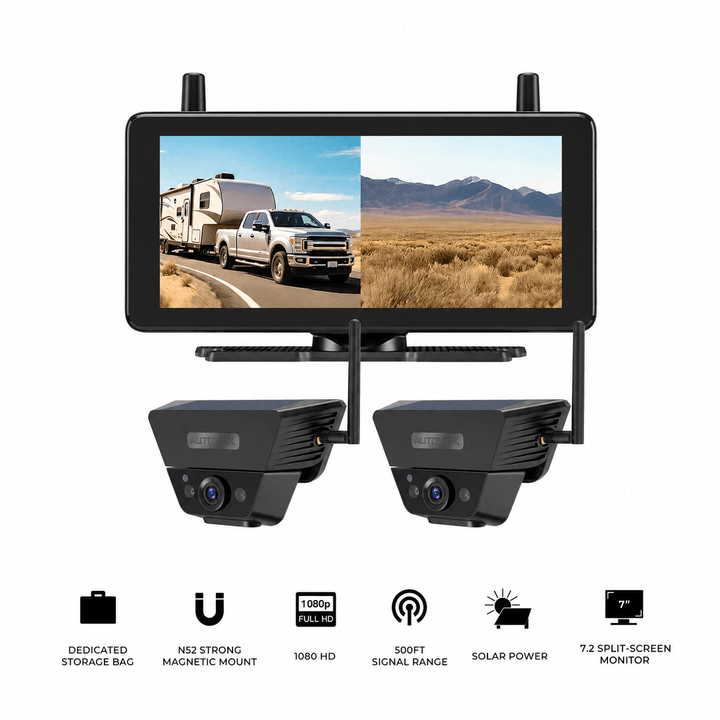
| Solar5B Dual-Camera Kit | Two rechargeable magnetic cameras + monitor | Main rear + flexible second view |
| T9 | Rear camera + 9.35" mirror display | Digital mirror-style rear viewing |
Fixed Wireless: W7 Pro
W7 Pro uses wireless video transmission between its rear camera and 5-inch monitor.
The rear camera connects to a supported vehicle power source, while the monitor uses a separate accessory-power connection.
This approach reduces long video-cable routing while keeping the camera in a fixed position.
W7 Pro lists a wireless range of up to 44 feet under suitable conditions. Test the actual Express body and equipment layout before finalizing the installation.
Rechargeable Rear View: Solar3A Plus Max
Solar3A Plus Max uses a rechargeable wireless camera and a 7.2-inch IPS anti-glare monitor.
It can provide a rear view without permanently connecting the camera to vehicle power.
The system also supports a second compatible camera for dual-channel viewing.
The rechargeable design can simplify installation, especially where the original wiring is difficult to access.
Solar charging provides supplemental charging and should be supported by regular battery checks.
Flexible Dual Views: Solar5B Dual-Camera Kit
Solar5B Dual-Camera Kit includes two magnetic rechargeable cameras and a 7.2-inch monitor.
One camera can be positioned for the main rear view while the second provides another selected perspective.
Depending on the van and suitable mounting surfaces, this may include:
- rear plus passenger-side corner
- rear plus hitch area
- rear plus external cargo area
Magnetic mounting should be checked carefully on a working van, especially around moving rear doors and areas exposed to loading activity.
Mirror Display: T9
T9 uses a 9.35-inch touchscreen mirror display with a rear camera.
It can suit drivers interested in a wider camera-based rear view without adding another standalone dashboard monitor.
Installation requires checking the Chevy Express mirror mount, rear-camera placement, power, and cable route.
T9 includes a rear-camera cable, with extensions available separately for longer installations.
It is an aftermarket mirror system and should not be assumed to share the wiring or camera feed used by the factory Rear Vision Camera or dealer-installed Rearview Camera Mirror.
Chevy Express Backup Camera Upgrade Options



Prices and configurations may change. Confirm the current product page, selected package, Chevy Express model compatibility, mounting surfaces, rear-door clearance, cable length, and power requirements before purchase.
Frequently Asked Questions
Does the Chevy Express come with a factory backup camera?
Many recent Chevy Express vans include a factory Rear Vision Camera that displays the area behind the vehicle when reverse is selected. Equipment varies by model year and configuration, so confirm the actual vehicle's installed camera and display.
Where is the factory backup camera on a Chevy Express?
Recent Chevrolet Express owner documentation identifies the Rear Vision Camera above the license plate. The exact mounting arrangement may vary by model year or completed vehicle body, particularly on cutaway configurations.
Can I install a backup camera in the Chevy Express third brake light?
Vehicle-specific third-brake-light camera assemblies are available for certain Express models. Confirm the exact model year, lamp design, mounting position, electrical connector, and weather-sealing requirements. The installation must preserve the center brake light's operation.
What is the difference between the Chevy Express Rear Vision Camera and Rearview Camera Mirror?
The Rear Vision Camera primarily provides a rear image during reversing. The available Rearview Camera Mirror can provide a camera-based rearward view during supported driving operation. The 2025 Express introduced a dealer-installed Rearview Camera Mirror option identified as RPO 5BJ. Verify the actual installed equipment because mirror display functions can vary.
Will a wireless backup camera work on an extended Chevy Express?
It may work well when the camera and monitor are within the system's supported range. The long metal body, cargo partitions, shelving, and equipment can affect signal performance. Test the connection with rear doors closed and the monitor in its normal position before finalizing the installation.
Can an aftermarket backup camera use the Chevy Express factory screen?
Compatibility depends on the original display, model year, wiring, and available interfaces. Some installations require vehicle-specific adapters or programming. A standalone monitor is often the simpler way to add a supplementary view without modifying the factory camera system.
Final Thoughts: Match the Camera to the Express Body and Daily Use
A Chevy Express backup camera upgrade should start with the van's existing equipment and the area the driver needs to see.
The factory Rear Vision Camera may already be adequate for ordinary reversing. A third-brake-light camera can offer a higher perspective, while a license-plate camera can provide a practical lower rear view.
Rear swing-out doors add mounting and wiring considerations. A wired system needs a protected route that accommodates door movement, while a wireless system still requires compatible power or battery management and reliable signal transmission through the van body.
The display should match the job too. A standalone monitor can simplify an aftermarket installation, while a mirror display may be useful when continuous rear viewing is a priority.
Before purchasing an upgrade:
- Verify the Chevy Express model year, body style, and factory camera equipment.
- Identify the rear area you actually need to see.
- Choose a mounting location that preserves rear-door movement and required vehicle equipment.
- Decide between permanent wiring and a wireless or rechargeable camera.
- Confirm display compatibility and measure the actual cable route if using a wired system.
- Test image quality, camera position, and connection stability before regular use.
For work vans, consistent camera operation and secure installation may be the main priorities. For passenger or privately used vans, a rechargeable or supplementary viewing option may provide the flexibility needed.
Start with the original camera and the missing view, then choose a mounting position, power arrangement, and display that match the Chevy Express's rear-door design and daily working routine.


