


You're preparing to change lanes when a car appears beside you, just outside the area covered by your mirrors.
One aftermarket system could show that car on a small dashboard screen. Another might illuminate a warning light beside the mirror. A third could sound an alert when you activate the turn signal.
All three products may be advertised as blind-spot systems, although they work in different ways.
A blind spot camera provides a live image of a selected area beside or behind the vehicle. A blind spot sensor uses radar, ultrasonic technology, or another detection method to identify objects within its monitored zone and trigger an alert when specified conditions are met.
The difference affects what the driver sees, which objects the system can detect, how it responds to traffic, and how much installation work is required.
It also matters when choosing an aftermarket upgrade. Adding a side camera does not automatically give an older vehicle the same blind-spot warning functions as a factory radar-based system. Likewise, a sensor warning cannot show the driver the actual road scene.
This guide explains how camera-based and sensor-based blind-spot systems work, where each performs well, why false warnings happen, and which setup makes sense for cars, SUVs, trucks, RVs, and trailers.
Quick Navigation
Driver-assistance reminder: Blind-spot cameras and sensors have limited viewing or detection zones. Alerts and camera images can be missed, delayed, or affected by installation and operating conditions. Continue using properly adjusted mirrors, direct observations, and normal lane-change procedures. Aftermarket equipment does not automatically reproduce factory ADAS functionality.
Blind Spot Camera vs. Sensor: How Do They Work?
The easiest way to compare these systems is to look at what happens when another vehicle enters a blind area.
A camera captures the scene and sends an image to the driver. A detection system evaluates signals from its sensors and decides whether the conditions for a warning have been met.
| System | How It Works | Driver Receives | Primary Use |
|---|---|---|---|
| Blind spot camera | Captures live video from a selected side or rear position | Visual image | Seeing adjacent lanes, rear corners, curbs, or trailer sides |
| Radar blind-spot sensor | Uses reflected radio signals to detect objects within a monitored area | Warning light, sound, or another supported alert | Detecting vehicles beside or approaching the rear quarters |
| Ultrasonic sensor | Uses reflected high-frequency sound to identify nearby obstacles | Proximity warning or distance indication | Close-range parking and low-speed maneuvering |
| Combined camera + sensor system | Uses separate visual and detection functions | Live image plus applicable alerts | Adding both visual context and automated detection |
Camera-Based Systems Show the Road Scene
A typical aftermarket side-camera system includes:
- one or two side-mounted cameras
- a monitor or compatible display
- video transmission and power connections
- optional turn-signal activation on supported systems
The cameras are usually positioned near the side mirrors, front fenders, or rear quarters, depending on the vehicle and desired field of view.
When activated, the camera displays the area beside the vehicle.
That image can help the driver interpret details such as:
- the position of another car in the adjacent lane
- the edge of a curb
- a cyclist beside the vehicle
- a trailer following a turn
- an obstacle near a rear corner
A camera provides useful context because the driver can see the surrounding scene rather than receiving only a warning signal.
For most basic aftermarket cameras, the driver must recognize and interpret anything visible in the image.
Some advanced camera systems include software-based object recognition and alerts, but those capabilities depend on the exact model and should be verified separately.

Radar Systems Detect Objects and Trigger Warnings
Radar blind-spot systems use radio waves to monitor a defined region beside and behind the vehicle.
Many automotive designs place radar sensors near the rear bumper corners.
The system analyzes reflected signals to identify objects and determine whether they meet its warning conditions.
A typical warning sequence might involve:
- A vehicle enters the monitored blind-spot region.
- The system detects a relevant object.
- A warning indicator illuminates near the side mirror.
- If the driver activates the turn signal, an additional audible or visual warning may occur.
The exact logic depends on the system.
Modern radar-based blind-spot monitoring can also detect certain vehicles approaching rapidly from behind, allowing warnings before those vehicles reach the area immediately beside the car.
This is one important difference from shorter-range ultrasonic systems.
Radar warning systems also apply filtering rules so that ordinary roadside objects do not constantly trigger alerts.
However, detection capability varies. Do not assume a particular aftermarket radar kit recognizes every motorcycle, cyclist, pedestrian, or rapidly approaching vehicle.
Ultrasonic Sensors Work Best at Close Range
Ultrasonic sensors emit high-frequency sound and measure returning echoes.
They are commonly used for parking assistance and nearby obstacle detection.
In a parking lot, that can be useful for detecting an object close to the bumper or side of the vehicle.
Some systems have used ultrasonic sensors for short-range blind-spot assistance, but typical ultrasonic parking sensors are designed for much shorter distances than highway blind-spot radar.
They should not automatically be treated as substitutes for radar systems designed to monitor vehicles approaching at road speed.
Before buying an ultrasonic kit advertised for blind spots, confirm its intended operating speed, detection range, mounting instructions, and supported alert behavior.
Core distinction: A basic camera helps the driver see a selected area. Radar-based blind-spot monitoring can actively warn about relevant traffic. Ultrasonic sensors generally serve shorter-range proximity detection.
Coverage, Alerts, and False Warnings: What Are the Tradeoffs?
A wide camera image and a radar detection zone are measured differently.
A camera's coverage depends on where its lens points and how much of the scene falls inside the field of view.
A sensor's coverage depends on its detection pattern, range, operating speed, and the objects its software is designed to recognize.
Camera Coverage Depends on Placement and Field of View
A side camera mounted near the passenger-side mirror can show a section of the adjacent lane and the area along the vehicle.
Moving that camera higher, lower, or farther back changes what appears on screen.
A wider lens may show more horizontal area, although objects can appear smaller and more distorted near the frame edges.
Blind areas can remain:
- directly below the camera
- behind vehicle bodywork
- outside the viewing angle
- behind a trailer or cargo
- between the fields of view of two cameras
This is why positioning a second camera to provide a different perspective can be more useful than adding another lens aimed at nearly the same area.
For larger vehicles, one side camera near the cab may offer limited information near the rear of a long trailer.
A second side or rear-quarter view can help address that specific gap.
Sensor Coverage Depends on Detection Rules
Radar-based systems work through defined detection regions.
Many blind-spot warning systems are designed primarily to identify other vehicles during normal road travel.
Their warning behavior may depend on:
- vehicle speed
- relative speed
- object position
- direction of movement
- turn-signal status
- sensor calibration
Some systems provide an initial visual warning whenever a relevant vehicle occupies the monitored region and an additional warning when the driver signals a lane change.
Other systems use different activation rules.
The absence of a warning should never be interpreted as confirmation that the adjacent lane is clear.
False Alerts and Missed Detections
Sensor-based systems can produce false positives and false negatives.
A false positive occurs when the system warns even though the relevant hazard is absent.
A false negative occurs when a relevant vehicle or object is present but the system fails to provide the expected warning.
Possible contributing factors include:
- incorrect sensor alignment
- poor calibration
- roadside guardrails or metal structures
- trailer or accessory interference
- dirt, ice, or other contamination
- objects outside the system's intended detection capability
- operating speeds outside the supported range
Radar systems use filtering and object-tracking logic to reduce irrelevant warnings.
That filtering is useful because drivers quickly lose confidence in an alert that activates constantly around guardrails, parked vehicles, or normal roadside structures.
Overly restrictive detection or poor sensor positioning can create the opposite problem by missing traffic the driver expected the system to identify.
Camera-based systems have a different limitation.
A basic live camera does not generate detection alerts, so it avoids that specific type of automated false warning. However, the driver can misinterpret the image, overlook an object, or miss a hazard outside the frame.
Wide-angle distortion, screen glare, video delay, and poor viewing conditions can all affect the usefulness of the picture.

How Weather Affects Each Technology
Weather can affect cameras and sensors differently.
| Condition | Camera-Based View | Sensor-Based Detection |
|---|---|---|
| Darkness | Depends on camera sensor, lighting, and night-view capability | Radar does not require visible light |
| Rain or road spray | Droplets and dirt can obscure the lens | Radar may continue operating but performance still depends on conditions and sensor design |
| Snow, ice, or dirt buildup | Can obstruct the camera image | Can interfere with some sensor installations |
| Strong glare | Can reduce image detail | Radar is less affected by optical glare |
| Obstacles outside the camera view | Not visible on screen | May be detectable if inside the sensor's supported zone |
Radar has advantages in low-light conditions because it does not rely on a visible-light image. Cameras provide the visual detail that a typical radar warning cannot.
Both require correct installation and maintenance.
Comparison rule: Camera performance is judged by whether the driver can see and interpret the scene. Sensor performance is judged by whether the intended objects are detected and the correct warnings occur under supported conditions.
Aftermarket Installation: Cameras vs. Radar and Ultrasonic Sensors
Installation complexity can be one of the strongest reasons to choose one technology over another.
A basic aftermarket camera can often be installed with a suitable mount, power connection, video link, and monitor.
A radar-based blind-spot warning kit adds sensor alignment, wiring, alert indicators, and system configuration.
Installing an Aftermarket Blind Spot Camera
Side cameras are commonly mounted near:
- mirror housings
- front fenders
- side-marker positions on compatible larger vehicles
- selected rear-quarter locations
The installer needs to decide which area should appear on the display.
A camera aimed rearward along the vehicle is useful for adjacent-lane context. A downward camera may be better for a close curb or side obstacle during low-speed maneuvering.
The display can be:
- a dedicated dashboard monitor
- a compatible mirror display
- an aftermarket head unit
- an original factory screen with a supported interface
Some camera systems support turn-signal activation. Others provide continuously selectable or split-screen views.
For a wireless backup camera system, the video signal can travel wirelessly while the camera and monitor still use their supported power arrangements.
Wireless installation may reduce long cable routes, but signal stability should be checked with the camera and monitor in their final positions.
Installing Aftermarket Radar Sensors
Radar blind-spot kits often place sensors near the rear bumper corners.
The exact location and mounting angle depend on the product.
Some radar systems are designed to operate behind compatible plastic bumper surfaces. Metal bumpers, reinforced structures, and aftermarket accessories can interfere with that arrangement.
An installation may involve:
- bumper or trim removal
- sensor brackets
- electrical power and ground
- turn-signal connections
- warning-light installation
- buzzer or other alert wiring
- sensor positioning and calibration
Some systems also require specific vehicle-speed information or other compatible signals.
Installation instructions should establish which connections are required.
Accurate alignment matters because a small change in sensor direction can alter the monitored region.
Vehicles with existing factory ADAS equipment deserve particular care. Replacing or modifying components near factory sensors can affect those systems, and appropriate diagnostic or calibration procedures may be required.
Installing Ultrasonic Sensors
Ultrasonic proximity kits may require sensors to be mounted through or onto a bumper or body panel.
The installation needs to account for sensor height, spacing, angle, and surrounding surfaces.
Some kits require drilling, while others use surface mounts.
The system then connects to a control module and an audible or visual indicator.
Before installation, confirm whether the product is designed for parking-distance assistance, low-speed side proximity, or another specified function.
A short-range parking sensor should not be assumed to provide the warning distance required for highway lane changes.

What Does Installation Complexity Look Like?
| Installation Factor | Camera System | Radar System | Ultrasonic System |
|---|---|---|---|
| Main hardware | Camera + display | Radar sensors + control module + alerts | Ultrasonic sensors + control module + alerts |
| Typical mounting | Mirror, fender, side, or rear | Specified rear-quarter or bumper positions | Close-range bumper or side positions |
| Display requirement | Usually yes | Often warning indicators instead | Often buzzer or distance indicator |
| Vehicle wiring | Camera power, video, optional trigger | Power, warning outputs, possible speed/turn signals | Power and proximity alerts |
| Calibration | Camera aiming and view testing | Sensor alignment and specified calibration | Sensor orientation and sensitivity setup |
| DIY difficulty | Low to high depending on routing | Often more demanding | Depends on bumper work and intended function |
For simple side-view installations, experienced owners may be comfortable with DIY work.
Radar retrofits involving bumper removal, factory electronics, calibration, or unfamiliar vehicle wiring often justify professional installation.
Whatever technology is selected, verify the final viewing or detection area under controlled conditions before relying on the system.
Installation rule: Camera positioning determines what the driver sees. Sensor positioning determines what the system can detect. Both need a proper installation, although sensor-based warning systems typically add more calibration and electrical integration.
Which Blind Spot System Is Better for Your Vehicle?
The right choice depends on the problem you are trying to solve.
A daily commuter may want a warning when a vehicle enters the adjacent lane. A pickup towing a trailer may need a clearer image of the passenger-side rear corner. A large RV may benefit from rear and both-side views during campsite maneuvering.
Those situations do not require identical equipment.
| Vehicle / Use Case | Useful Starting Point | Why |
|---|---|---|
| Passenger car, frequent highway driving | Compatible radar blind-spot warning system | Can provide alerts about relevant adjacent or approaching traffic |
| Older SUV with limited side visibility | Side camera or appropriately matched radar system | Choose visual context or automated alerts based on the main need |
| Pickup truck towing a trailer | Rear + selected side camera views | Provides additional visual context around a longer combination |
| Class A motorhome or large RV | Rear + left + right multi-camera system | Helps show selected areas around the larger vehicle |
| Delivery van or box truck | Side cameras, with additional detection equipment if appropriate | Body structure and length can limit normal mirror visibility |
| Low-speed parking around obstacles | Camera + suitable proximity sensors | Combines visual information with close-range warnings |
Choose Radar When Automated Traffic Warnings Are the Priority
A radar-based system is worth evaluating when your main concern is relevant vehicles approaching or occupying an adjacent-lane blind spot.
Useful questions include:
- Does the kit support your vehicle type?
- What is the monitored detection range?
- What speeds does it operate at?
- Does it warn about approaching motorcycles?
- What happens when the turn signal is activated?
- How does it filter irrelevant stationary objects?
- Is professional calibration required?
Aftermarket kits vary considerably in their detection logic and operating conditions.
A product should be selected according to documented capabilities rather than a generic promise to detect all blind spots.
Choose Cameras When Visual Context Is the Priority
Cameras can be more useful when you want to see the position of an object or vehicle in relation to your own vehicle.
This is especially relevant for:
- tight campground turns
- trailer positioning
- loading-bay approaches
- curb-side observation
- large vehicle rear-quarter views
For a backup camera for truck application, the main question is which camera angle provides the missing view.
A rear camera may show the main reversing path, while a side camera can provide another selected perspective along the passenger side.
For a large RV backup camera system, rear-plus-left-plus-right layouts can be useful because the driver sits far from the rear corners.
A camera with a wider field of view can reduce some visibility gaps, though a wider lens may also introduce more distortion.
The driver still needs to interpret the image correctly.
Can You Combine Cameras and Radar?
Yes, when the equipment and installation are compatible.
The systems can serve complementary purposes:
- Radar: Alerts about relevant detected traffic within its supported zone.
- Side camera: Shows the actual selected side area.
- Rear camera: Provides rearward context during parking or maneuvering.
- Ultrasonic sensor: Adds supported close-range proximity information.
The presence of both technologies does not automatically create a fully integrated factory-style ADAS system.
Each aftermarket component may operate independently, with its own power, controls, display, and warnings.
For drivers considering both, keep the interface manageable.
Too many screens, beeps, and overlapping alerts can distract from the normal mirror scan and surrounding traffic.
Begin with the most important visibility or detection problem and add equipment only when it provides a useful additional function.
AUTO-VOX Camera Options for Rear and Side Visibility
AUTO-VOX offers several camera configurations that provide selected rear and side views for compatible vehicles.
These are camera-based visual assistance systems. They should be distinguished from dedicated radar blind-spot monitoring systems that detect relevant traffic and automatically generate lane-change warnings.
| Product | Camera Layout | Viewing Use |
|---|---|---|
| WF4 | 1 rear + 2 side cameras | Rear, left, and right selected views |
| CampSync D1 | 3 cameras / 4 lenses | Closer/farther rear perspectives plus both sides |
| Solar5B Dual-Camera Kit | 2 magnetic cameras | Main rear + flexible second angle |
| Solar5B | 1 magnetic camera | Portable selected rear view |
WF4: Rear and Both Sides
WF4 uses one rear camera and two side cameras in its multi-camera configuration.
Its 7.2-inch monitor supports single, dual, and triple split-screen viewing.
For compatible larger RVs and trailers, this arrangement provides additional visual context when the driver wants to see the rear and both sides from one display.
The side cameras are designed around compatible marker-light mounting locations, while the rear camera supports compatible RV mounting arrangements.
WF4 is primarily an RV camera system. Installation on other vehicles requires confirmation of power, mounting, and signal compatibility.
CampSync D1: Two Rear Perspectives Plus Both Sides
CampSync D1 uses three physical cameras and four lenses.
Its rear camera contains two lenses, while separate cameras provide left- and right-side views.
This arrangement offers two different rear perspectives and selected side views.
It can be useful when a driver needs both closer and farther rear context alongside the vehicle's side areas.
CampSync D1 also uses a 7.2-inch monitor with multi-view display modes.
Neither CampSync D1 nor WF4 should be assumed to provide radar-based adjacent-vehicle detection or automatic highway blind-spot warnings.
Solar5B Dual: Flexible Camera Placement
Solar5B Dual-Camera Kit provides two rechargeable magnetic cameras and a dedicated 7.2-inch monitor.
One camera can serve as the main rear view while the second is positioned toward another selected area, provided the vehicle has suitable mounting surfaces.
This can suit temporary or changing viewing needs, such as:
- a passenger-side rear corner
- the rear of a trailer
- a hitch or cargo area
- another area that is difficult to observe directly
Magnetic mounting security, wireless performance, and battery condition should be checked before use.
Solar charging is supplemental and does not replace routine battery charging.
Solar5B: A Simple Rear-View Option
Solar5B provides a portable magnetic rear camera with a dedicated monitor.
It is useful when one selected rear view is sufficient, particularly for compatible RVs, trailers, or other vehicles where permanent installation is less desirable.
If rear visibility is already adequate and automated adjacent-lane warnings are the main objective, a dedicated compatible radar system may be more relevant than adding another rear camera.
Product distinction: AUTO-VOX camera systems shown here provide live viewing of selected areas. They do not replace a dedicated radar blind-spot warning system. Any separate reversing-assist or object-recognition feature must be evaluated according to its specific detection area and operating conditions.
Camera Options for Rear and Side Visibility


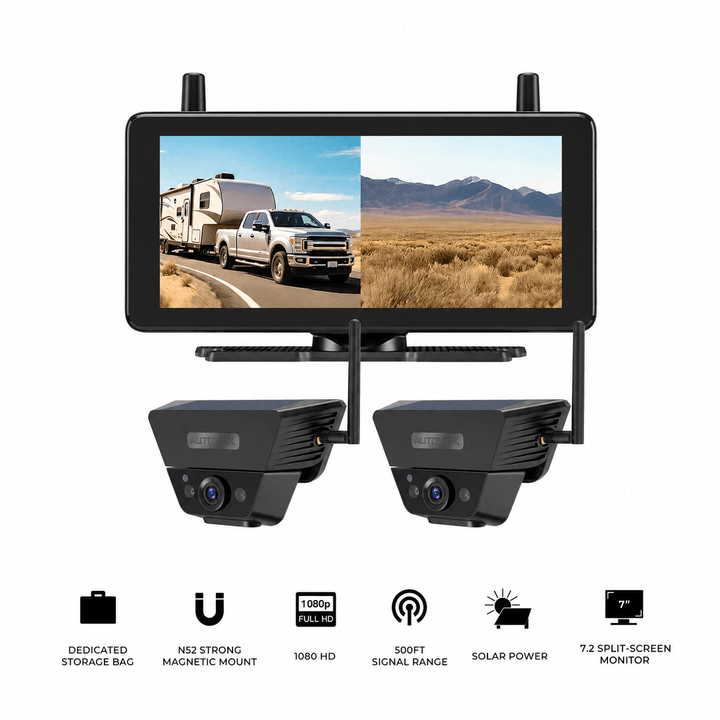

Prices and configurations may change. Confirm the current product page, selected camera package, vehicle compatibility, mounting surfaces, power requirements, and wireless performance before purchase. These products provide camera-based viewing and should not be treated as radar blind-spot detection equipment.
Frequently Asked Questions
What is the difference between a blind spot camera and a blind spot sensor?
A blind spot camera shows a live image of a selected area beside or behind the vehicle. A blind spot sensor uses detection technology such as radar to identify objects within a defined region and generate warnings when specified conditions are met. A camera provides visual context, while a sensor provides detection-based alerts.
Is radar better than a camera for blind-spot monitoring?
Radar is useful when automated detection of relevant vehicles in adjacent or approaching traffic is the priority. Cameras are useful when the driver needs to see the actual surrounding area, such as a curb, trailer side, or rear corner. The technologies can complement each other when installed in compatible systems.
Are ultrasonic blind spot sensors the same as radar sensors?
No. Ultrasonic sensors commonly operate over shorter distances and are widely used for parking and low-speed proximity assistance. Automotive radar blind-spot systems can monitor larger side-rear regions and, depending on the design, detect vehicles approaching at road speed. Check the intended application of any aftermarket sensor kit.
Why does my blind spot sensor warn when no vehicle is beside me?
A warning may be triggered by an irrelevant object, environmental conditions, sensor contamination, or incorrect installation. Guardrails, nearby structures, and accessories can affect some systems. If alerts happen repeatedly without an apparent cause, consult the product troubleshooting instructions and have sensor alignment checked when appropriate.
Can I install an aftermarket blind spot system myself?
Basic camera kits can be suitable for DIY installation when mounting, power, and wiring requirements are understood. Radar-based warning systems may require specific sensor positioning, bumper work, turn-signal integration, and calibration. Professional installation is advisable when factory electronics, unfamiliar wiring, or specialized calibration are involved.
Can a backup camera replace blind spot monitoring?
A rear backup camera provides a selected view behind the vehicle. It does not automatically monitor adjacent lanes or generate highway blind-spot warnings. Side cameras can add visual context, while dedicated radar-based systems serve the separate purpose of detecting relevant traffic and providing alerts.
Final Thoughts: Choose Between Seeing More and Receiving Warnings
Blind spot cameras and blind spot sensors address related visibility problems through different methods.
Camera systems show the driver what is happening in selected areas around the vehicle. They can be especially useful for larger vehicles, trailers, tight parking spaces, and situations where the position of an object matters.
Radar-based blind-spot systems monitor defined areas and can generate warnings about relevant traffic. Ultrasonic systems are generally more appropriate for close-range proximity detection.
The most useful purchase decision begins with the vehicle and its actual visibility problem.
Before choosing an aftermarket system:
- Identify which area remains difficult to see or monitor with the existing mirrors.
- Decide whether a live image, an automatic warning, or both would be useful.
- Check the camera field of view or sensor detection region.
- Confirm operating-speed limits, warning behavior, and object-detection capabilities.
- Review mounting, wiring, calibration, and vehicle compatibility.
- Test the finished system under controlled conditions before regular use.
A side camera may solve a practical visibility problem for a long RV or trailer. A radar warning system may be a better match for an older passenger car whose driver wants alerts about adjacent traffic. A combined arrangement can provide both kinds of information where the equipment supports it.
Choose the technology that addresses the actual missing view or warning requirement, and keep cameras and sensors as additions to proper mirror use, direct observation, and normal driving judgment.


