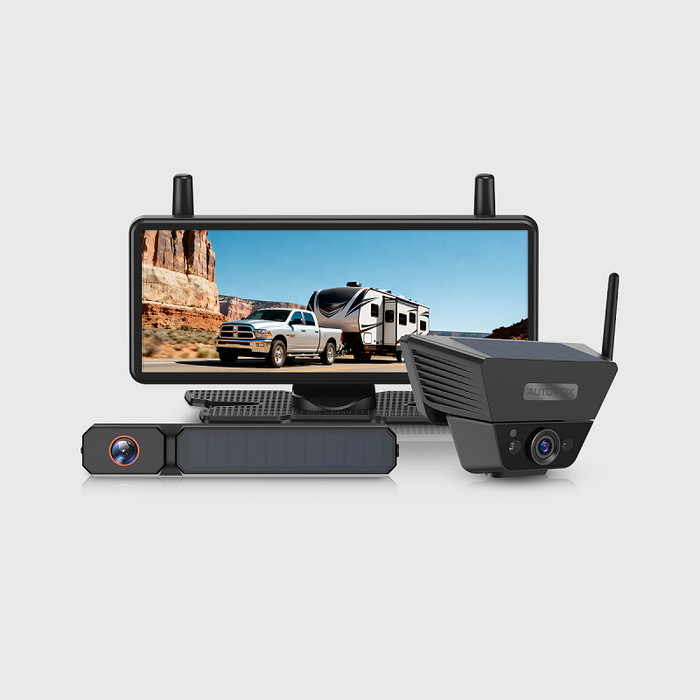
Sun-Powered Freedom. Zero Wiring Required.Install in just 60 seconds—no drilling, no auto-shop fees. Powered by continuous solar charging and ultra-stable signal transmission, it’s the ultimate hassle-free upgrade for every vehicle.
Real-Time HD Clarity. Signal That Never Flinches.Powered by AutoLink™ 2.4GHz technology, experience zero-lag 1080P live stream across long vehicles. Plug, play, and drive with unshakeable clarity.
Classic connection, ultimate reliability. Hardwired setup ensures real-time, interference-free video at all times. Built for families who value consistency and durability.
It’s bright and crystal clear so you can see details like license plate numbers.
Testsieger ist die Auto-Vox Solar 3A Plus: stabile Signalübertragung und tolle Bildqualität, bei Tag und Nacht.
Recognized across the Harvest Hosts RV community for life on the road.
T9Pro:すっごく映像が綺麗で肉眼で見ているくらい
Dank kabelloser Anbindung lässt sich die Rückfahrkamera leicht nachrüsten, ohne ein Kabel aufwendig durch den Innenraum zu verlegen.
It’s bright and crystal clear so you can see details like license plate numbers.
Testsieger ist die Auto-Vox Solar 3A Plus: stabile Signalübertragung und tolle Bildqualität, bei Tag und Nacht.
Dank kabelloser Anbindung lässt sich die Rückfahrkamera leicht nachrüsten, ohne ein Kabel aufwendig durch den Innenraum zu verlegen.
T9Pro:すっごく映像が綺麗で肉眼で見ているくらい
Recognized across the Harvest Hosts RV community for life on the road.
19 Years of Engineering Safety into Every Journey.
Since 2007, AUTO-VOX has pioneered wireless vehicle technology. Trusted by over 10,000,000 users across 20+ countries, we don’t just build cameras—we eliminate driving anxiety so you can focus on the road ahead.
“This camera was recommended to me by a friend who has these on his camper. I got the twin pack with 7” Monitor. The clarity and camera range is impressive , especially infra red night mode , allowing some interesting viewing from inside the vehicle at night time. The product quality is fantastic , built to last , definitely “ex squaddie proof” too. ”
Jerry
⭐️⭐️⭐️⭐️⭐️
“I don't usually write reviews, but I must in this case! ! had some trouble at first. These folks walked me through and even sent replacement equipment. Awesome!! Very good quality...clear, easy to instaall.. ”
Adan
⭐️⭐️⭐️⭐️⭐️
“I use it on the back of my pickup, and it makes lining up the tow ball with the caravan hitch much easier. The picture on my phone is clear, and I can usually get everything lined up first time without jumping in and out of the cab. A really handy bit of kit.”
John
⭐️⭐️⭐️⭐️⭐️
“I recently purchased the back-up camera for our new RV. It was easy to install in the location identified by the rv manufacturer. It comes with a nice gasket to seal the location from water. I also used some clear caulk as additional protection. The camera works well and customer support was very fast for a technical question that I had. style of mounting.”
sgallery
⭐️⭐️⭐️⭐️⭐️
“I purchased a back up camera from my Rv last year September 2023 and was so impressed I opted to purchase another one to use as a trail camera on the front of my jeep while offroading for this year while we are in Arizona, important to see what you are about to go over before you actually climb onto it.”
Sandra
⭐️⭐️⭐️⭐️⭐️
“This is perfect for an older car that doesn't have a camera. Great for long vehicles like RVs or trucks. My sister says she's gonna borrow it to try on her school bus. It's easy to install and set up. Has a clear picture. It has a heavy duty case for storage when not in use. It makes a great kitty cam too.”
Quick Answer: On a slide-in truck camper, mounting location matters more than monitor size. Removing the tailgate disconnects a tailgate camera, and the camper's rear overhang blocks bumper-mounted views. Mount high on the camper's rear wall for campsite backing and highway traffic awareness, mount low near the rear step or hitch for coupler alignment, or combine both while accounting for aluminum signal shielding, power routing, and non-magnetic camper walls.
Loading vs. Loaded: Two Separate Visibility Jobs
A slide-in truck camper creates two distinct visibility problems. Before loading or while unloading, your tailgate is typically off and you need to back the bare pickup bed squarely between the camper's four corner jacks—a tight alignment task where a cab cargo view or temporary bed-edge lens helps most.
Once loaded, the camper's rear overhang extends past the truck bumper, placing the space directly behind the camper outside what a truck bumper camera can see. As highlighted in a Truck Camper Magazine discussion among 37 owners, campers generally choose between relocating/extending their factory truck camera plug or mounting an independent camera on the camper itself because the loaded overhang changes every sightline.
High Rear-Wall Mount vs. Low Hitch-Level Mount
Where you bolt or bracket the rear camera decides what you actually see on the monitor:
High rear-wall (roof-line) mount: Placed high near the rear roofline and angled downward, this position gives a wide overview of tight campsites, rear overhangs, and following highway traffic. The trade-off is softer depth judgment right at bumper level, extra exposure to low branches, and a longer wire path if hardwired.
Low rear-step or hitch-level mount: Positioned near the camper bumper or receiver extension, a low camera excels at lining up a boat or utility trailer hitch and checking a visible hitch or low curb. Its trade-off is faster lens buildup from dust and wet road spray, plus a narrower look at traffic behind you.
Check the bracket against the camper wall material and confirm where the cable will separate when you unload.
Metal Shielding, Power Routing, and Magnetic Mount Limits
Three physical realities frequently catch first-time slide-in camper owners off guard:
Metal shielding and wireless dropouts: Aluminum exterior siding, aluminum framing, appliances, and water tanks sit directly between the rear wall and the truck cab, which can weaken a wireless backup camera signal far more than an open utility trailer does.
Power source trade-offs: Tapping rear clearance or marker lights is a common shortcut, but it requires keeping your truck's running lights on whenever you want the camera powered. Wiring to a dedicated 12V camper circuit with an interior switch allows daytime highway viewing independently, while battery-assisted units skip camper wall wiring for reverse-only duty.
Magnetic mounts require steel: Most slide-in camper walls are fiberglass or aluminum. A magnetic mount needs a suitable steel surface. Aluminum and fiberglass panels will not hold it, so any magnetic camera needs a solid steel rear bumper/step or a securely fastened steel mounting plate.
Slide-In Camper Mounting Trade-Off Table
Mount Position
Primary Strength
Main Trade-Off
Signal / Power Watch-Out
High rear wall
Wide campsite backing + highway traffic view
Less precision at hitch height; branch exposure
A video cable bypasses radio shielding; marker or switched 12V power
Low bumper / hitch level
Trailer coupler alignment + low ground obstacles
Lens collects road spray and dust faster
Easier access to lower 12V wiring or steel bumper
Dual camera (high + low)
Covers highway rear view and tight hitching
Higher cost and extra installation work
Confirm monitor split-screen support and power draw
Removable magnetic / bracket
Moves from bed loading to camper rear
Magnetic models need suitable steel; check duty cycle
No drilling; check wireless reception through camper shell
Wired vs. Wireless vs. Solar Wireless Trade-Offs
If you haul an aluminum-sided slide-in camper regularly and want reliable all-day highway observation, a wired system—or a truck-specific factory-screen extension—avoids radio interference and charging routines, at the cost of routing and sealing exterior cables.
On fiberglass shells, a 12V wireless backup camera simplifies installation when the antenna sits clear of dense metal. For seasonal trips—or drivers who want one no-drill backup camera for truck bed loading and rear-step backing—a portable solar wireless backup camera can move between mounting positions, provided it mounts securely on steel and is used for backing checks rather than continuous highway driving.
For a permanent high mount on the camper, compare a camper backup camera with a weather-sealed cable route. A low truck backup camera can stay with the pickup for hitch work when the camper comes off. If you prefer a wireless backup camera, test reception in the cab with the camper loaded and its door closed.
Frequently Asked Questions
Why doesn't my truck's factory backup camera work once the slide-in camper is loaded?
Most slide-in setups require removing the tailgate (which unplugs a tailgate-mounted camera), and even a bumper-level lens is usually blocked by the camper's rear overhang and entry steps.
If I power a camper camera from the marker lights, will it stay on during the day?
Only while your truck's parking or running lights are switched on. For independent daytime observation, wire the camera to a dedicated 12V circuit with an on/off switch.
Can a magnetic solar camera stick directly to a truck camper's rear wall?
Only on ferrous steel. Fiberglass and aluminum camper panels will not hold a magnet—use a bolted bracket or a properly anchored steel plate instead.
Quick Answer: When a Jeep Compass backup camera stops working, start by identifying whether you have a blue screen, an intermittent image, or a completely dark infotainment display. Run basic parked exterior checks on the liftgate and lens first, then check your 17-digit VIN for open safety recalls—including NHTSA Campaign 24V-436 for select 2022–2023 models—before paying for parts or teardown.
Blue Screen vs. Intermittent vs. Full Black Screen
Not every Jeep Compass camera problem has the same cause. Paying attention to what the dashboard screen actually shows narrows down where the fault sits before you visit a shop:
Blue screen (audio and menus still work): The display has power, yet the reverse image is missing. A technician can check the camera, connector, liftgate wiring and radio software; screen color alone cannot identify the fault.
Intermittent or flickering image: The camera works on some trips, cuts out after opening the liftgate, or drops in wet weather. Repeated flex in the liftgate harness, moisture inside the rear connector, or loose terminals are possibilities to discuss with the technician.
Entire infotainment screen black: If audio controls, menus, and the backup view are all dead at once, ask the technician to check the head unit, display power, or infotainment system as well as the reverse image.
Safe Parked and Exterior Checks First
Avoid guessing fuse locations or pulling random fuses—fuse layouts vary across Compass model years and trims—and skip unofficial DIY radio software flashing, which can damage the head unit. Instead, run four zero-tool checks while parked safely with the parking brake set:
Confirm the liftgate is latched fully: Record whether the intermittence followed opening or closing the hatch. Keep the vehicle parked during this check.
Inspect the exterior lens: Wipe away mud or road salt and look closely for cracked glass or condensation trapped inside the housing.
Separate camera loss from a dead screen: Test whether radio menus and audio respond normally while parked.
Try one normal key-off restart: Note whether the image comes back at the next normal startup; a temporary return is worth recording for the technician.
These three observations help a technician reproduce the problem. The screen color alone cannot identify a failed part.
Run a Free VIN Recall Check (Including NHTSA 24V-436)
Before paying for diagnostics, enter your 17-digit VIN into the official NHTSA Recall Lookup tool. Under NHTSA Recall Campaign 24V-436, certain 2022–2023 Jeep Compass vehicles were recalled because radio software may prevent the rearview camera image from displaying in reverse, failing Federal Motor Vehicle Safety Standard No. 111 ("Rear Visibility").
For affected vehicles, authorized Jeep dealers update the radio software free of charge. Even if your Compass is an earlier or newer year, a VIN lookup verifies whether any open safety recall applies before you approve paid repairs.
Symptom-to-Action Judgment Table
What You See
Likely Area Involved
Practical Next Step
Blue screen; radio menus work
Camera signal, rear connector, harness, or radio software
Check liftgate latch and lens; run VIN recall lookup before replacing parts
Intermittent or flickers after hatch use
Liftgate wiring flex wear, loose plug, or moisture
Note triggers (rain, bumps, hatch opening) for technician harness inspection
Entire infotainment unit black
Head unit or display power/system fault
Try one normal ignition sleep cycle; check VIN recalls and book diagnosis
Cloudy, hazy, or foggy image
Dirty exterior lens or failed camera weather seal
Clean outer glass; photograph internal condensation before arranging inspection
Dealer Diagnosis vs. Out-of-Warranty Auxiliary Options
If your VIN shows an open recall or you hold active factory or extended coverage such as a Mopar service contract, book an authorized Jeep dealer so software updates and covered components stay documented.
Before authorizing a paid repair, ask the shop to distinguish a camera fault from a wiring or radio fault and identify which test supports its estimate. A photo of the display taken while parked and a note of the conditions can save a repeat visit.
If you need a second view for a specific job, an aftermarket backup camera can use an independent display. A wireless backup camera avoids routing a video cable through the cabin, while a solar wireless backup camera needs a suitable charging location. Neither restores the factory camera or completes a recall repair.
Frequently Asked Questions
Should I check fuses or flash Jeep software myself to fix the camera?
No. Fuse assignments vary by Compass generation and trim, and unofficial USB firmware flashing risks bricking the infotainment unit. Stick to visual checks, official VIN recall lookup, and qualified diagnostics.
Does NHTSA Recall 24V-436 cover every Jeep Compass?
No. Campaign 24V-436 applies to select 2022–2023 Jeep Compass vehicles, and eligibility depends strictly on your individual 17-digit VIN at NHTSA.gov.
Will an aftermarket wireless backup camera display on my factory Compass screen?
A standalone kit shows the picture on its own monitor or compatible phone. Factory-screen integration is a separate, vehicle-specific feature; confirm it for your year and radio before buying.
Quick Answer: A hitch bike rack affects your SUV differently when folded empty, lowered empty, or loaded with bikes. Clearing the camera image does not stop parking radar chimes or reverse automatic braking. Check license plate and taillight visibility first, review your owner's manual for any factory accessory setting, and consider a rack designed for an offset position or an auxiliary camera when bikes block the rear screen.
Three Rack States, Three Different Views
SUV owners often assume a hitch rack blocks the backup screen the same way all the time, then get caught off guard on their first backing maneuver. Check your screen in a safe, parked spot across all three states before driving in tight traffic:
Folded empty rack: The upright tray or mast sits close to the liftgate, often placing solid metal directly across a center-mounted lens and triggering rear proximity sensors right away.
Unfolded empty rack: Lowering the platform away from the hatch usually restores partial visibility above the trays, though the hitch mast and horizontal rails still cut through the lower frame.
Loaded with bikes: Frames, wheels, pedals, and handlebars fill the wide-angle lens, turning the display into dark silhouettes while hiding curbs, low posts, and pedestrians behind the rack.
Camera Blockage vs. Parking Sensors vs. Reverse Auto-Braking
Many forum discussions lump every rear-end annoyance together, but a hitch rack can interfere with three separate SUV systems:
Visual camera blockage: The lens still works, yet your screen shows metal bars or bike tires instead of the area behind the rack.
Parking radar or ultrasonic chimes: Rear sensors read the stationary rack as a close obstacle and sound continuous alerts as soon as you shift into reverse.
Reverse automatic braking: On SUVs with rear automatic emergency braking or cross-traffic braking, the system may treat the rack as an imminent impact and apply the brakes while backing.
Do not rely on generic tips telling you to disable vehicle safety systems. Automakers handle accessory and towing settings differently, and turning off protections blindly creates new risks. Check your SUV's owner's manual to see whether a factory accessory or trailer setting exists and which warnings remain active.
Before attaching a second camera, compare its image with the rack folded, unfolded and loaded.
License Plate and Taillight Visibility Checks
Before buying any camera hardware, have a helper operate the lights from the driver’s seat while you check the parked, secured SUV from behind. Check the plate and lighting requirements where you drive with the rack installed. If bikes hide your plate or rear lights, an auxiliary camera alone will not resolve compliance or rear-traffic visibility—you may also need a plate relocation bracket, a wired auxiliary light bar, or a different rack style.
Comparing Practical Fixes for SUV Hitch Racks
Rack State or Issue
What Changes
Practical Fix
Key Trade-Off
Folded empty rack blocking lens
Upright frame sits close to liftgate camera
Remove rack between trips or use an offset hitch design
Extra storage effort; offset clearance varies by SUV
Unfolded empty rack in frame
Lower view cut off; sensors may still chime
Rely on side mirrors, walk-arounds, and manual-approved settings
Cramped screen view; alerts may continue
Loaded bikes hiding rear path
Full blind spot behind wheels and frames
Mount a rear-facing wireless backup camera past the load
Restores vision only; does not change radar or auto-braking
Blocked plate or taillights
Visibility and local-law compliance risk
Add a plate relocator or auxiliary lighting kit
Requires verifying state rules and trailer-plug power
Adding an Auxiliary Camera Setup
Some racks place the mast to one side of a center camera. That can clear the empty mast while the nearest bicycle still blocks the view. Before spending money, load your widest bike and look for the pavement immediately beyond its rear wheel in the display. Only use positions and hardware approved by the rack manufacturer.
Set up the AUTO-VOX Solar4 WiFi while parked if you prefer a phone display. Check the image with the bikes strapped in and liftgate closed. Use a secure display mount and complete app setup before moving.
Will a wireless backup camera stop my SUV from auto-braking in reverse?
No. An auxiliary camera displays a clear rear view on its own screen, but it does not modify your SUV's factory parking sensors or reverse automatic braking logic.
Why is my screen more blocked when the rack is folded empty than lowered?
Folded trays stand vertically right in front of liftgate-mounted lenses. Lowering the rack flat or removing it when unloaded usually opens more of the factory view.
Can I stick a magnetic camera straight onto any bike rack?
Only on a clean steel section that holds a magnet firmly. Many racks use aluminum arms or composite trays that require a dedicated bracket or strap mount instead.
Is installation of AUTO-VOX backup cameras complicated?
Not at all! Our products, including the Solar5, Solar4B, Solar3A Plus feature hassle-free designs like magnetic installation and wireless setups. These make it easy to install on RVs, trailers, and other large vehicles without professional assistance.
Are AUTO-VOX backup cameras compatible with all vehicle types?
Yes, Auto-Vox offers a wide range of products tailored to different vehicle types, including cars, trucks, RVs, trailers, and vans. For example, the Solar3C is specifically designed for large vehicles, while other models cater to standard cars and smaller vehicles.
How does AUTO-VOX ensure the product's durability in extreme weather?
AUTO-VOX products are built with high-quality, weather-resistant materials. They are designed to withstand extreme heat, cold, rain, and snow, ensuring reliable performance in all conditions.
What are the benefits of shopping with AUTO-VOX?
We offer free shipping across the US, 24/7 customer support, 100% secure payment, and a 30-day return policy to ensure a risk-free shopping experience.
How does AUTO-VOX support sustainable driving?
AUTO-VOX integrates sustainability into its product design. For example, the Solar3A Plus features advanced solar-assisted charging and power-saving technology, reducing battery consumption by 50% while maintaining excellent performance and reliability.
Why are EU/UK prices different from US prices?
EU and UK prices reflect local taxes, import duties, and shipping costs, which may cause differences from US pricing.