





¿Es complicada la instalación de las cámaras de marcha atrás AUTO-VOX?
exclusivo para australia · ofertas de primavera
Escapadas de primavera. Una vista más clara.
Prepárate para tus viajes por carretera y aventuras de camping con las cámaras de marcha atrás AUTO-VOX.

nuevo lanzamiento
la próxima evolución:
cámara de marcha atrás wi-fi
Sin ocupar el salpicadero ni tender cables. Vídeo HD en directo en tu móvil.


Premiada como «Mejor cámara de marcha atrás» por destacados medios tecnológicos alemanes.
premiada como «mejor cámara de marcha atrás» en alemania
Valorada como n.º 1 por FAZ y Heise. Nuestra cámara solar inalámbrica 1080P más vendida, con montaje universal en solo 3 minutos.

Solar5B AI
Más inteligencia al maniobrar,
más seguridad al dar marcha atrás
La asistencia inteligente de marcha atrás detecta automáticamente peatones y vehículos para ayudarte a maniobrar en espacios estrechos.

Acerca de AUTO-VOX
Más de 500.000 conductores de todo el mundo confían en nosotros.
Desde 2007 desarrollamos tecnología inalámbrica y solar para la seguridad del vehículo. Una forma más inteligente de ver lo que hay detrás.

Envíos a todo el mundo
Disponible en más de 20 países.
ASISTENCIA 24/7
Asistencia las 24 horas, todos los días, cuando la necesites.
PAGO 100 % SEGURO
Pago oficial de Shopify con garantía de pago 100 % seguro.
30-Day Return Policy
Support 30-day no-reason return and exchange.
Encuentra tu modelo

Con grabación DVR
Para coches y SUV
Para autocaravanas
Para remolques
Sistemas multicámara
Retrovisor
Encuentra tu modelo
Cámaras de marcha atrás

Dashcam

CarPlay

Para coches y SUV

Para autocaravanas y vehículos recreativos

Para remolques

Sistema de marcha atrás con varias cámaras

Sistema de cámara de marcha atrás con DVR
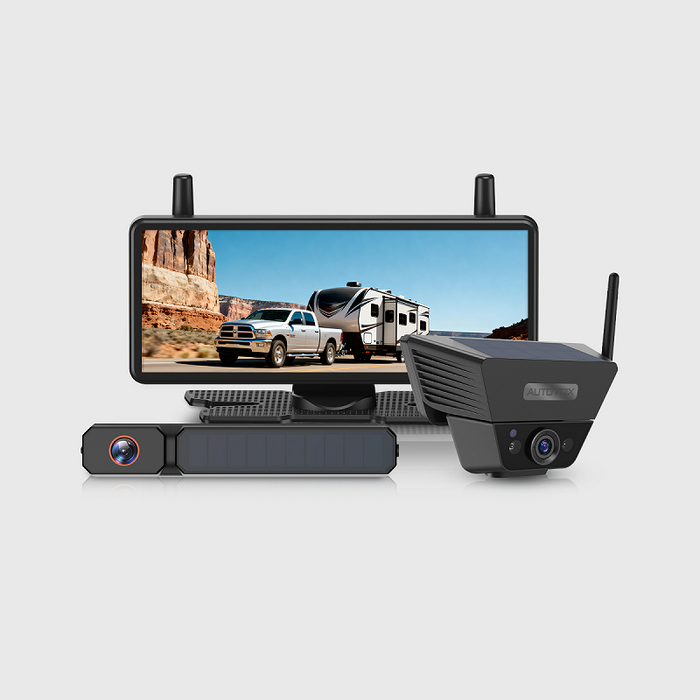
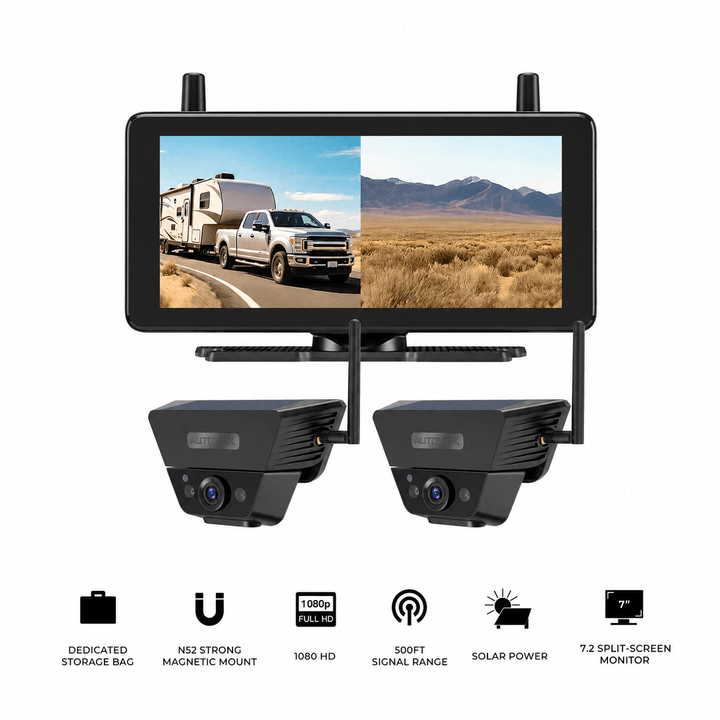
Cámara de marcha atrás con monitor en el retrovisor
Nuestras recomendaciones para cada conductor
Comprar por categoría
Camping y viajes en autocaravana
Explora con libertad. Aparca con facilidad.

Remolque y caravanas
Engancha el remolque. Da marcha atrás con confianza.

Trayectos diarios
Aparca fácilmente y con más seguridad.

Alimentación y conexión

Serie solar
Libertad con energía solar. Sin tender cables. Se instala en solo 60 segundos, sin taladrar ni pagar un taller. La carga solar continua y una transmisión de señal muy estable facilitan la mejora de tu vehículo.

Serie inalámbrica
Imágenes HD en directo. Señal estable. La tecnología AutoLink™ de 2,4 GHz ofrece vídeo en directo 1080P de baja latencia, incluso en vehículos largos. Conecta, enciende y conduce con una visión clara.

Serie con cable
Conexión clásica, máxima fiabilidad. La instalación por cable garantiza vídeo en tiempo real y sin interferencias en todo momento. Diseñada para familias que valoran la constancia y la durabilidad.

Destacado en
La imagen es luminosa y nítida, y permite ver detalles como las matrículas.


La ganadora de la prueba es la Auto-Vox Solar 3A Plus: transmisión de señal estable y excelente calidad de imagen, tanto de día como de noche.

Reconocida en la comunidad de autocaravanas de Harvest Hosts para la vida en la carretera.

T9Pro: la imagen es tan nítida que parece que la estás viendo con tus propios ojos.

Gracias a la conexión inalámbrica, la cámara de marcha atrás se instala fácilmente sin tener que pasar un cable por todo el habitáculo.

La imagen es luminosa y nítida, y permite ver detalles como las matrículas.
La ganadora de la prueba es la Auto-Vox Solar 3A Plus: transmisión de señal estable y excelente calidad de imagen, tanto de día como de noche.
Gracias a la conexión inalámbrica, la cámara de marcha atrás se instala fácilmente sin tener que pasar un cable por todo el habitáculo.
T9Pro: la imagen es tan nítida que parece que la estás viendo con tus propios ojos.
Reconocida en la comunidad de autocaravanas de Harvest Hosts para la vida en la carretera.


19 años desarrollando tecnología para hacer cada viaje más seguro.
Desde 2007, AUTO-VOX es pionera en tecnología inalámbrica para vehículos. Más de 10 millones de usuarios en más de 20 países confían en nosotros. Nuestras cámaras ayudan a conducir sin preocupaciones para que puedas concentrarte en la carretera.
Experiencias de creadores de contenido
Creador de YouTube

Creador de YouTube
Creador de YouTube
Creador de YouTube
Creador de YouTube
Lo que dicen nuestros clientes
Steven Tucker
⭐️⭐️⭐️⭐️⭐️

«Me recomendó esta cámara un amigo que las lleva en su camper. Compré el pack de dos con monitor de 7 pulgadas. La nitidez y el alcance son impresionantes, sobre todo el modo nocturno por infrarrojos, que permite observar cosas interesantes desde dentro del vehículo por la noche. La calidad es fantástica y se nota que está hecha para durar. ¡Hasta aguanta a un exmilitar como yo!»
Jerry
⭐️⭐️⭐️⭐️⭐️

«No suelo escribir reseñas, pero esta vez tenía que hacerlo. Al principio tuve algunos problemas. El equipo me ayudó paso a paso e incluso me envió material de sustitución. ¡Genial! Muy buena calidad, imagen clara y fácil instalación.»
Adan
⭐️⭐️⭐️⭐️⭐️

«La uso en la parte trasera de mi camioneta y facilita mucho alinear la bola de remolque con el enganche de la caravana. La imagen del móvil es clara y normalmente consigo alinearlo todo a la primera sin tener que entrar y salir de la cabina. Un equipo realmente práctico.»
John
⭐️⭐️⭐️⭐️⭐️

«Compré hace poco esta cámara de marcha atrás para nuestra nueva autocaravana. Fue fácil instalarla en el lugar indicado por el fabricante. Incluye una buena junta para sellar la zona contra el agua. También añadí sellador transparente como protección adicional. La cámara funciona bien y el servicio de atención al cliente respondió muy rápido a una consulta técnica.»
sgallery
⭐️⭐️⭐️⭐️⭐️

«Compré una cámara de marcha atrás para mi autocaravana en septiembre de 2023 y me gustó tanto que compré otra para colocarla delante de mi Jeep cuando hacemos rutas todoterreno en Arizona. Es importante ver el obstáculo antes de pasar por encima.»
Sandra
⭐️⭐️⭐️⭐️⭐️

«Es perfecta para un coche antiguo sin cámara y va muy bien en vehículos largos, como autocaravanas o camiones. Mi hermana dice que me la pedirá prestada para probarla en su autobús escolar. Es fácil de instalar y configurar, y la imagen es clara. Incluye un estuche resistente para guardarla cuando no se usa. También sirve genial para vigilar al gato.»
Producto no encontrado
Blog

By AaliyahGloria
Guías
Jul 30, 2026
Un remolque que se siente manejable a veinte pies puede convertirse en un problema de visibilidad diferente a treinta, treinta y cinco o cuarenta pies.
El cambio no siempre es obvio al conducir en línea recta por una carretera abierta. Se vuelve más claro en los momentos en que el vehículo remolcador y el remolque necesitan moverse por diferentes caminos.
Un cambio de carril requiere que el conductor juzgue si un vehículo ha despejado completamente el costado del remolque. Una vuelta en un camping puede llevar las ruedas interiores del remolque hacia un bordillo, mientras que la esquina trasera exterior se balancea hacia un árbol. Una salida de estación de servicio puede parecer lo suficientemente ancha desde el vehículo remolcador, pero el remolque aún tiene que seguir la curva y despejar la isla del surtidor.
Luego está la marcha atrás.
Una cámara trasera puede mostrar la carretera detrás del remolque o el espacio cerca del parachoques, dependiendo de su ángulo. Puede que no muestre ambos igual de bien. También puede dejar las áreas laterales izquierda y derecha fuera del encuadre cuando el remolque está entrando en un camping en ángulo.
Eso no hace que una cámara trasera sea inútil. Significa que el problema de visibilidad ha crecido con el remolque.
Un sistema de cámara de marcha atrás para remolques multicámara puede proporcionar vistas seleccionadas traseras, traseras inferiores, laterales izquierdas y laterales derechas. Estas perspectivas adicionales pueden ayudar a reducir la incertidumbre de los puntos ciegos, pero no pueden eliminar por completo los puntos ciegos, garantizar la prevención de accidentes o reemplazar los espejos de remolque, la observación directa, una vuelta de reconocimiento y un observador visible.
Esta guía explica cuándo una cámara trasera puede parecer limitada, qué aportan los diferentes ángulos de cámara, dónde la cobertura multicámara es más importante y cómo verificar si un sistema se ajusta al remolque real antes de la instalación.
Navegación Rápida
- Respuesta Rápida sobre Cámaras para Remolques Largos
- Cómo la Longitud del Remolque Cambia la Visibilidad
- Mapear las Áreas Difíciles de Ver del Remolque
- Entender los Límites de Una Sola Cámara Trasera
- Qué Añaden las Vistas de Varias Cámaras
- Dónde Importa la Cobertura Multicámara
- Usar Cámaras Traseras y Laterales Durante los Giros
- Establecer una Rutina de Marcha Atrás para Remolques Largos
- Verificar la Compatibilidad de Instalación
- Usar CampSync D1
- Considerar CampSync D1 Lite
- Comparar WF4
- Considerar un Kit Portátil de Doble Cámara
- Usar la Lista de Verificación para Remolques Largos
- Preguntas Frecuentes
Importante: Los sistemas de cámaras pueden proporcionar vistas adicionales seleccionadas, pero no pueden mostrar el entorno completo alrededor de un remolque largo. Continúe utilizando espejos de remolque correctamente ajustados, observación directa, una inspección a pie, un observador visible, hábitos seguros de cambio de carril y el juicio del conductor. Confirme la compatibilidad de instalación, alimentación y vehículo antes de usar.
Respuesta Rápida: ¿Cuándo No Es Suficiente Una Sola Cámara Trasera?
Una cámara trasera puede ser suficiente cuando la necesidad principal es una vista directa detrás del remolque.
Un remolque más largo puede beneficiarse de vistas de cámara adicionales cuando el conductor debe monitorear varias áreas diferentes durante el mismo viaje, incluyendo la carretera trasera, el área del parachoques o el enganche, y los lados izquierdo y derecho.
Considere una configuración de varias cámaras cuando:
- el remolque es lo suficientemente largo como para que las áreas laterales sean difíciles de juzgar
- el voladizo trasero se acerca a los obstáculos durante los giros
- el remolque se usa frecuentemente en tráfico de varios carriles
- el conductor da marcha atrás regularmente en campings en ángulo
- las vueltas en estaciones de servicio y las curvas de campings requieren correcciones repetidas
- un portabicicletas, rueda de repuesto, escalera o portaequipajes afecta la vista trasera
- un solo ángulo trasero no puede proporcionar vistas útiles de la carretera y del parachoques cercano al mismo tiempo
| Situación de Conducción | Lo que Puede Mostrar una Cámara Trasera | Lo que Puede Seguir Siendo Difícil de Juzgar |
|---|---|---|
| Marcha atrás en línea recta | Trayectoria trasera y distancia de frenado | Esquinas traseras izquierda y derecha |
| Conducción por autopista | Tráfico detrás del remolque | Vehículos al lado del remolque |
| Marcha atrás en camping en ángulo | Parte de la ruta de marcha atrás | Esquina trasera interior y balanceo exterior |
| Giro cerrado | Parte del entorno trasero | Seguimiento de las ruedas del remolque y espacio lateral |
| Comprobación de enganche o parachoques | Área trasera inferior cercana | Tráfico más lejano detrás del remolque |
| Cambio de carril | Vehículos que siguen | Si un vehículo ha despejado el lateral del remolque |
| Salida de estación de servicio | Área trasera cerca del remolque | Cámaras laterales, trayectoria de las ruedas y balanceo de la esquina trasera |
La pregunta útil no es cuántas cámaras puede llevar el remolque. Es qué áreas siguen siendo difíciles de juzgar y si otra vista proporcionaría información relevante antes de que el conductor se mueva.
Paso 1: Comprender cómo la longitud del remolque cambia la visibilidad
Un remolque más largo añade distancia, superficie, movimiento de giro y desafíos de instalación.
La cámara trasera está más lejos del conductor
A medida que el remolque se alarga, la distancia entre la cámara trasera y la pantalla aumenta.
La señal también puede necesitar viajar a través o alrededor de:
- estructuras de carrocería metálicas
- electrodomésticos
- compartimentos de almacenamiento
- tanques de agua
- carga
- bicicletas y portabicicletas
- equipos eléctricos
- otros dispositivos inalámbricos
El video inalámbrico no depende del servicio celular, pero la conexión de la cámara al monitor aún puede verse afectada por la distancia, las obstrucciones, la ubicación de la antena, las interferencias y la estabilidad de la energía.
Pruebe el sistema en el vehículo remolcador y remolque reales en lugar de confiar solo en un número de alcance máximo.
Una Mayor Longitud del Remolque Crea Más Área Lateral
El conductor puede necesitar entender varias zonas:
- el área detrás del vehículo remolcador
- la mitad delantera del lado del remolque
- la mitad trasera del lado del remolque
- el área trasera del lado del pasajero
- el área de cambio de carril del lado del conductor
- la esquina trasera
- el área del parachoques, el enganche o los accesorios
Una sola lente trasera no está naturalmente posicionada para responder a todas las preguntas sobre esas áreas.
Las ruedas del remolque siguen un camino interior
Durante un giro, las ruedas del remolque siguen el camino interior del vehículo tractor.
El vehículo tractor puede despejar un bordillo, señal, surtidor o poste de camping, mientras que el remolque se acerca a él. Al mismo tiempo, la esquina trasera exterior puede girar hacia otro obstáculo.
Esto crea dos problemas diferentes en una sola maniobra: el seguimiento de la rueda interior y el balanceo exterior trasero.
Los accesorios traseros cambian la vista
Vuelva a verificar la visibilidad después de instalar:
- un neumático de repuesto
- un portabicicletas
- un portaequipajes
- una escalera
- una caja de almacenamiento
- soportes para botes o equipos
Un accesorio puede bloquear parte de la imagen, cambiar el punto de parada final o convertirse en la primera parte del remolque en acercarse a un obstáculo.
Paso 2: Mapear las áreas difíciles de ver antes de elegir un sistema
Comience con el remolque, los espejos y la posición de conducción real, no con la lista de productos.
Una prueba de visibilidad simple puede mostrar dónde sería útil un ángulo de cámara adicional.
Utilice un área abierta segura
- Conecte correctamente el vehículo remolcador y el remolque.
- Ajuste los espejos de remolque.
- Estacione en un área legal, abierta y de poco tráfico.
- Pida a un ayudante que coloque conos ligeros alrededor del remolque.
- Marque dónde desaparecen los conos de los espejos.
- Repita la prueba en ambos lados y en ambas esquinas traseras.
- Compare esas áreas con la vista de la cámara trasera existente.
- Repita después de cargar el equipo de viaje.
Mantenga al ayudante alejado de la trayectoria del vehículo y use conos en lugar de obstáculos reales.
Identificar cuatro preguntas clave de visualización
| Área de visualización | Pregunta que el conductor necesita responder |
|---|---|
| Parte trasera lejana | ¿Hay tráfico que se acerca o sigue de cerca al remolque? |
| Parte trasera cercana | ¿Cuánto espacio queda cerca del parachoques, el enganche o el límite de estacionamiento? |
| Lado izquierdo | ¿Un vehículo ha despejado el remolque y cuál es la holgura del lado del conductor? |
| Lado derecho | ¿Hay un vehículo, bordillo, poste u obstáculo en el área del lado del pasajero? |
Cada cámara adicional debe responder a una pregunta específica.
Instalar varias lentes que muestran casi la misma área puede aumentar la complejidad de la pantalla sin añadir información útil.
Consejo del conductor: No empiece con "¿Cuántas cámaras puedo añadir?". Empiece con "¿Qué decisión sigue siendo incierta con mis espejos y la vista trasera actual?".
Paso 3: Conozca lo que una cámara trasera puede y no puede mostrar
Una cámara trasera bien posicionada sigue siendo útil para muchas situaciones de remolque.
Una cámara trasera puede ayudar con:
- marcha atrás en línea recta
- distancia de frenado trasera
- verificación del área del parachoques o el enganche
- monitoreo del tráfico detrás del remolque
- verificación del área antes de salir de un camping
- observación de un portabicicletas o portaequipajes
Un solo ángulo trasero puede no manejar todas las tareas traseras
Una lente apuntada más abajo puede proporcionar una vista cercana útil del parachoques, el enganche o el límite de estacionamiento. Ese mismo ángulo puede proporcionar menos información sobre el tráfico más lejano.
Una lente apuntada más lejos en la carretera puede ser útil al conducir. Puede proporcionar menos detalles en el área inmediatamente debajo de la parte trasera del remolque.
Una cámara trasera puede no mostrar las áreas laterales
Las zonas de cambio de carril izquierda y derecha, la trayectoria de las ruedas del remolque y el movimiento de la esquina trasera pueden permanecer fuera del encuadre.
Esto se vuelve especialmente importante durante:
- viajes por autopista de varios carriles
- incorporaciones
- curvas estrechas en campings
- marcha atrás en ángulo
- salidas de estaciones de servicio
- estacionamiento en la carretera
Las vistas de gran angular tienen sus desventajas
Una lente más ancha puede mostrar más del área circundante, pero también puede cambiar la forma en que la distancia aparece en la pantalla.
Practique con la cámara antes del viaje. Utilice conos para aprender cómo se ven cinco, diez o veinte pies en la vista seleccionada.

Una cámara trasera sigue sin poder evaluar el entorno completo
Puede que no muestre:
- ramas aéreas
- terreno blando
- las ruedas del remolque
- un obstáculo al lado de la mitad delantera del remolque
- una persona fuera del encuadre de la cámara
- la esquina trasera opuesta durante una maniobra en ángulo
Continúe utilizando los espejos de remolque y las comprobaciones directas.
Paso 4: Lo que realmente añade un sistema multicámara
El valor principal de un sistema multicámara no es simplemente una lista de especificaciones más grande.
Es la capacidad de asignar diferentes tareas de visualización a diferentes lentes y seleccionar las vistas relevantes para la maniobra actual.
| Perspectiva de la cámara | Uso principal |
|---|---|
| Vista trasera principal | Carretera detrás del remolque, tráfico que sigue y monitoreo trasero normal |
| Vista trasera inferior | Parachoques, enganche, límite de estacionamiento y obstáculos cercanos |
| Vista lateral izquierda | Área del carril del lado del conductor, espacio lateral y monitoreo de giros |
| Vista lateral derecha | Área del lado del pasajero, bordillos, postes y contexto de marcha atrás en punto ciego |
La visualización en pantalla dividida permite la comparación
La visualización en pantalla dividida puede permitir al conductor comparar áreas seleccionadas sin cambiar repetidamente de canal de cámara.
Por ejemplo:
- parte trasera lejana más parte trasera inferior mientras se remolca
- parte trasera más lado derecho durante una aproximación a un camping en ángulo
- parte trasera más lado izquierdo durante una verificación de cambio de carril
- parte trasera y ambos lados durante una maniobra lenta en un camping
Mostrar más imágenes también hace que cada imagen individual sea más pequeña. El conductor no debe asumir que cada canal disponible necesita permanecer en pantalla en todo momento.
Elija las vistas relevantes para la tarea
Antes de que el remolque se mueva, decida cuáles son las dos o tres vistas que responden a las preguntas actuales.
Durante el viaje por carretera, una vista trasera más lejana y la vista lateral relevante pueden ser lo más importante. Durante la marcha atrás final en el camping, la parte trasera inferior y el contexto de la esquina trasera pueden ser más útiles.
Las vistas de la cámara deben reducir la incertidumbre, no crear una nueva razón para que el conductor pase demasiado tiempo mirando lejos de la carretera.
Paso 5: Dónde la cobertura multicámara importa más
Cambios de carril con un remolque largo
Antes de cambiar de carril, el conductor necesita comprender:
- si el carril objetivo está ocupado
- si un vehículo cercano ha despejado completamente el remolque
- si el tráfico se acerca rápidamente desde atrás
- si el remolque permanece estable en su carril actual
Una cámara lateral puede añadir información sobre el área al lado del remolque. No reemplaza el espejo de remolque, la señal de giro, la observación directa o la necesidad de esperar un espacio claro.
No complete un cambio de carril mirando solo la pantalla.
Bucle en campings
Los caminos de los campings pueden ser estrechos y estar flanqueados por:
- árboles
- postes de servicios públicos
- vehículos remolcadores estacionados
- mesas de picnic
- niños y mascotas
- señales
- extensiones de vecinos
Es posible que el conductor deba monitorear simultáneamente el seguimiento de las ruedas interiores del remolque y el balanceo de la esquina trasera exterior.
Marcha atrás en un sitio en ángulo
Un sitio en ángulo puede colocar la esquina trasera del lado del pasajero fuera de la vista del espejo del conductor.
Diferentes vistas pueden ayudar con:
- la trayectoria principal de marcha atrás
- la distancia de frenado trasera
- el límite del sitio del lado del conductor
- la esquina trasera del lado del pasajero
- el área del enganche o del parachoques
- la ubicación del observador
El observador debe permanecer visible. Si el conductor pierde de vista al observador, el remolque se detiene.
Gasolineras estrechas
Antes de entrar, verifique:
- la altura del dosel
- el ancho del carril de la bomba
- el espacio de giro del vehículo remolcador
- la trayectoria de la rueda del remolque
- el balanceo trasero
- la ruta de salida
- el tráfico detrás y al lado del remolque
Una estación con un precio ligeramente más alto puede ser una mejor opción cuando ofrece una entrada amplia y una salida hacia adelante.
Incorporación a una autopista
Una cámara lateral puede complementar la vista del espejo, particularmente cuando el tráfico se acerca junto a la mitad trasera del remolque.
Acelere adecuadamente, señale con anticipación, mantenga la posición en el carril y espere una apertura clara. La pantalla sigue siendo una referencia adicional en lugar de la única base para la incorporación.
Paso 6: Use las vistas traseras y laterales durante los giros
Antes del giro
- reduzca la velocidad
- confirme el ancho de la carretera
- verifique peatones y tráfico
- identifique el carril de salida
- deje espacio para el seguimiento de las ruedas del remolque
- verifique hacia dónde puede girar la esquina trasera
Durante el giro
Use los espejos de remolque para monitorear la carrocería y la trayectoria de las ruedas del remolque. Use la vista lateral relevante como una verificación adicional. Use la vista trasera para comprender el movimiento de la esquina trasera y el tráfico detrás.
Evite cambiar repetidamente entre todos los canales de cámara disponibles. Seleccione las vistas que importan antes de entrar en el giro.
Después de que el vehículo tractor despeja
No asuma que el remolque completo ha superado el obstáculo porque el vehículo tractor lo ha pasado.
Continúe monitoreando hasta que las ruedas del remolque y la esquina trasera hayan completado el giro.
Si el espacio libre disponible es incierto, deténgase en una posición segura e inspeccione directamente.
Paso 7: Establecer una rutina de marcha atrás repetible
La visualización de pantalla dividida funciona mejor cuando soporta un plan de respaldo claro.
- Deténgase antes de entrar al sitio de acampada.
- Recorra el sitio cuando sea seguro.
- Identifique los peligros de las esquinas traseras izquierda y derecha.
- Compruebe la altura libre y el estado del suelo.
- Decida dónde deben terminar las ruedas del remolque y el parachoques trasero.
- Elija un observador principal.
- Seleccione las vistas de cámara más relevantes.
- Muévase lo suficientemente lento como para detenerse inmediatamente.
- Deténgase cuando el observador desaparezca.
- Deténgase cuando la imagen de una cámara se congele o se desconecte.
- Avance y reinicie cuando el ángulo sea deficiente.

Asigne una función a cada vista
| Vista | Función de marcha atrás |
|---|---|
| Parte trasera lejana | Monitorice la carretera más ancha o el área del camping detrás del remolque |
| Parte trasera inferior | Juzgue el parachoques, el enganche o el límite de parada final |
| Lado izquierdo | Compruebe el límite del sitio del lado del conductor y el espacio libre del remolque |
| Lado derecho | Monitorice la esquina trasera del lado del pasajero y los obstáculos cercanos |
Consejo para el conductor: La visualización en pantalla dividida apoya el plan de marcha atrás. No reemplaza caminar por el sitio ni mantener al observador visible.
Paso 8: Compruebe la compatibilidad del remolque antes de la instalación
Un sistema de cámaras debe seleccionarse solo después de confirmar cómo se montará y recibirá energía en el remolque real.
Compruebe si hay un soporte de cámara trasera precableado
Confirme:
- si el remolque tiene un soporte de cámara precableado existente
- si el estilo del soporte coincide con el sistema seleccionado
- qué circuito del vehículo suministra energía
- si la energía es controlada por las luces de marcha o las luces de marcha atrás
- si se requiere un adaptador
- si el voltaje permanece estable
No asuma que un soporte visible tiene energía. Pruebe la toma de corriente según las instrucciones del fabricante del remolque.
Compruebe las posiciones de las luces de gálibo laterales
Para las cámaras laterales de luces de gálibo, confirme:
- el tamaño y la posición de la luz de gálibo
- la alimentación de 12 V disponible
- la altura de montaje izquierda y derecha
- si un deslizamiento, puerta, toldo o pieza de acabado bloquea el ángulo
- si la función de la luz de gálibo sigue siendo correcta
- si se requieren perforaciones o cambios en el cableado
Los requisitos de instalación pueden variar entre remolques de viaje, quintas ruedas, autocaravanas y vehículos de remolque.
Compruebe la ubicación del monitor
La pantalla debe:
- permanecer visible sin bloquear la carretera
- permitir que el conductor eche un vistazo en lugar de mirar fijamente
- mantener los cables de alimentación alejados de los controles
- permanecer estable en carreteras irregulares
- mostrar claramente la disposición de pantalla dividida seleccionada desde la posición de conducción
Pruebe la señal en el equipo completo
Pruebe con:
- el remolque conectado al vehículo remolcador
- la cámara en su posición final
- el monitor en la posición normal de conducción
- el motor en marcha
- las luces de marcha y los circuitos relevantes encendidos
- los aparatos electrónicos normales de la cabina funcionando
- disposiciones de vista única, dual y múltiple
- condiciones realistas de luz diurna y poca luz
- varios minutos de funcionamiento continuo
Si la imagen se congela o desaparece, detenga el vehículo. Un fotograma congelado claro no es una vista en vivo.
Compruebe la compatibilidad de PWM y alimentación
Algunos vehículos remolcadores y circuitos de vehículos recreativos pueden utilizar energía modulada por ancho de pulso (PWM) que no proporciona un suministro estable para todas las configuraciones de cámara.
Compruebe el vehículo remolcador, el circuito del remolque y las instrucciones del producto antes de realizar el pedido o la instalación. Una lectura de voltaje o la forma del conector por sí solas pueden no confirmar una compatibilidad estable.
Paso 9: Utilice CampSync D1 para perspectivas traseras y laterales
Para un remolque más largo que necesita información trasera cercana y lejana, además de vistas laterales izquierda y derecha, el sistema de cámara múltiple CampSync D1 para vehículos recreativos utiliza tres cámaras con cuatro lentes.
La configuración incluye:
- una cámara trasera de doble lente
- una cámara lateral izquierda
- una cámara lateral derecha
- una pantalla de 7,2 pulgadas con diseños de vistas múltiples
Asigne funciones específicas a las cuatro lentes
| Perspectiva CampSync D1 | Uso práctico |
|---|---|
| Lente trasera más lejana | Carretera detrás del remolque y tráfico que se aproxima |
| Lente trasera inferior | Parachoques, enganche, portaequipajes y zona trasera cercana |
| Cámara lateral izquierda | Área del carril del lado del conductor y espacio libre para giros |
| Cámara lateral derecha | Área del carril del lado del pasajero, bordillo y obstáculos del camping |
Dónde puede ser útil esta configuración
- remolques de viaje largos
- quintas ruedas
- autocaravanas más grandes
- conducción regular en múltiples carriles
- marcha atrás en ángulo en campings
- caminos estrechos en campings
- giros en estaciones de servicio
- conductores que necesitan vistas traseras cercanas y lejanas separadas
Las vistas adicionales pueden ayudar a reducir la incertidumbre de los puntos ciegos. No pueden eliminar completamente los puntos ciegos ni mostrar todos los peligros superiores, a nivel del suelo y fuera del encuadre.

Límites de energía, señal y grabación
Inalámbrico se refiere a la transmisión de la señal de video. Las cámaras y el monitor aún requieren una fuente de alimentación de CC adecuada.
El rendimiento real de la señal depende de la longitud del remolque, la construcción del vehículo, la posición de la antena, la estabilidad de la energía, las interferencias y la instalación.
CampSync D1 admite la grabación en bucle DVR con almacenamiento local compatible. Una tarjeta SD se vende por separado. El metraje puede ayudar a revisar el contexto disponible, pero no garantiza la prevención de accidentes, la aceptación legal, la determinación de fallas o un resultado del seguro.
Paso 10: Cuando CampSync D1 Lite puede ser suficiente
No todos los remolques más largos necesitan cámaras laterales.
La cámara trasera de doble lente CampSync D1 Lite puede ser adecuada para un conductor cuyo principal problema es elegir entre una vista trasera más lejana y una vista más cercana del parachoques o el enganche.
Utiliza un cuerpo de cámara trasera con dos lentes:
- una perspectiva superior o trasera más lejana
- una perspectiva inferior o trasera más cercana
D1 Lite puede encajar cuando
- los espejos de remolque ya proporcionan una cobertura lateral útil
- el conductor necesita principalmente dos ángulos traseros diferentes
- la instalación de la cámara en las luces de gálibo no es adecuada
- el remolque se utiliza principalmente para dar marcha atrás y remolcar en línea recta
- el parachoques, el enganche, el portabicicletas o el área de carga necesitan una vista cercana
Una unidad trasera de doble lente no añade las vistas laterales dedicadas izquierda y derecha incluidas con CampSync D1.
El video inalámbrico aún requiere energía para la cámara y el monitor. El rendimiento real de la señal debe probarse en el equipo completo.
Cuando se utiliza la grabación DVR, se vende una tarjeta SD por separado. La grabación puede ayudar en la revisión, pero no garantiza un resultado legal o de seguro.
Paso 11: Cuando WF4 puede ser una mejor opción
El sistema de cámara WF4 de 3 canales para RV de varias cámaras utiliza una cámara trasera y dos cámaras laterales.
Puede ser adecuado para un remolque donde un ángulo trasero es suficiente y la principal necesidad de mejora es el contexto del lado izquierdo y derecho.
| Sistema | Estructura trasera | Estructura lateral |
|---|---|---|
| CampSync D1 | Una cámara trasera de doble lente con perspectivas más lejanas y más cercanas | Cámaras laterales izquierda y derecha |
| WF4 Multi-cámara | Una cámara trasera | Cámaras laterales izquierda y derecha |
WF4 puede encajar cuando
- una perspectiva trasera satisface la necesidad principal de vista trasera
- las vistas laterales izquierda y derecha son la información principal que falta
- el remolque admite la instalación de las luces traseras y de gálibo requeridas
- el conductor desea opciones de vista simple, dual o triple
Confirme el precableado trasero, las posiciones de las luces de gálibo, la alimentación de 12 V CC, la ubicación del monitor y la compatibilidad con PWM, cuando sea relevante.
Inalámbrico se refiere a la transmisión de video en lugar de una operación sin energía.
Cuando se utiliza la grabación en bucle DVR, se vende una tarjeta SD por separado. El metraje puede ayudar a revisar el contexto disponible, pero no garantiza un reclamo, un resultado legal o de responsabilidad.
Paso 12: Cuando un kit portátil de doble cámara tiene más sentido
Un sistema trasero y lateral instalado permanentemente no es la dirección correcta para todos los remolques.
El kit de doble cámara Solar5B puede ser más práctico para:
- un remolque alquilado o prestado
- remolque estacional
- una configuración temporal
- conductores que mueven cámaras entre vehículos
- un remolque sin posiciones adecuadas para cámaras laterales de gálibo
- una vista trasera principal y un segundo ángulo móvil
Use la segunda cámara para un área diferente
Las posibles posiciones incluyen:
- la esquina trasera del lado del pasajero
- el enganche
- el límite del camping
- un ángulo temporal inferior-trasero
- una vista de carga o portabicicletas
Una segunda cámara magnética portátil no proporciona automáticamente la misma función que una cámara lateral de gálibo montada permanentemente durante la conducción de larga distancia.
Compruebe el montaje y la carga
Confirme que la superficie de montaje sea adecuada, limpia y esté colocada lejos del contacto directo con ramas. Vuelva a comprobar la cámara después de conducir por carreteras irregulares.
La carga solar solo proporciona una carga suplementaria. Controle la batería y recargue manualmente cuando sea necesario.
Compruebe el paquete actual del producto y los requisitos de grabación antes de viajar. El metraje de la cámara no puede garantizar que se capture cada evento ni determinar un resultado legal o de seguro.
Lista de verificación de visibilidad y remolque para remolques largos
| Categoría | Qué comprobar |
|---|---|
| Vehículo remolcador | Espejos, frenos, luces, enganche, controlador y compatibilidad de energía |
| Remolque | Neumáticos, presión en frío, carga, tuercas, puertas y equipo exterior |
| Dimensiones | Altura, anchura, longitud del remolque y longitud combinada del vehículo |
| Cámara trasera | Lente, ángulo, montaje, energía, señal y vistas bloqueadas |
| Cámaras laterales | Posiciones de las luces de gálibo, energía, ángulos izquierda/derecha y obstrucciones |
| Monitor | Ubicación, energía, estabilidad y legibilidad de la pantalla dividida |
| Señal | Motor en marcha, electrónica encendida, longitud total del remolque y prueba continua |
| Carga | Portabicicletas, rueda de repuesto, escalera o transportín que afectan la vista |
| DVR | Almacenamiento compatible, hora correcta, estado de grabación y protección de archivos |
| Práctica | Cambios de carril, giros amplios, marcha atrás en ángulo y reajustes hacia adelante |
| Observador | Señales simples, posición visible y regla de parada inmediata |
| Ruta | Carreteras adecuadas para vehículos recreativos, acceso a combustible, clima y llegada diurna |
| Camping | Entrada, ancho del circuito, ángulo del sitio, obstáculos laterales y ruta de salida |
¿Qué configuración AUTO-VOX se adapta a un remolque más largo?
| Producto | Más adecuado para | Estructura de visualización principal |
|---|---|---|
| CampSync D1 | Equipos más largos que necesitan vistas traseras cercanas/lejanas y laterales izquierda/derecha | Cámara trasera de doble lente + lado izquierdo + lado derecho |
| CampSync D1 Lite | Conductores que necesitan principalmente dos perspectivas traseras diferentes | Parte trasera más lejana + parte trasera más cercana |
| WF4 Multi-cámara | Conductores que necesitan una vista trasera y dos vistas laterales | Trasera + lado izquierdo + lado derecho |
| Kit de doble cámara Solar5B | Necesidades de visualización dual temporales o móviles | Vista trasera principal + segunda vista móvil |
Opciones de cámara para remolques más largos
Los precios, las configuraciones y la disponibilidad pueden cambiar. Confirme la página actual del producto, la compatibilidad con el remolque, el circuito de alimentación, el método de montaje y el paquete seleccionado antes de la compra.
Errores comunes de la cámara en remolques largos
Agregar más cámaras sin mapear las áreas difíciles
Las lentes adicionales solo son útiles cuando responden a diferentes preguntas de conducción.
Apuntar ambas lentes traseras a la misma área
Una configuración de doble lente es más útil cuando una vista cubre el tráfico trasero más lejano y la otra cubre el parachoques o el área del enganche.
Uso de cámaras laterales como reemplazo de espejos
Las cámaras laterales añaden contexto visual seleccionado. Continúe usando espejos de remolque ajustados correctamente y observación directa.
Ver todas las vistas de pantalla dividida a la vez
Seleccione las vistas relevantes para la tarea actual. No permita que varias imágenes lo distraigan de la carretera.
Ignorar el seguimiento de las ruedas del remolque
Una vista lateral puede no mostrar la posición exacta de las ruedas. Practique los giros y siga usando los espejos.
Elegir una cámara antes de comprobar el cableado previo
Confirme el soporte, el conector, el circuito de alimentación y el adaptador necesario antes de la compra.
Asumir que cada luz de posición puede alimentar una cámara lateral
Verifique el voltaje de CC, el control del circuito, la compatibilidad con PWM y las instrucciones del producto.
Probar el sistema solo mientras está estacionado
Pruebe el equipo completo con el motor y los componentes electrónicos normales en funcionamiento.
Continuar cuando la imagen se congela
Un fotograma congelado no es una vista en vivo. Detenga el vehículo e inspeccione el área directamente.
Asumir que inalámbrico significa que no hay energía ni cableado
Inalámbrico se refiere a la transmisión de la señal de video. Las cámaras y el monitor aún necesitan energía.
Asumir que la grabación garantiza la evidencia
Las imágenes pueden proporcionar contexto, pero no pueden garantizar la prevención de accidentes, la aceptación legal, la determinación de fallas o un resultado del seguro.
Afirmar que la cobertura de múltiples cámaras elimina todos los puntos ciegos
Una descripción más precisa es que los ángulos de cámara seleccionados pueden ayudar a reducir la incertidumbre de los puntos ciegos.
Preguntas frecuentes
¿Es suficiente una cámara trasera para una casa rodante?
Puede ser suficiente cuando la necesidad principal es una vista trasera sencilla. Un remolque más largo puede beneficiarse de vistas traseras o laterales adicionales cuando varias áreas siguen siendo difíciles de juzgar.
¿Cuándo debo agregar cámaras laterales a un remolque?
Considere las cámaras laterales cuando los espejos de remolque no proporcionan suficiente información alrededor de la mitad trasera del remolque durante los cambios de carril, los giros o el retroceso en ángulo.
¿Por qué los remolques largos son más difíciles de ver?
Crean más área lateral, mayor distancia de la cámara al monitor, movimientos de giro más amplios y consideraciones adicionales de las esquinas traseras y el seguimiento de las ruedas.
¿Qué áreas puede pasar por alto una cámara trasera?
Una cámara trasera puede pasar por alto las áreas laterales izquierda y derecha, las ruedas del remolque, los peligros elevados, la esquina trasera opuesta y los objetos fuera de su campo de visión.
¿Cuál es la diferencia entre una vista trasera lejana y una vista trasera cercana?
Una vista trasera más lejana se dirige hacia la carretera y el tráfico siguiente. Una vista trasera cercana se dirige más cerca del parachoques, el enganche, el portaequipajes o el límite de estacionamiento.
¿Dónde deben montarse las cámaras laterales en un remolque?
La posición depende del diseño del remolque y de la cámara. Los sistemas de cámara de luz de posición utilizan comúnmente las áreas de las luces de posición laterales izquierda y derecha, pero se debe confirmar la alimentación, el ángulo, el espacio libre y la compatibilidad de la instalación.
¿Las cámaras laterales reemplazan los espejos de remolque?
No. Añaden vistas laterales seleccionadas, pero no reemplazan los espejos de remolque ajustados correctamente ni la observación directa.
¿Un monitor de pantalla dividida puede mostrar todas las cámaras a la vez?
Depende del sistema. CampSync D1 puede mostrar tres canales de cámara, mientras que su canal trasero contiene dos perspectivas de lente. WF4 admite vistas únicas, duales o triples.
¿Debo mirar todas las vistas de la cámara mientras conduzco?
No. Seleccione las vistas relevantes y use miradas breves. La carretera, los espejos y el tráfico circundante siguen siendo el enfoque principal.
¿Qué es una cámara trasera de doble lente?
Es un cuerpo de cámara trasera que contiene dos lentes dirigidas a diferentes áreas, como el tráfico más lejano y la zona cercana del parachoques o del enganche.
¿Cuál es la diferencia entre CampSync D1 y CampSync D1 Lite?
CampSync D1 Lite utiliza una cámara trasera de doble lente. CampSync D1 añade cámaras laterales izquierda y derecha a esa configuración trasera de doble lente.
¿Cuál es la diferencia entre CampSync D1 y WF4?
CampSync D1 tiene una cámara trasera de doble lente más dos cámaras laterales. WF4 utiliza una cámara trasera más dos cámaras laterales.
¿CampSync D1 es compatible con un remolque precableado?
Admite instalaciones precableadas compatibles, pero el soporte, el conector, el circuito de alimentación y el ajuste específico del remolque deben confirmarse antes de la compra.
¿Las cámaras de remolque inalámbricas aún necesitan energía?
Sí. Inalámbrico describe la transmisión de video. La cámara y el monitor aún requieren la alimentación de CC correcta o una fuente de batería compatible.
¿Las luces de posición pueden alimentar cámaras laterales?
Pueden proporcionar energía en una instalación compatible, pero se deben verificar el voltaje, el circuito, el conector, el comportamiento de PWM y la función de la luz de posición.
¿Por qué se congela una imagen inalámbrica en un remolque largo?
Las posibles causas incluyen la distancia, las obstrucciones metálicas, la ubicación de la antena, la interferencia, la energía inestable o problemas de instalación. Detenga el vehículo siempre que la imagen no esté claramente en vivo.
¿Necesito una tarjeta SD para la grabación de DVR?
Se requiere almacenamiento local compatible donde se utilice la grabación de DVR. Para CampSync D1, CampSync D1 Lite y WF4, la tarjeta SD se vende por separado.
¿Un sistema de cámara puede eliminar por completo los puntos ciegos del remolque?
No. Las cámaras proporcionan vistas seleccionadas y pueden ayudar a reducir la incertidumbre de los puntos ciegos, pero algunas áreas permanecen fuera de las lentes.
¿Cómo debo probar un sistema de cámara antes de un viaje largo?
Pruebe en el equipo conectado completo con el motor, las luces de circulación y los componentes electrónicos normales en funcionamiento. Verifique cada vista, fuente de alimentación, posición de montaje y señal durante varios minutos.
¿Qué vistas ayudan al retroceder en un camping en ángulo?
Una vista trasera inferior puede ayudar con la distancia de frenado, mientras que las vistas laterales izquierda y derecha pueden proporcionar contexto adicional de la esquina trasera y del límite del sitio. Un observador y la inspección directa del sitio siguen siendo importantes.
Reflexiones finales: Mejore la visibilidad cuando el remolque sea más grande
Un remolque más largo no requiere automáticamente el sistema de cámara más grande.
Requiere que el conductor comprenda qué áreas siguen siendo difíciles de juzgar y si las vistas traseras o laterales adicionales harían que esas decisiones fueran menos inciertas.
Comience con los espejos existentes y la cámara trasera. Mapee las áreas trasera cercana, trasera lejana, lateral izquierda y lateral derecha. Identifique qué situaciones crean la mayor incertidumbre: cambios de carril, bucles de campamento, retroceso en ángulo, estaciones de servicio o monitoreo del enganche.
Luego, revise el remolque.
Confirme el soporte precableado, las posiciones de las luces de posición, la alimentación de CC, la compatibilidad con PWM, la ubicación del monitor, la ruta de la señal y los requisitos de instalación. Pruebe el sistema en el equipo completo en lugar de solo en un banco de trabajo o en la entrada.
Durante el viaje, seleccione las vistas que se ajusten a la tarea actual. Siga usando los espejos de remolque, señalice con anticipación, mantenga la posición en el carril y deténgase cuando una vista no esté clara. Durante el retroceso, camine por el sitio, mantenga al observador visible y avance cuando sea necesario reiniciar el ángulo.
- Identifique lo que ya muestra la cámara trasera actual.
- Mapee las áreas que siguen siendo difíciles de juzgar.
- Separe las necesidades de la parte trasera lejana, la parte trasera cercana, el lado izquierdo y el lado derecho.
- Elija ángulos de cámara para escenarios de conducción reales.
- Confirme la alimentación del remolque y la compatibilidad de montaje.
- Pruebe el sistema en el equipo completo.
- Practique el uso de pantalla única y pantalla dividida.
- Continúe usando espejos, controles directos y un observador.
A medida que el equipo se alarga, el plan de visibilidad debe crecer con él, un ángulo útil a la vez.

By AaliyahGloria
Guías
Aug 28, 2026
Una autocaravana Clase A puede resultar sorprendentemente manejable una vez que avanza por una interestatal ancha.
Los momentos difíciles suelen llegar mucho más lentamente.
Una entrada estrecha al campamento. Una isla de combustible con postes de hormigón a ambos lados. Un giro a la derecha entre árboles. Un estacionamiento concurrido. Los últimos metros al retroceder en un sitio.
Desde el asiento del conductor, la parte delantera de la autocaravana puede ser fácil de juzgar. La parte trasera del vehículo puede estar a diez metros o más detrás de usted, con una carrocería alta, una sección trasera que se extiende detrás del eje y muy poca línea de visión directa a cualquier cosa cercana al parachoques.
Agregue un coche pequeño detrás de la autocaravana y la imagen visual cambia de nuevo.
Por eso las cámaras traseras se han convertido en una característica tan útil en las autocaravanas Clase A. Muchos modelos más nuevos ya incluyen una cámara trasera de fábrica, y algunos también ofrecen vistas de cámara laterales izquierdas y derechas.
Eso lleva a una pregunta más útil que simplemente preguntar si una Clase A necesita una cámara de marcha atrás:
¿El sistema de cámara de su autocaravana ya muestra las áreas que realmente necesita ver?
Para un propietario, la cámara trasera de fábrica puede ser suficiente. Otro conductor puede remolcar un coche regularmente, maniobrar en campamentos estrechos o tener visibilidad limitada en ambas esquinas traseras. En ese caso, las vistas traseras o laterales adicionales pueden hacer que el sistema de cámara sea más útil.
El objetivo es identificar primero la vista que falta, luego elegir la configuración más sencilla que cubra esa brecha.
Navegación Rápida
- Respuesta Rápida
- Verifique el Sistema de Fábrica Primero
- Por Qué la Visibilidad Trasera Importa Más
- Por Qué una Sola Cámara Trasera Puede Ser Limitada
- Balanceo de Cola y Vistas Laterales Traseras
- Qué Añaden Tres Cámaras
- Opciones de Vista Múltiple para Autocaravanas Clase A
- Por Qué los Propietarios de Clase A Remolcan Coches
- Tres Métodos Comunes de Remolque
- Restricción de Marcha Atrás en Remolque Plano
- Vistas de Cámara con un Vehículo Remolcado
- Opción de Segunda Cámara Portátil
- ¿Debería Actualizar?
- Lista de Verificación de Cámara y Remolque
- Preguntas Frecuentes
Recordatorio de remolque: Las vistas de la cámara no cambian los límites operativos de una barra de remolque, plataforma de remolque, remolque, chasis de autocaravana, enganche o vehículo remolcado. Los sistemas de remolque plano estándar comúnmente prohíben retroceder mientras están conectados. Siga las instrucciones para la autocaravana, el enganche, el equipo de remolque, el sistema de frenado suplementario y el vehículo remolcado exactos antes de remolcar o maniobrar.
Respuesta Rápida: ¿Necesita una autocaravana Clase A una cámara de marcha atrás?
Una cámara trasera es muy útil en una Clase A porque el conductor tiene visibilidad directa limitada inmediatamente detrás de un vehículo tan grande.
Muchas autocaravanas Clase A modernas ya incluyen una de fábrica.
La siguiente pregunta es si ese sistema de fábrica proporciona suficiente cobertura para la forma en que usted viaja.
| Su configuración actual | Qué considerar |
|---|---|
| Buena cámara trasera de fábrica + cámaras izquierda/derecha útiles | Utilice y evalúe el sistema existente antes de comprar equipo adicional |
| Buena cámara trasera pero sin vistas laterales útiles | Considere si el contexto lateral izquierdo/derecho ayudaría con los giros y las maniobras en el campamento |
| La vista de la cámara trasera es estrecha o está mal posicionada | Identifique qué área trasera falta antes de elegir otra cámara |
| El sistema de fábrica funciona pero usted remolca un coche | Considere si la conexión de remolque, el vehículo remolcado u otra área trasera seleccionada necesita una vista suplementaria |
| Sin cámara trasera utilizable | Una configuración de cámara trasera o multicámara del mercado de accesorios se vuelve más relevante |
| Vehículo remolcado plano detrás de la autocaravana | Utilice cámaras para el contexto visual mientras continúa siguiendo las restricciones de funcionamiento del remolque plano |
Más cámaras son útiles solo cuando cada una responde a un problema de visibilidad real.
Una configuración práctica de Clase A puede consistir en una buena vista trasera única, un sistema trasero más lateral o un sistema de fábrica existente complementado con una cámara portátil.
Comience con el sistema de cámara de fábrica
Antes de instalar cualquier cosa, siéntese en el asiento del conductor y comprenda lo que ya tiene la autocaravana.
Los paquetes de cámaras varían según el fabricante, el año del modelo, el plano y el paquete de opciones.
Algunas autocaravanas Clase A recientes incluyen una cámara trasera como equipo estándar, mientras que ofrecen cámaras laterales como opción. Otras autocaravanas pueden tener ya las vistas trasera, izquierda y derecha integradas en la pantalla del salpicadero.
Verifique la autocaravana exacta, no solo el nombre del modelo
Verifique:
- año del modelo
- distribución
- paquete de opciones de fábrica
- presencia de cámara trasera
- presencia de cámara lateral izquierda
- presencia de cámara lateral derecha
- activación de la cámara de señal de giro
- tamaño de la pantalla
- capacidad de vista única, dividida o múltiple
Si está comprando una Clase A usada, también verifique si el sistema de cámara sigue siendo el original.
Un propietario anterior puede haber reemplazado el monitor, cambiado la posición de la cámara o agregado equipos de posventa.
Pruebe el sistema en las situaciones que importan
Una cámara que se ve bien mientras la RV está estacionada en un lote de distribuidor puede sentirse muy diferente durante una maniobra real en un campamento.
Prueba:
- el área inmediatamente detrás de la autocaravana
- el área trasera más lejana
- ambas esquinas traseras
- vistas laterales durante giros lentos donde estén disponibles
- calidad de imagen nocturna o con poca luz
- la pantalla mientras usa sus gafas de conducir o gafas de sol habituales
Utilice el sistema existente el tiempo suficiente para identificar una limitación real antes de decidir qué agregar.
Lo que hay que recordar: "Autocaravana Clase A" no describe un paquete de cámaras universal. Verifique el equipo de fábrica exacto antes de planificar una actualización de posventa.
Por qué la visibilidad trasera es más importante en una Clase A
Una autocaravana Clase A coloca al conductor muy por delante del parachoques trasero.
Los espejos grandes ayudan enormemente con la conciencia lateral, pero no pueden crear una línea de visión directa a través de toda la autocaravana.
La parte trasera de la autocaravana está lejos
Cuanto más lejos esté el asiento del conductor de la parte trasera de la RV, más difícil resultará juzgar objetos traseros cercanos mediante la observación directa normal.
En un camping, eso puede incluir:
- un poste de servicio
- una mesa de picnic
- un árbol
- un poste bajo
- otro vehículo
- equipo de camping
- el borde trasero de la parcela de aparcamiento
Una cámara trasera puede mantener visible un área seleccionada detrás de la autocaravana mientras esta se mueve lentamente.

La carrocería es alta
La altura de una Clase A crea otro desafío de visibilidad.
Un conductor que mira a través de los espejos puede ver un vehículo grande detrás de la RV, pero no ver algo mucho más cerca del parachoques y más bajo al suelo.
La vista real depende de la altura de la cámara, el ángulo, la lente y la instalación.
El eje trasero puede estar muy por delante del parachoques trasero
Dependiendo del chasis, la distancia entre ejes y el diseño de la autocaravana, una sección significativa de la autocaravana puede extenderse detrás del eje trasero.
Esto es importante al girar porque la carrocería trasera sigue un camino diferente al de la parte delantera de la autocaravana.
Esta es una de las razones por las que los giros en los campamentos y las paradas de combustible merecen tanta atención como el propio retroceso.
Por qué una sola cámara trasera puede dejar áreas importantes difíciles de ver
Una cámara trasera suele hacer su trabajo más eficaz directamente detrás del autocaravana.
Eso deja varias otras preguntas de visualización.
| Área | Por qué aún puede ser difícil de ver |
|---|---|
| Área trasera principal | Una cámara trasera centrada generalmente cubre esta área de forma más directa |
| Esquina trasera izquierda | Un objeto cerca del autocaravana puede quedar fuera del encuadre principal de la cámara trasera |
| Esquina trasera derecha | El área trasera del lado del pasajero puede ser difícil de juzgar desde la posición del conductor |
| Área trasera muy cercana | Una cámara apuntada más atrás del RV puede proporcionar menos detalles inmediatamente debajo o cerca de la carrocería trasera |
| Conexión de remolque | Una vista optimizada para el tráfico trasero más lejano puede no ser ideal para el enganche o el área de la barra de remolque |
| Vehículo remolcado | Una vista trasera cercana puede mostrar la conexión claramente mientras proporciona menos contexto alrededor de todo el vehículo remolcado |
Esto no significa que una sola cámara trasera sea inadecuada para todas las Clase A.
Significa que la colocación de la cámara implica un compromiso.
Una lente apuntada hacia abajo proporciona información diferente a una apuntada más hacia la carretera.
Una vista trasera amplia proporciona información diferente a las cámaras laterales dedicadas izquierda y derecha.
El número correcto de cámaras depende de cuáles de esas vistas sean importantes para su configuración de conducción y remolque.
El balanceo de la cola hace que la conciencia lateral-trasera sea importante
Una autocaravana grande no gira alrededor de su parachoques delantero.
Durante un giro, la parte de la carrocería detrás del eje trasero puede moverse hacia el lado opuesto del giro.
Este movimiento se discute comúnmente como voladizo trasero o balanceo de la cola.
Piense en un giro a la derecha
A medida que la parte delantera de la autocaravana gira a la derecha, la parte trasera de la carrocería detrás del eje puede moverse hacia objetos en el lado izquierdo.
Dependiendo de la geometría de la autocaravana, eso puede importar alrededor de:
- bombas de combustible
- bolardos
- vehículos estacionados
- postes de camping
- árboles
- estructuras de puertas
- entradas de estacionamientos estrechas
El patrón opuesto puede ocurrir durante un giro a la izquierda.
Una cámara trasera y una cámara lateral responden a preguntas diferentes
Una vista trasera centrada le dice lo que está sucediendo detrás de la autocaravana.
Una cámara lateral puede añadir una vista seleccionada junto al vehículo o cerca de una esquina trasera.
Los espejos siguen siendo una parte esencial del proceso.
La vista de cámara adicional le da al conductor otra referencia al planificar y completar una maniobra lenta.
No proporciona una cobertura completa de todas las áreas circundantes.
Lo que hay que recordar: La visibilidad de la Clase A es más que el espacio directamente detrás del parachoques. El voladizo trasero y el movimiento lateral-trasero hacen que los lados izquierdo y derecho también sean dignos de evaluación.
Lo que añade un sistema de RV de tres cámaras
Un diseño de tres cámaras suele asignar una cámara a la parte trasera y una a cada lado.
El valor proviene de dar a cada cámara un trabajo específico.
Cámara trasera principal
La cámara trasera puede proporcionar contexto visual para:
- retroceder
- posicionamiento en el camping
- el área detrás de la autocaravana
- un vehículo remolcado o un remolque donde la instalación admita esa vista
Cámara lateral izquierda
Una vista lateral izquierda puede complementar el espejo durante:
- giros en campings
- situaciones seleccionadas de cambio de carril
- aproximaciones a estaciones de servicio
- maniobras lentas cerca del área trasera del lado del conductor
Cámara lateral derecha
Una vista del lado del pasajero puede ser especialmente útil porque ese lado está más lejos del conductor.
Puede añadir contexto para:
- límites del campamento del lado derecho
- giros lentos
- situaciones seleccionadas de cambio de carril
- objetos cerca del cuarto trasero del lado del pasajero
Tres cámaras no crean una vista de 360 grados garantizada ni eliminan los puntos ciegos.
Proporcionan tres perspectivas seleccionadas que se pueden utilizar con espejos, visión directa, paseos y un observador cuando sea apropiado.
Opciones de cámara multivista para una Clase A más grande
Para un propietario de Clase A que ha identificado vistas traseras y laterales faltantes, un sistema de múltiples cámaras puede consolidar varias perspectivas en una sola pantalla.
CampSync D1: Dos perspectivas traseras más ambos lados
El CampSync D1 utiliza tres cámaras físicas y cuatro lentes.
La disposición consiste en:
- una cámara trasera de doble lente
- una cámara lateral izquierda
- una cámara lateral derecha
La cámara trasera de doble lente puede proporcionar dos perspectivas traseras diferentes, mientras que las cámaras laterales añaden vistas laterales izquierda y derecha seleccionadas.
Para una Clase A larga, esa disposición puede ser útil cuando el conductor desea ambos:
- una referencia trasera más cercana
- una referencia trasera más lejana
- contexto del lado izquierdo
- contexto del lado derecho
La utilidad exacta depende de la posición de montaje, la geometría de la autocaravana y cómo se orientan las cámaras.

WF4: Trasera + Izquierda + Derecha
La configuración multicámara WF4 utiliza:
- una cámara trasera
- una cámara lateral izquierda
- una cámara lateral derecha
Su monitor de 7,2 pulgadas admite modos de visualización simple, dual y triple.
Esto le da al conductor una disposición sencilla de parte trasera más dos laterales cuando una perspectiva trasera principal es suficiente.
La conexión inalámbrica todavía requiere alimentación
Con estos sistemas de RV, "inalámbrico" se refiere a la transmisión de la señal de video.
Las cámaras y la pantalla aún requieren sus conexiones eléctricas compatibles.
La instalación en una Clase A larga también debe tener en cuenta la longitud de la autocaravana, la posición de montaje, el acceso eléctrico y las condiciones de transmisión inalámbrica esperadas.
No asuma que cada posición de cámara en cada autocaravana larga producirá un rendimiento de señal idéntico.
Por qué los propietarios de Clase A a menudo remolcan un vehículo más pequeño
Las mismas características que hacen que una Clase A sea cómoda en un camping pueden hacerla inconveniente para viajes cortos locales.
Una vez estacionada la autocaravana, el propietario puede haber:
- nivelado la autocaravana
- extendido los deslizadores
- conectado la corriente eléctrica
- conectado el agua
- montado el equipo exterior
Desmontar el camping para ir al supermercado puede convertirse en una tarea sorprendentemente grande.
Un vehículo más pequeño resuelve ese problema.
Puede ocuparse de:
- viajes al supermercado
- visitas a restaurantes
- aparcamiento en senderos
- conducción urbana
- aparcamientos de atracciones
- excursiones de un día fuera del camping
Para muchos viajeros, la Clase A se encarga del viaje de larga distancia, mientras que el vehículo más pequeño se encarga del transporte local después de la llegada.
Ese vehículo más pequeño a menudo se llama vehículo remolcado o vehículo auxiliar.
Tres métodos comunes para llevar un coche detrás de una autocaravana
Las necesidades de la cámara pueden cambiar según cómo se transporte el vehículo.
1. Remolque plano / Cuatro ruedas abajo / Remolque de dinghy
Con el remolque plano, las cuatro ruedas del vehículo remolcado permanecen en la carretera.
Una configuración típica puede implicar equipos como:
- un receptor de autocaravana compatible
- una barra de remolque con la clasificación adecuada
- una placa base específica para el vehículo
- cables de seguridad
- equipo de iluminación o cableado
- un sistema de frenado suplementario según lo exijan la configuración y las normas aplicables
El propio vehículo remolcado debe estar aprobado para el procedimiento de remolque plano previsto.
Consulte su manual del propietario y las directrices del fabricante antes de elegir este método.
2. Carro de remolque
Un carro de remolque generalmente soporta un extremo del coche mientras que otro par de ruedas permanece en la carretera.
Esto genera sus propias preguntas relacionadas con:
- compatibilidad del vehículo
- capacidad del carro
- procedimiento de carga
- procedimiento de amarre
- frenado e iluminación
- almacenamiento en el campamento
Siga las instrucciones del fabricante del carro, la autocaravana y el vehículo para la combinación específica.
3. Remolque de coche
Un remolque de coche completo transporta el vehículo completo fuera de la superficie de la carretera.
Esto añade otro equipo grande detrás de la Clase A.
La planificación debe incluir:
- peso del remolque
- peso del vehículo
- capacidad de remolque de la casa rodante
- capacidades del receptor y del enganche
- frenos y luces del remolque
- longitud total de la combinación
- estacionamiento y almacenamiento en el camping
Cualquiera que sea el método de remolque que elija, utilice las clasificaciones y procedimientos para la casa rodante, el chasis, el enganche, el equipo de remolque y el vehículo reales.

Importante: Una cámara no cambia las restricciones de marcha atrás con remolque plano
Esta distinción es importante porque añadir una cámara trasera más clara puede generar más confianza en la visión detrás de la autocaravana.
El equipo de remolque sigue teniendo los mismos límites mecánicos.
Por ejemplo, Blue Ox indica a los usuarios que no den marcha atrás con su barra de remolque conectada al vehículo remolcado.
El movimiento en reversa puede hacer que el vehículo remolcado se desvíe incorrectamente, se bloquee o haga tijera, y puede someter la barra de remolque, la placa base y la estructura del vehículo a cargas para las que el sistema no fue diseñado.
Una imagen más clara del vehículo remolcado no hace que esa maniobra sea aceptable.
Planifique la salida antes de entrar en un área estrecha
Cuando remolque en plano, piense con anticipación en:
- estaciones de servicio
- restaurantes
- estacionamientos
- áreas de registro de campings
- calles sin salida
- bucle de camping estrechos
Busque una ruta que permita que la casa rodante y el vehículo remolcado sigan adelante.
Si es necesario retroceder, siga las instrucciones de la barra de remolque, la casa rodante y el vehículo remolcado para desconectar y reposicionar el equipo.
Regla de remolque plano: Nunca use la vista de una cámara como justificación para dar marcha atrás con un conjunto de remolque plano conectado cuando el fabricante del equipo lo prohíba. Las instrucciones de operación del sistema de remolque controlan la maniobra.
Remolcar un coche cambia la imagen visual detrás de la autocaravana
Sin un vehículo remolcado, la cámara trasera puede centrarse completamente en el área detrás de la casa rodante.
Con un vehículo remolcado conectado, varias áreas de referencia pueden volverse importantes al mismo tiempo.
El área de conexión
Es posible que desee un contexto visual alrededor del área inmediatamente detrás de la casa rodante donde se encuentra el equipo de remolque.
Una cámara puede ayudarle a ver la relación general del equipo desde la posición del conductor.
La inspección física previa al viaje aún debe verificar elementos como:
- conexión de la barra de remolque
- pasadores y dispositivos de retención
- cables de seguridad
- conexión eléctrica
- equipo de frenado suplementario
- iluminación
Una imagen de cámara no puede confirmar que esos componentes estén instalados, clasificados o asegurados correctamente.
El vehículo remolcado
Una perspectiva trasera más lejana puede ayudar a mantener el vehículo remolcado dentro del contexto visual del conductor mientras viaja.
El campo de visión útil depende de la altura de la cámara, el ángulo y la distancia entre la casa rodante y el vehículo remolcado.
Ambos lados de la autocaravana
La adición de un vehículo remolcado aumenta la longitud total de la combinación.
Las vistas laterales izquierda y derecha pueden añadir contexto cuando el conductor está:
- acercándose a un giro en el camping
- moviéndose por una estación de servicio
- evaluando situaciones seleccionadas de cambio de carril
- pasando objetos al borde de la carretera a baja velocidad
Las cámaras complementan los espejos y las observaciones normales de conducción.
Lo que debe recordar: El remolque puede crear tres necesidades de visualización diferentes: el área de conexión, el vehículo remolcado más atrás y los lados izquierdo/derecho de la casa rodante.
Cuando una segunda cámara portátil puede ser útil
No siempre es necesario un reemplazo completo de varias cámaras.
Algunos propietarios de autocaravanas Clase A ya tienen una cámara trasera de fábrica que funciona bien.
La vista que falta puede ser un área temporal o muy específica.
El Kit de Doble Cámara Solar5B proporciona un monitor dedicado con dos cámaras magnéticas portátiles.
Dependiendo de las superficies de montaje adecuadas y la disposición del vehículo, una cámara puede proporcionar la vista principal seleccionada mientras que la segunda puede moverse hacia otra área como:
- una esquina trasera
- un área de enganche o conexión de remolque
- un área lateral-trasera seleccionada
- una referencia de posicionamiento temporal en el camping
Una Solar5B estándar ofrece la versión más sencilla de una cámara para los propietarios que solo necesitan una perspectiva trasera portátil.
Los sistemas portátiles y fijos resuelven problemas diferentes
Un sistema fijo trasero y lateral tiene sentido cuando las mismas vistas son útiles la mayoría de los días de viaje.
Una cámara portátil puede tener más sentido cuando la vista que falta cambia con la tarea.
Por ejemplo, un propietario puede usar la cámara trasera de fábrica para la conducción normal y colocar una cámara portátil cerca de otra área adecuada durante una maniobra en el camping.
La cámara sigue siendo una referencia visual.
No verifica la instalación del sistema de remolque, las holguras exactas o los límites de carga seguros.
¿Debería actualizar el sistema de cámara de fábrica?
La decisión se vuelve mucho más fácil una vez que evalúa el sistema existente en situaciones reales de conducción y estacionamiento.
Mantenga el sistema de fábrica cuando ya haga el trabajo
Una actualización puede agregar poco valor si ya tiene:
- una vista trasera clara
- vistas laterales útiles izquierda/derecha
- una pantalla que pueda leer cómodamente
- posiciones de cámara que funcionen con su configuración de remolque
Use esas funciones primero.
Considere más contexto lateral cuando la cobertura trasera ya es buena
Si la vista trasera es útil pero la casa rodante no tiene vistas de cámara laterales, evalúe si las áreas difíciles ocurren durante:
- giros
- carreteras de camping
- maniobras en paradas de combustible
- situaciones seleccionadas de cambio de carril
Un sistema trasero-más-izquierdo-más-derecho puede abordar ese patrón de manera más directa que agregar otra cámara solo trasera.
Considere una cámara suplementaria cuando la vista que falta sea específica
Si el sistema de fábrica funciona la mayor parte del tiempo y el remolque introduce una necesidad de visualización adicional, una segunda cámara portátil puede ser suficiente.
Revise los límites de instalación antes de comprar
Verifique:
- ubicaciones de montaje de la cámara
- potencia disponible
- configuración existente de las luces de posición laterales
- ubicación del monitor
- longitud del autocaravana
- ruta de transmisión inalámbrica
- exposición al clima
- compatibilidad con el equipo existente
También decida si prefiere:
- un monitor permanente de múltiples vistas
- la pantalla de fábrica existente más una pantalla suplementaria
- un sistema portátil que se usa solo cuando es necesario
Lista de verificación de cámara y remolque para autocaravanas Clase A
| Verificar | Qué confirmar |
|---|---|
| Autocaravana | Año exacto, fabricante, modelo, distribución, longitud e información de chasis aplicable |
| Cámara trasera de fábrica | Si está instalada, funciona y está posicionada de forma útil |
| Cámaras laterales de fábrica | Si las cámaras izquierda/derecha están instaladas y cómo se activan |
| Pantalla | Tamaño de pantalla y capacidad de vista única, dividida o múltiple |
| Vista trasera cercana | Si el área inmediatamente detrás de la autocaravana es lo suficientemente visible para sus necesidades |
| Vista trasera más lejana | Si el sistema proporciona un contexto útil más allá de la parte trasera de la autocaravana |
| Áreas laterales | Qué áreas izquierda/derecha siguen siendo difíciles de observar |
| Método de remolque | Sin vehículo remolcado, remolque plano, dolly de remolque o remolque completo |
| Límites de remolque de la autocaravana | Clasificaciones del chasis, receptor y fabricante |
| Vehículo remolcado | Procedimiento de remolque aprobado por su fabricante |
| Equipo de remolque | Clasificaciones, configuración y procedimientos operativos correctos |
| Ubicación de la cámara | Qué área física está destinada a mostrar cada cámara |
| Energía | Suministro eléctrico compatible y correctamente instalado |
| Inspección física | Enganche, equipo de remolque, dispositivos de seguridad y alrededores verificados directamente |
| Manuales | Manuales de la autocaravana, chasis, enganche, equipo de remolque y vehículo remolcado disponibles |
Opciones de cámara AUTO-VOX para autocaravanas Clase A
| Producto | Disposición de la cámara | Mejor ajuste en este artículo |
|---|---|---|
| CampSync D1 | 3 cámaras / 4 lentes | Contexto trasero más cercano/lejano más vistas izquierda y derecha seleccionadas |
| WF4 | 1 cámara trasera + 2 laterales | Configuración sencilla de vista múltiple trasera, izquierda y derecha |
| Kit de Doble Cámara Solar5B | 2 cámaras móviles | Vista principal flexible más un ángulo suplementario seleccionado |
| Solar5B | 1 cámara portátil | Opción simple de cámara trasera portátil |
Opciones de cámara para visibilidad trasera y lateral de autocaravanas Clase A
Los precios, configuraciones y disponibilidad pueden cambiar. Confirme la página actual del producto, la configuración seleccionada, la compatibilidad con la casa rodante, las ubicaciones de montaje de la cámara, los requisitos eléctricos y las condiciones de transmisión esperadas antes de la compra.
Errores comunes de cámara y remolque en autocaravanas Clase A
Asumir que cada Clase A tiene el mismo paquete de cámara de fábrica
El equipo de cámaras traseras y laterales puede variar según el fabricante, el año del modelo, la distribución y el paquete de opciones. Verifique la autocaravana exacta.
Mirar solo directamente detrás de la autocaravana
Evalúe también las esquinas traseras y las áreas traseras laterales, especialmente cuando la autocaravana tiene una longitud considerable de carrocería detrás del eje trasero.
Asumir que tres cámaras crean una cobertura envolvente completa
Un sistema de tres cámaras proporciona perspectivas traseras, izquierda y derecha seleccionadas. Las áreas fuera de esos campos de visión aún requieren espejos, comprobaciones directas y observación normal.
Olvidar que un vehículo remolcado cambia la longitud de la combinación
La autocaravana puede sentirse familiar sola, mientras que el vehículo remolcado conectado añade otro vehículo y sistema de remolque detrás de ella.
Usar la cámara en lugar de inspeccionar el equipo de remolque
Verifique físicamente la barra de remolque o la conexión del remolque, los pasadores, el equipo de seguridad, la iluminación y los componentes de frenado suplementario de acuerdo con sus instrucciones.
Asumir que una mejor visibilidad trasera hace que la marcha atrás con remolque plano sea aceptable
La visibilidad de la cámara no altera la prohibición del fabricante de la barra de remolque de dar marcha atrás mientras está conectada.
Comprar un sistema de posventa antes de probar las cámaras de fábrica
Identifique primero la vista que realmente falta. Las cámaras traseras y laterales existentes pueden cubrir ya las áreas que necesita.
Preguntas Frecuentes
¿Las autocaravanas Clase A vienen con cámaras de marcha atrás?
Muchas autocaravanas Clase A más nuevas incluyen una cámara trasera de fábrica, y algunas también incluyen u ofrecen cámaras de visión lateral. El equipo varía según el fabricante, el año del modelo, la distribución y el paquete de opciones, así que consulte la hoja de especificaciones y la autocaravana real antes de asumir una configuración de cámara particular.
¿Es suficiente una cámara trasera para una autocaravana Clase A?
Puede ser suficiente cuando la vista trasera es clara y los espejos proporcionan un contexto lateral adecuado para el uso normal del conductor. Las cámaras adicionales izquierda y derecha pueden ser útiles en autocaravanas más grandes, en maniobras ajustadas en campings o cuando las áreas laterales traseras importantes siguen siendo difíciles de observar.
¿Cuál es la ventaja de un sistema de autocaravana de tres cámaras?
Un sistema típico de tres cámaras proporciona una vista trasera principal más vistas laterales izquierda y derecha seleccionadas. CampSync D1 utiliza tres cámaras físicas y cuatro lentes porque su cámara trasera contiene dos lentes, añadiendo dos perspectivas traseras diferentes junto con las dos vistas de cámara lateral.
¿Puedo dar marcha atrás con una autocaravana Clase A mientras remolco un coche en plano?
Las configuraciones estándar de remolque plano con barra de remolque comúnmente prohíben dar marcha atrás mientras el vehículo remolcado permanece conectado. Blue Ox, por ejemplo, instruye específicamente a los usuarios a no dar marcha atrás con su barra de remolque conectada. Siga las instrucciones para su barra de remolque, autocaravana y vehículo remolcado exactos y desconecte según esos procedimientos cuando sea necesario dar marcha atrás.
¿Cuál es la diferencia entre remolque plano, plataforma rodante y remolque para coche?
El remolque plano mantiene las cuatro ruedas del vehículo remolcado en la carretera. Una plataforma rodante soporta un extremo del vehículo mientras que otro par de ruedas permanece en la carretera. Un remolque completo para coche transporta el vehículo completo. Cada método tiene sus propios requisitos de compatibilidad, peso, frenado, conexión y funcionamiento.
¿Puede una cámara de autocaravana de posventa reemplazar a un asistente o una inspección de remolque?
No. Las cámaras añaden información visual seleccionada. Continúe usando espejos, observación directa, recorridos alrededor y un asistente cuando sea apropiado. Las conexiones de la barra de remolque, los componentes del enganche, los cables de seguridad, la iluminación, el equipo de frenado suplementario y otros accesorios de remolque aún requieren una inspección directa según sus manuales.
Reflexiones finales: Empiece con las vistas que ya tiene
Una autocaravana Clase A se beneficia enormemente de la visibilidad trasera, pero la decisión de actualizar debe comenzar con el equipo ya instalado.
Comience con cuatro preguntas:
- ¿Qué cámaras traseras y laterales tiene ya esta autocaravana exacta?
- ¿Qué zona sigue siendo difícil de ver durante el viaje real o las maniobras en el camping?
- ¿Viajará la autocaravana sola, remolcará un coche en plano, usará una plataforma rodante o tirará de un remolque?
- ¿Justifica la vista que falta una cámara suplementaria portátil o un sistema fijo trasero y lateral?
Si las cámaras traseras y laterales de fábrica ya le brindan las vistas que necesita, puede haber pocas razones para reemplazarlas.
Si la vista trasera principal es útil, pero un ángulo de remolque o de campamento sigue siendo difícil de ver, una configuración portátil de doble cámara puede suplir una deficiencia específica.
Si el autocar necesita regularmente contexto trasero, izquierdo y derecho, un sistema multicámara como CampSync D1 o WF4 puede ajustarse mejor a la forma en que se conduce la Clase A.
El remolque añade otra capa a cada decisión. La colocación de la cámara debe tener en cuenta la autocaravana, la conexión de remolque y el vehículo remolcado, mientras que la configuración física del remolque sigue las clasificaciones y los procedimientos de los manuales pertinentes.
Lo más importante es que una mejor imagen de la cámara no cambia lo que el equipo de remolque puede hacer de forma segura.
Antes de actualizar el sistema de cámaras de una autocaravana Clase A, verifique la configuración de fábrica de las cámaras traseras y laterales y confirme cómo remolcará y estacionará la autocaravana. Luego decida si una configuración flexible de doble cámara o un sistema multicámara trasero más lateral satisface la vista real que falta.

By AaliyahGloria
Guías
Aug 28, 2026
Una renovación de autocaravana puede parecer perfecta mientras el vehículo está aparcado.
Los cojines están colocados, las plantas en su sitio, el nuevo revestimiento de pared se ve mejor en persona que en la muestra, y el embellecedor del saliente finalmente se siente más como algo que elegirías para una casa.
Entonces llega el día del viaje.
La planta necesita un lugar donde ir antes de la primera curva. Un marco decorativo se sacude contra la pared. Una alfombra se pliega en un pasillo. Una nueva pieza de embellecedor se asienta más cerca del saliente de lo esperado. La hermosa cesta de almacenamiento se convierte en otro objeto que debe moverse antes de que la autocaravana pueda salir.
Ahí es cuando una renovación de autocaravana se somete a su verdadera prueba.
Una mejora apta para viajes debe funcionar en dos modos. Debe hacer que la autocaravana sea más cómoda cuando está estacionada, y debe seguir siendo práctica cuando los salientes se retraen, los armarios se cierran y el vehículo comienza a moverse de nuevo.
Eso no significa que tu autocaravana tenga que sentirse simple o temporal. Significa que cada decisión de renovación merece cuatro preguntas:
¿Cuánto peso añade? ¿Cómo se mantendrá segura? ¿Mantiene el espacio libre? ¿Pueden los sistemas detrás de ella seguir siendo inspeccionados y mantenidos?
Las ocho mejoras a continuación utilizan esas preguntas para equilibrar el estilo, la comodidad y el uso real en el día del viaje.
Navegación Rápida
- La prueba de renovación para el día del viaje
- 1. Muebles blandos ligeros
- 2. Dale a la decoración una posición de viaje
- 3. Utiliza arte de pared ligero
- 4. Prueba materiales autoadhesivos
- 5. Mantén el cabecero inspeccionable
- 6. Respeta el espacio libre del saliente
- 7. Crea zonas sin decoración
- 8. Añade visibilidad flexible
- Lista de verificación de renovación para el día del viaje
- Errores comunes de renovación
- Preguntas frecuentes
Antes de modificar la autocaravana: Preserva el acceso a las salidas de emergencia, etiquetas de seguridad, paneles eléctricos, ventilación, fontanería, cableado, mecanismos de extensión y otros puntos de servicio. Sigue las instrucciones del fabricante de la autocaravana y de los componentes cuando una renovación afecte a un área estructural, eléctrica, de fontanería, de gas, mecánica o relacionada con la seguridad.
Antes de renovar: Utiliza la prueba del día del viaje
Es fácil juzgar una mejora a partir de una foto del camping.
Una prueba más útil imagina la autocaravana diez minutos antes de la salida.
| Prueba | Pregunta a hacer |
|---|---|
| Peso | ¿Cuánto peso añade y dónde se encuentra ese peso? |
| Fijación | ¿Se mantendrá seguro durante la aceleración, el frenado, los giros y la vibración normal de la carretera? |
| Posición de viaje | Si no puede quedarse donde está, ¿a dónde va antes de la salida? |
| Espacio libre | ¿Pueden los salientes, armarios, puertas, ventanas y muebles seguir moviéndose con normalidad? |
| Visibilidad | ¿Tiene el conductor una visión clara a través de las ventanas y espejos requeridos? |
| Acceso de emergencia | ¿Se puede acceder a cada salida de emergencia y dispositivo de seguridad de inmediato? |
| Facilidad de servicio | ¿Se pueden seguir inspeccionando el cableado, los sellos, los paneles, el equipo y los sujetadores? |
| Tiempo de reinicio | ¿Puede la autocaravana pasar del modo camping al modo viaje sin una larga rutina de embalaje? |
Hay una pregunta más para cualquier renovación que añada material permanente:
¿Qué efecto tiene esto en la capacidad de carga disponible de la autocaravana?
Es poco probable que una pequeña pieza de decoración transforme el peso de una autocaravana grande. Una renovación completa sí puede.
Suelos, madera, muebles, encimeras, azulejos, baterías, electrodomésticos y adiciones de almacenamiento se acumulan rápidamente.
Utiliza las clasificaciones y la información de carga de tu autocaravana específica, presta atención a la carga por eje y utiliza los pesos reales de la báscula cuando necesites comprender la autocaravana cargada en lugar de estimar a partir de elementos individuales.
Mejora 1: Usa muebles blandos ligeros para un gran cambio visual
Los textiles son una de las formas más fáciles de hacer que una autocaravana se sienta intencional sin reconstruir nada.
Una alfombra diferente, algunas fundas de almohada y una manta pueden cambiar la habitación más que un proyecto de pared complicado.
También funcionan bien en un vehículo en movimiento cuando los eliges pensando en el día del viaje.
Prioriza las cosas que son fáciles de lavar y guardar
Las opciones útiles incluyen:
- fundas de almohada extraíbles
- mantas ligeras
- alfombras lavables
- ropa de cama compacta
- telas que se pliegan en armarios o contenedores de almacenamiento existentes
El objetivo es añadir color y textura sin crear un segundo sistema de gestión de carga.
Piensa en la posición de viaje antes de comprar
Si hay que mover seis cojines decorativos antes de cada viaje, decide dónde irán.
Si una alfombra necesita enrollarse porque interfiere con un saliente o con el movimiento de los muebles, asegúrate de que la alfombra enrollada tenga un lugar seguro para guardarse.
Cuando la respuesta de almacenamiento es "lo pondremos en algún sitio", eso suele convertirse en una molestia en el día del viaje.
Vigila el peso acumulado
Los muebles blandos suelen ser más ligeros que los muebles o los materiales de construcción, por lo que son un lugar práctico para empezar.
Aun así, las renovaciones de autocaravanas suelen ocurrir en capas.
Una alfombra pesada, una manta con peso, un topper de colchón adicional y varias cestas de almacenamiento se convierten en parte del vehículo cargado.
Elige el cambio visual que deseas con el menor peso innecesario posible.
Prueba del día del viaje: Si el objeto está suelto cuando la autocaravana se mueve, necesita una posición de viaje segura antes de formar parte de la renovación.
Mejora 2: Dale a las plantas y a la decoración de mesa una posición para el día del viaje
Las plantas pueden hacer que un interior compacto de autocaravana se sienta más cálido casi de inmediato.
Pequeñas lámparas, cuencos, libros y objetos decorativos pueden hacer lo mismo.
La pregunta de la autocaravana aparcada es dónde se ven bien.
La pregunta de la autocaravana en movimiento es dónde van después.
Piensa en dos modos
Modo camping: el objeto se muestra donde quieres usarlo o verlo.
Modo viaje: el objeto se asegura, se retira o se reubica antes de que el vehículo se mueva.
Una pequeña planta puede vivir en un estante en el campamento y viajar en un contenedor seguro.
Un cuenco decorativo puede permanecer sobre la mesa mientras está aparcado y moverse a un armario antes de la salida.
Una lámpara puede necesitar una posición de viaje más baja y segura.
Utiliza métodos de retención dentro de sus límites
Dependiendo del objeto y la superficie, la gente suele utilizar:
- tiras de velcro removibles
- masilla o cera de estilo museo
- revestimientos antideslizantes
- pequeñas bandejas de contención
- contenedores de viaje dedicados
Estos pueden reducir el movimiento diario, pero no deben considerarse una garantía de que un objeto permanecerá seguro durante cada frenada, carretera en mal estado o maniobra repentina.
Cualquier cosa pesada, frágil o capaz de convertirse en un proyectil merece una posición de viaje más conservadora.

Evita crear veinte pequeñas tareas de salida
Mover una planta lleva segundos.
Doce objetos decorativos esparcidos por estantes, mostradores y mesas pueden convertir la salida en una búsqueda del tesoro.
Una renovación sencilla funciona mejor cuando la mayoría de los objetos:
- permanecen seguros en su lugar, o
- se mueven a una ubicación obvia de almacenamiento para el viaje.
Cuantas menos decisiones se requieran la mañana de la salida, más fácil será usar la autocaravana.
Mejora 3: Monta fotos y arte de pared pensando en el viaje
La decoración de pared resuelve una ventaja que la decoración de mesa no tiene: puede añadir personalidad sin ocupar un mostrador.
El desafío es que una pared de autocaravana se mueve, vibra y puede contener cableado, tuberías o una construcción ligera muy diferente a la de una pared residencial.
Elige piezas ligeras
Para una autocaravana en movimiento, considera:
- marcos pequeños y ligeros
- acristalamiento acrílico en lugar de vidrio pesado cuando sea apropiado
- arte de pared de tela
- impresiones delgadas
- letreros ligeros
- piezas decorativas de perfil bajo
Un espejo pesado o un marco de vidrio grueso requieren mucha más confianza tanto en la estructura de la pared como en el método de montaje.
Utiliza el método de montaje menos invasivo que funcione
Las tiras removibles y otros métodos de montaje de bajo impacto pueden ser útiles para la decoración ligera cuando son compatibles con la superficie de la pared.
Prueba primero.
Los paneles interiores de las autocaravanas pueden reaccionar de manera diferente a:
- adhesivo
- calor
- humedad
- limpiadores de superficies
- presión a largo plazo
No asumas que un adhesivo etiquetado como removible en una pared residencial dejará todos los acabados de la autocaravana inalterados.
Conoce lo que hay detrás de la pared antes de taladrar
Un tornillo o clavo introduce un conjunto diferente de preguntas.
Antes de taladrar, comprende la construcción de la pared y verifica que no estás entrando en un área que contenga:
- cableado eléctrico
- fontanería
- componentes estructurales
- hardware relacionado con el deslizamiento
- otros equipos ocultos
Cuando esa información es incierta, utiliza una solución de montaje que no requiera adivinar qué hay detrás del panel.
Prueba del día del viaje: La decoración de pared debe permanecer segura durante el movimiento normal de la carretera sin convertir la pared de la autocaravana en un experimento estructural o de cableado oculto.
Mejora 4: Prueba materiales autoadhesivos antes de cubrir una pared entera
Los papeles pintados autoadhesivos, los paneles para salpicaderos y las películas decorativas son herramientas atractivas para la renovación de autocaravanas porque pueden transformar una superficie sin una demolición importante.
Una autocaravana también expone el adhesivo a condiciones que una casa climatizada quizás nunca experimente.
El calor del verano, el almacenamiento en invierno, la humedad y la vibración repetida son factores importantes.
Empieza con una pequeña zona de prueba oculta
Antes de cubrir una pared entera, prueba el material exacto en la superficie exacta de la autocaravana.
Comprueba:
- adhesión inicial
- levantamiento de bordes
- burbujas
- reacción al calor
- facilidad de limpieza
- cómo se ve la superficie original después de la eliminación
- si quedan residuos de adhesivo
Dale a la prueba tiempo suficiente para experimentar cambios realistas de temperatura si es posible.
Las áreas de cocina necesitan una consideración adicional
Un salpicadero cerca de una zona de cocción tiene que lidiar con algo más que la vibración.
Considera:
- exposición al calor
- grasa
- productos de limpieza
- humedad
- distancia a los electrodomésticos
Sigue los requisitos del fabricante del electrodoméstico y de la autocaravana en torno a los equipos que producen calor.

Mantén los paneles de acceso accesibles
Una superficie decorativa continua puede hacer que un panel de acceso parezca menos atractivo, pero cubrirlo permanentemente puede convertir una futura inspección de cinco minutos en un proyecto de desmontaje.
Si la autocaravana original proporciona acceso removible, consérvalo.
Utiliza juntas, secciones removibles u otro diseño que permita a técnicos y propietarios acceder al equipo detrás del acabado.
Mejora 5: Mantén el cabecero ligero e inspeccionable
La pared detrás de una cama de autocaravana suele ser un buen objetivo de renovación.
Es visualmente importante, relativamente pequeña y puede hacer que un dormitorio se sienta mucho menos genérico.
También es un área donde un panel decorativo puede ocultar accidentalmente algo que puedas necesitar más tarde.
Comprueba lo que ya hace la pared
Antes de añadir un cabecero, inspecciona la zona en busca de:
- ventanas
- ventanas de salida de emergencia
- enchufes eléctricos
- puertos USB
- luces de lectura
- ventilación
- juntas de pared
- signos de condensación
- acceso al cableado o equipo
Una ventana de salida de emergencia debe permanecer accesible y utilizable.
No permitas que telas decorativas, paneles o muebles interfieran con su apertura.
Utiliza una construcción ligera
Si quieres un aspecto más arquitectónico, los materiales ligeros a menudo pueden crear el efecto visual sin añadir madera dura gruesa o una estructura tapizada pesada.
Los enfoques potenciales incluyen:
- paneles de tela
- tapices
- tableros decorativos finos
- listones ligeros
- papel pintado o revestimiento de pared removible
Sea lo que sea que uses, asegúrate de que el método de montaje sea apropiado para la pared.
Planifica la inspección futura
Supongamos que aparece una mancha de humedad detrás de la cama el año que viene.
¿Puedes seguir inspeccionando la junta de la pared?
Si una luz de lectura falla, ¿puedes acceder a su cableado?
Si un sello de ventana necesita atención, ¿se puede quitar el embellecedor sin desmantelar la mitad del dormitorio?
Un buen cabecero decora la pared permitiendo un futuro mantenimiento.
Prueba del día del viaje: Mantén los cabeceros decorativos ligeros, bien sujetos y lo suficientemente extraíbles para que las ventanas, las juntas y las zonas de servicio sigan siendo inspeccionables.
Mejora 6: Trata el embellecedor de los salientes como parte de un sistema móvil
Reemplazar el embellecedor de los salientes antiguo puede marcar una gran diferencia visual porque el embellecedor original a menudo ocupa una gran parte de la habitación.
También es una de las áreas de renovación donde la apariencia debe seguir el espacio libre mecánico.
El embellecedor decorativo puede estar estacionario con respecto a una parte del interior, pero el saliente en sí mismo es un sistema móvil.
Observa primero el ciclo completo del saliente
Antes de quitar o añadir material, observa cómo funciona el saliente a través de su ciclo normal de extensión y retracción.
Observa la relación entre el embellecedor y:
- estructura móvil del saliente
- sellos
- suelo
- muebles
- cableado visible
- pistas u otros componentes de mecanismo accesibles
- puntos de servicio e inspección
Utiliza la documentación del fabricante para el mecanismo de extensión instalado cuando se trate de requisitos de espacio libre.
No permitas que el material decorativo entre en la trayectoria de movimiento
La nueva madera, tela, sujetadores o adhesivos no deben interferir con:
- el movimiento del deslizador
- la compresión del sello
- los rodillos o rieles, según corresponda
- el cableado móvil
- el acceso para inspección
Incluso un pequeño cambio decorativo puede convertirse en un problema mecánico cuando ocupa el espacio que el deslizador necesita durante el movimiento.
Piensa en los sujetadores
Un tornillo más largo puede llegar más lejos en la estructura que el sujetador original.
Una pieza de embellecedor más pesada puede requerir un método de montaje diferente.
No elijas la longitud o la ubicación del sujetador solo por su apariencia.
Confirma lo que hay detrás del punto de fijación y si la modificación es compatible con la estructura del deslizador.

Mantenlo fácil de inspeccionar
La renovación terminada aún debe permitirte observar:
- sellos
- sujetadores visibles
- bordes
- signos de intrusión de agua
- cambios en la alineación del deslizador
Si la nueva moldura dificulta la inspección, revisa el diseño mientras la renovación aún es fácil de cambiar.
Mejora 7: Crea zonas sin decoración alrededor de las áreas de conducción y seguridad
Algunas áreas de la autocaravana se benefician de una simple regla de renovación:
No decores a través de la función.
Un organizador colgante puede ser atractivo y útil hasta que cubra una ventana. Una planta puede verse bien al lado del asiento del conductor hasta que se mueva a la línea de visión del conductor. Un panel decorativo puede hacer que un compartimiento eléctrico desaparezca visualmente y también hacer que el interruptor de reinicio sea más difícil de alcanzar.
Marca las zonas sin decoración antes de renovar
| Área | Lo que debe permanecer disponible |
|---|---|
| Posición del conductor | Parabrisas, ventanas laterales, espejos, controles y visibilidad de conducción normal |
| Salidas de emergencia | Mecanismo de apertura, enfoque claro y vía de salida completamente utilizable |
| Equipo de seguridad | Extintor de incendios y otros equipos de emergencia instalados |
| Etiquetas de seguridad | Información de advertencia, funcionamiento y capacidad que debe permanecer legible |
| Área eléctrica | Interruptores, fusibles, desconectadores y acceso de servicio |
| Ventilación | Retornos de aire, ventilaciones y rutas de flujo de aire requeridas |
| Paneles de servicios | Puntos de inspección de fontanería, electricidad y electrodomésticos |
| Slide-outs | Movimiento, sellado y espacio libre de servicio |
Revisa el asiento del conductor después de cada cambio en la cabina delantera
Siéntate en la posición de conducción normal después de instalar:
- cortinas
- cubiertas de ventanas
- soportes para teléfono
- organizadores
- plantas
- señales decorativas
Mira a través del parabrisas, ambas ventanas laterales y los espejos.
Luego, verifica de nuevo con el objeto en la posición que podría tomar después de una vibración o un giro.
Un objeto colgante que permanece fuera de la línea de visión mientras está estacionado puede entrar en ella mientras se mueve.
Mantén las salidas de emergencia obvias
Una ventana de emergencia no debe desaparecer detrás de:
- un cabecero fijo
- estanterías decorativas
- cajas de almacenamiento
- cortinas pesadas que restrinjan el funcionamiento
- paneles de pared
Todos los que viajen en la RV deben saber dónde están las salidas y cómo funcionan.
Prueba del día de viaje: Si una renovación dificulta el uso de una vista de conducción, una salida de emergencia, una etiqueta de advertencia, un control o un punto de inspección, rediseña esa área antes de considerar que el proyecto está terminado.
Mejora 8: Añade visibilidad flexible sin reconstruir la RV
Algunas mejoras útiles para RV no requieren reemplazar muebles ni abrir paredes.
Una cámara flexible puede añadir una vista trasera o exterior seleccionada sin convertir el proyecto en una modificación importante de la carrocería.
La distinción útil es cómo prefieres ver esa imagen.
Solar4 Wifi: Usa el teléfono o la tableta que ya llevas
Solar4 Wifi proporciona una vista de cámara en vivo en un teléfono o tableta compatible en lugar de requerir un monitor de tablero separado.
La cámara se conecta localmente al dispositivo a través de WiFi, por lo que la vista en vivo no depende del servicio celular ni de una conexión a Internet externa.
Esto puede adaptarse a una renovación de RV donde el objetivo es mantener el tablero relativamente simple.
Dependiendo de la ubicación de la cámara, puede proporcionar una vista seleccionada como:
- la parte trasera de la RV
- un área lateral-trasera seleccionada
- un enganche o área de carga
- otro punto de referencia exterior cercano
El dispositivo de visualización debe permanecer dentro del rango de conexión WiFi local de la cámara.
La carga asistida por energía solar soporta la batería de la cámara y sigue siendo una carga suplementaria.
Solar5B: Usa una pantalla dedicada
Algunos conductores prefieren tener el teléfono disponible para la navegación, llamadas u otra tarea.
El Solar5B combina una cámara magnética portátil con su propia pantalla, creando una configuración de visión trasera dedicada.
Esto puede ser útil para:
- retroceder en campamentos
- verificar un acercamiento trasero seleccionado
- instalaciones temporales o estacionales
- RV donde una configuración portátil tiene más sentido que un gran proyecto de instalación
El kit de doble cámara Solar5B puede añadir un segundo ángulo de cámara móvil cuando dos vistas seleccionadas son más útiles que una.
Mantén claro el papel de la cámara
Una cámara flexible es una herramienta visual adicional.
No reemplaza:
- espejos
- observación directa
- revisiones a pie
- un observador cuando sea apropiado
- supervisión de niños
- supervisión de mascotas
- inspección física del campamento
Solar4 Wifi no debe tratarse como un sistema de seguridad o de monitoreo desatendido de niños o mascotas.
Las imágenes de la cámara también proporcionan referencias visuales en lugar de mediciones exactas de espacio físico.
Ángulo de renovación: Las mejoras de visibilidad pueden ser útiles precisamente porque pueden añadir una vista seleccionada sin requerir una reconstrucción interior importante. Elige entre una vista local basada en el teléfono y una pantalla dedicada según cómo se use realmente la RV.
Lista de verificación de renovación de RV para el día de viaje
Después de finalizar una mejora, realiza esta verificación antes del próximo viaje.
| Verificar | Qué confirmar |
|---|---|
| Peso añadido | Comprendes lo que la renovación añadió y cómo afecta a la RV cargada |
| Objetos sueltos | Cada planta, decoración y artículo portátil tiene una posición de viaje segura |
| Elementos montados en la pared | Marcos, paneles y decoración permanecen firmemente sujetos |
| Armarios y puertas | Todas las puertas, cajones y pestillos funcionan normalmente |
| Slides | Las rutas completas de extensión y retracción permanecen despejadas |
| Ventanas | Las ventanas normales y las salidas de emergencia aún se abren según lo previsto |
| Visibilidad del conductor | Parabrisas, ventanas laterales y espejos permanecen sin obstáculos |
| Equipo de seguridad | El equipo de emergencia y las etiquetas de advertencia permanecen accesibles |
| Acceso al servicio | Los puntos de acceso eléctrico, de fontanería, mecánico y de electrodomésticos permanecen utilizables |
| Restablecimiento de viaje | La RV puede pasar del modo campamento al modo viaje sin un proceso de embalaje complicado |
Opciones de AUTO-VOX para una visión flexible de RV
| Producto | Estilo de visualización | Ajuste práctico |
|---|---|---|
| Solar4 Wifi | Vista local de WiFi en teléfono/tableta | Para usuarios que prefieren una vista en vivo seleccionada sin añadir una pantalla de tablero separada |
| Solar5B | Monitor dedicado | Configuración portátil de visión trasera para estacionamiento y aproximaciones a campamentos |
| Kit de cámara dual Solar5B | Monitor dedicado + dos cámaras | Vista trasera principal más una segunda perspectiva seleccionada móvil |
| Solar5B AI | Monitor dedicado con asistencia inteligente para marcha atrás | Cues adicionales de marcha atrás a baja velocidad dentro del área de la línea de estacionamiento |
Opciones de cámara flexible para días de viaje en RV
Los precios y las configuraciones pueden cambiar. Confirma la página actual del producto, la configuración seleccionada, la compatibilidad con tu RV, la posición de montaje y los requisitos de energía antes de comprar.
Errores comunes de renovación de RV que aparecen el día del viaje
Diseñar solo para el modo campamento
Una RV pasa tiempo estacionada, pero también acelera, frena, gira y viaja por carreteras imperfectas.
Cada elemento suelto necesita una posición de viaje y cada instalación permanente debe tolerar el movimiento normal del vehículo.
Agregar materiales pesados sin revisar el peso
Los materiales residenciales pueden ser atractivos porque se sienten sustanciales.
Ese mismo peso viaja con la RV permanentemente.
Realiza un seguimiento de las grandes adiciones de renovación y evalúa la RV cargada en función de sus clasificaciones aplicables.
No dar una posición de almacenamiento a la decoración
Si cada partida requiere encontrar un nuevo lugar para plantas, almohadas y decoración de encimeras, la renovación crea trabajo en lugar de simplificar el espacio.
Usar adhesivo permanente antes de probar la superficie
Prueba los productos autoadhesivos y los adhesivos de montaje antes de cubrir áreas visibles.
El calor y el contacto prolongado pueden cambiar tanto la adhesión como el comportamiento de eliminación.
Cubrir paneles de inspección
Una pared lisa e ininterrumpida puede verse mejor en las fotos.
El acceso eléctrico, de fontanería y mecánico sigue siendo más valioso cuando algo necesita inspección en la carretera.
Cambiar el embellecedor del slide-out sin verificar el movimiento completo
Inspecciona la extensión, retracción, sellos y espacio libre de servicio antes de finalizar las modificaciones decorativas del slide.
Bloquear la visibilidad o el acceso de emergencia
Mantén las líneas de visión del conductor, los espejos, las ventanas, las salidas de emergencia, las etiquetas de advertencia y el equipo de seguridad fuera del plan de decoración.
Preguntas frecuentes
¿Cuánto peso puedo añadir durante una renovación de RV?
No existe un único límite de peso de renovación seguro para cada RV. Revisa la GVWR específica del vehículo, las clasificaciones de ejes y la información de carga, ten en cuenta los pasajeros, el agua, el combustible, el equipo y los equipos instalados, y utiliza pesos reales de báscula cuando sea necesario para comprender cómo se distribuye la RV cargada. Los grandes proyectos de renovación merecen una mayor planificación del peso que unos pocos cambios decorativos ligeros.
¿Es seguro el papel pintado autoadhesivo para las paredes de la RV?
La compatibilidad depende del acabado de la pared, el adhesivo, la exposición a la temperatura, la humedad y los productos de limpieza. Prueba el producto exacto en una pequeña sección discreta primero, luego verifica la adhesión y la eliminación antes de cubrir un área más grande.
¿Puedo colgar marcos de fotos de cristal normales en una RV?
Pueden añadir peso innecesario y riesgo de rotura en un vehículo en movimiento. Los marcos ligeros y el acrílico u otros acristalamientos menos frágiles suelen ser más fáciles de manejar. Sea cual sea el material que elijas, utiliza un método de montaje adecuado para la pared y la vibración normal de la RV.
¿Puedo reemplazar el embellecedor alrededor de un slide-out de RV?
El embellecedor decorativo del slide-out se puede cambiar en muchas RV, pero la renovación debe preservar el espacio libre de movimiento, los sellos y el acceso al mecanismo instalado. Observa el ciclo completo del slide y sigue los requisitos del fabricante de la RV o del sistema de slide antes de añadir material o sujetadores.
¿Puede funcionar Solar4 Wifi sin internet?
Sí. Solar4 Wifi se conecta localmente entre la cámara y un teléfono o tableta compatible, por lo que la vista en vivo no requiere datos celulares ni una conexión a Internet externa. El dispositivo de visualización aún debe permanecer dentro del rango de conexión WiFi local de la cámara.
¿Debo usar una cámara de RV para vigilar a niños o mascotas dentro de la RV?
Una cámara de respaldo no debe tratarse como un sustituto de la supervisión adecuada de niños o mascotas. Solar4 Wifi está diseñado para proporcionar una vista de cámara seleccionada y no debe utilizarse como un sistema de cuidado o seguridad desatendido.
Reflexiones finales: Renueva para la carretera, no solo para el campamento
Una RV puede sentirse personal sin convertir cada día de viaje en un proyecto de embalaje.
Las mejoras que suelen funcionar mejor comparten algunas características.
Añaden un peso razonable. Los objetos sueltos tienen una posición de viaje. Los objetos montados permanecen seguros. Los slides y las puertas mantienen su espacio libre. El conductor mantiene una vista clara. Las salidas de emergencia permanecen accesibles. Los paneles de servicio aún se pueden abrir.
Eso te da una secuencia de renovación simple:
- Elige materiales ligeros cuando sea práctico.
- Dale a cada objeto suelto una posición de viaje segura.
- Monta la decoración de la pared para un entorno en movimiento.
- Prueba los adhesivos antes de comprometerte a gran escala.
- Mantén los paneles decorativos lo suficientemente extraíbles para su inspección.
- Trata las áreas de los slide-out como espacios mecánicos móviles.
- Protege la visibilidad, las salidas, las etiquetas y el acceso al servicio.
- Usa mejoras de visualización flexibles cuando se ajusten a tu forma de viajar.
La mejor prueba llega después de que la renovación parece terminada.
Mete los slides. Cierra los armarios. Pon cada objeto suelto en modo de viaje. Siéntate en el asiento del conductor. Camina hasta cada salida de emergencia. Abre los paneles de servicio que puedas necesitar más tarde. Luego, imagina el primer giro brusco, el camino irregular del campamento y la maniobra de retroceso del próximo viaje.
Si la RV aún funciona de forma natural en ese estado, la renovación está haciendo algo más que verse bien.
Antes de finalizar cualquier renovación de RV, haz una última pregunta: ¿Esta mejora seguirá siendo segura, práctica, visible y fácil de inspeccionar cuando la RV se esté moviendo, girando, retrocediendo y estacionando?
Preguntas frecuentes
No. Modelos como Solar5, Solar4B y Solar3A Plus incorporan soluciones prácticas, como fijación magnética y conexión inalámbrica, que facilitan la instalación en autocaravanas, remolques y otros vehículos grandes sin ayuda profesional.
¿Para qué tipos de vehículos hay cámaras de marcha atrás AUTO-VOX?
AUTO-VOX ofrece distintos modelos para coches, camiones, autocaravanas, remolques y furgonetas. Por ejemplo, Solar3C está diseñado específicamente para vehículos grandes, mientras que otros modelos se adaptan a coches y vehículos más pequeños.
¿Cómo están protegidos los productos AUTO-VOX frente a condiciones meteorológicas extremas?
Los productos AUTO-VOX se fabrican con materiales de alta calidad resistentes a la intemperie. Están diseñados para soportar calor, frío, lluvia y nieve y ofrecer un funcionamiento fiable en condiciones exigentes.
What are the benefits of shopping with AUTO-VOX?
We offer free shipping across the US, 24/7 customer support, 100% secure payment, and a 30-day return policy to ensure a risk-free shopping experience.
¿Cómo incorpora AUTO-VOX la sostenibilidad a sus productos?
AUTO-VOX incorpora la sostenibilidad al diseño de sus productos. Por ejemplo, Solar3A Plus combina carga asistida por energía solar y tecnología de ahorro energético para reducir el consumo de batería un 50 % manteniendo el rendimiento y la fiabilidad.
Why are EU/UK prices different from US prices?
EU and UK prices reflect local taxes, import duties, and shipping costs, which may cause differences from US pricing.
¿Tienes más preguntas? Consulta todas las preguntas frecuentes