


Search for a "360 truck camera," and you'll find several products that look similar in photos but work very differently once installed.
One system displays a truck from above, with the surrounding road appearing in a single bird's-eye image. Another shows three separate video feeds: rear, left, and right. A third records immersive 360-degree footage from a camera mounted on the vehicle.
All three may be described using the word "360," but they solve different problems.
For a pickup navigating a narrow driveway, the priority might be seeing the front corners and nearby curbs. For a semi-truck backing toward a loading dock, a clear image from the trailer rear may be more useful. For a lifted Jeep or truck, the driver may want to observe selected areas around oversized tires or the rear bumper.
The number of cameras alone does not tell you what kind of system you're buying.
Quick Answer: A true 360° bird's-eye camera system combines images from cameras around the vehicle into a virtual top-down view using image processing and calibration. A multi-camera monitor displays separate live views from individual cameras, usually in full-screen or split-screen layouts. Multiple camera feeds do not automatically create a bird's-eye image.
Both approaches can provide useful information, but the differences affect camera placement, installation complexity, cost, calibration, and what the driver actually sees.
This guide explains how a true around-view system works, how it differs from independent multi-camera monitors, and which approach makes sense for pickups, lifted trucks, cargo vans, RVs, and commercial vehicles.
Quick Navigation
Visibility reminder: Camera systems provide selected visual information around a vehicle. Even a stitched bird's-eye display can distort objects, leave areas unshown, or misrepresent physical clearance. Continue using required mirrors, direct observation, walk-arounds, and spotters when appropriate. A camera image does not guarantee that the vehicle's full path is clear.
What Is a True 360° Bird's-Eye Truck Camera System?
A true automotive bird's-eye camera system creates a virtual view of the vehicle and its immediate surroundings as though the scene were being viewed from above.
The image is generated electronically.
There is no camera floating over the truck or following it from the air.
Instead, several cameras capture overlapping areas around the vehicle, and a processing unit combines those images into one simulated overhead perspective.
This type of system is also called an around-view monitor, surround-view monitor, or bird's-eye-view camera system.
How Four Cameras Create a Top-Down Image
A common automotive arrangement uses four wide-angle cameras:
- Front: Near the grille or another suitable front-facing position.
- Rear: Near the tailgate, rear hatch, or another rear-facing location.
- Left: Often beneath or near the driver-side mirror.
- Right: Often beneath or near the passenger-side mirror.
Each camera captures part of the area around the vehicle.
The processing unit then performs several operations:
- Receives video from the cameras.
- Corrects wide-angle lens distortion.
- Transforms the camera images into a common ground-plane perspective.
- Aligns overlapping image regions using calibration information.
- Combines the corrected views into an overhead-style image.
- Displays the combined image with a representation of the vehicle near its center.
The result helps show the vehicle's approximate position relative to nearby parking lines, curbs, and other visible objects.
This is the key technical feature that separates a true bird's-eye system from an ordinary multi-camera display.
For example, Chevrolet's HD Surround Vision combines images from front, rear, and side cameras to create a bird's-eye scene on supported vehicles.
Likewise, Nissan's Intelligent Around View Monitor uses four exterior cameras and real-time image processing to create a composite overhead perspective.
These examples demonstrate the underlying technology. Availability and operating features depend on the particular vehicle and system.
Why Calibration Is Essential
Image processing alone is not enough.
The system needs to know how the cameras are positioned relative to the vehicle.
Calibration helps establish:
- camera mounting height
- camera orientation
- lens distortion characteristics
- vehicle dimensions
- relationships between overlapping camera views
Without suitable calibration, a parking-space line may appear broken where two camera images meet.
A curb can appear offset at a seam, or the surrounding ground may look stretched.
Aftermarket around-view systems may use calibration mats or markers placed around the vehicle according to the manufacturer's procedure.
The process can require careful measurements and a controlled installation environment.
Camera mounting changes, vehicle modifications, or replacement of certain components may require recalibration.
A Bird's-Eye Image Still Has Visual Limitations
The composite display is a computer-generated perspective based on actual camera images.
It is particularly useful for understanding the ground immediately around the vehicle, but the presentation can be less accurate for objects that rise above the road surface.
For example:
- a tall post may appear stretched or displaced
- an object near a stitching boundary may look distorted
- areas immediately beside the vehicle may remain unshown
- an overhanging obstacle may appear in an unexpected position
- different lighting conditions can make the joined images visibly inconsistent
Vehicle manufacturers explicitly warn about these limitations.
As a result, a stitched overhead image should be used as a parking reference rather than an exact measurement of clearance.
A 360 Action Camera Is Another Product Category
There is also an important difference between an automotive around-view system and a 360-degree action camera.
A roof-mounted 360 action camera can capture immersive video for travel recording, content creation, and later reframing.
However, an immersive recording from one camera position does not automatically produce the same real-time, vehicle-centered overhead display as a calibrated automotive around-view system.
When shopping, check whether the product is intended for:
- low-speed vehicle positioning
- driver-facing live monitoring
- recording immersive footage
- fleet video management
The intended purpose determines which features matter.
Bird's-eye definition: A true surround-view parking system uses calibrated camera images and processing to generate a virtual overhead view. Four independent camera feeds shown beside one another are a different display arrangement.
360° Bird's-Eye View vs. Multi-Camera Monitor: What's the Difference?
A multi-camera monitor receives video from several cameras and presents those views individually or together.
A common layout for trucks and RVs includes:
- rear camera
- left-side camera
- right-side camera
Other systems may add a front-facing or second rear camera.
The monitor can display one camera full screen, two cameras side by side, or three selected feeds in a split-screen arrangement.
The driver sees each camera's original perspective rather than a single stitched overhead scene.
| Feature | True 360° Bird's-Eye System | Independent Multi-Camera Monitor |
|---|---|---|
| Typical image | Virtual top-down composite around the vehicle | Separate rear, left, right, or front video feeds |
| Camera arrangement | Commonly front, rear, left, and right | Depends on the selected viewing needs |
| Image stitching | Yes | No |
| Calibration | Required for proper image alignment | Camera aiming and applicable guideline adjustment |
| Processing hardware | Dedicated image-processing function | Compatible video receiver and display controls |
| Individual camera views | Often available | Primary viewing method |
| Split-screen display | May be available alongside the composite view | Common on compatible multi-camera monitors |
| Recording | Depends on the system | Depends on the system |
| Installation complexity | Usually higher because camera positions and calibration must work together | Depends on camera count, mounting, power, and video transmission |
How the Images Look in Practice
Imagine a pickup reversing into a narrow space with a concrete wall on one side.
A true bird's-eye system may display a virtual outline of the truck with a composite view of the nearby ground.
That can help the driver assess the truck's approximate position within the space.
A multi-camera monitor might instead show:
- a rear camera image of the parking space
- a left-side image showing part of the adjacent lane or curb
- a right-side image showing the opposite side
Each image provides its own perspective.
The driver mentally combines the information from the separate feeds, mirrors, and direct observations.
A split-screen monitor does not need to transform the video into a shared overhead coordinate system.

Four Cameras Do Not Automatically Mean a Bird's-Eye View
This is one of the most important checks when comparing camera kits.
A product might advertise:
- four lenses
- four channels
- multiple viewing angles
- full vehicle camera coverage
- simultaneous split-screen display
None of those features alone confirms that the equipment can create a virtual overhead image.
The product also needs compatible image-processing and calibration capabilities.
For example, a system can contain one dual-lens rear camera and two side cameras.
That gives three physical camera units and four lenses, but its monitor may display the rear and side images as separate channels.
The number of lenses does not change the nature of the display.
Multiple Views Can Be Better for Particular Tasks
A true bird's-eye view is useful for understanding close vehicle positioning, especially around a rigid vehicle body.
Separate camera feeds can provide an advantage when the driver needs detail from one specific direction.
For example:
- a rear camera can focus on a loading dock
- a side camera can provide context beside a long truck body
- a second rear angle can emphasize a hitch or bumper area
- a trailer-rear camera can show the area behind a connected trailer
A full-screen rear image may be easier to interpret for a close reversing maneuver than a smaller overhead composite.
The useful display depends on the task.
Many factory surround-view systems also allow drivers to select individual camera views, which reinforces the value of having both types of presentation where supported.
360-Degree Fleet Monitoring Is Another Distinction
Commercial camera systems sometimes use "360-degree coverage" to describe having cameras positioned around a vehicle.
These products may provide:
- several live camera channels
- split-screen monitors
- multi-channel recording
- remote footage retrieval
- fleet management software
Those capabilities are separate from generating a bird's-eye image.
A fleet system may have multiple cameras and remote video access without supporting stitched overhead viewing.
Likewise, a true around-view parking system may produce a virtual overhead image without providing cloud recording or fleet telematics.
Check each feature independently.
Comparison rule: A split-screen monitor presents several independent perspectives. A bird's-eye system transforms and joins camera images into a virtual top-down perspective. Neither feature automatically includes recording, AI detection, or remote fleet access.
Which Camera Setup Makes Sense for Your Truck or Vehicle?
Different vehicles have different visibility problems.
A lifted pickup needs close information around its large tires and bumpers. A long cargo van needs rear visibility despite limited rear windows. A semi-truck needs views that account for both tractor and trailer movement.
Those differences can be more important than the number of cameras.
Lifted Trucks, Pickups, and Off-Road Vehicles
Lifted trucks sit higher than their original configuration.
Oversized tires, suspension lifts, and modified bumpers can change the areas visible from the driver's seat.
This can make low objects near the front corners or beside the tires harder to judge.
A factory or compatible aftermarket bird's-eye system can be useful when close vehicle positioning is the main priority.
However, modifying the suspension or changing tire sizes can affect camera geometry and the accuracy of displayed guidelines.
Vehicle-specific calibration requirements should be checked after modifications.
A multi-camera setup offers a different approach.
For example, an off-road truck or Jeep might benefit from:
- a rear view for parking or trail maneuvering
- a selected passenger-side view
- a front-facing view for close terrain reference, using a compatible system
Each camera can be aimed toward the area that matters most.
For off-road use, also consider dust, mud, vibration, water exposure, and mounting security.
A camera cannot establish exact clearance beneath the vehicle, around suspension components, or behind large rocks.
Large Pickups and Work Trucks
A pickup used for towing, loading, or regular work may benefit from separate camera perspectives.
A backup camera for truck can provide a selected rear view, while a compatible additional camera can show another location such as a hitch or rear corner.
For a truck that mainly needs assistance during low-speed parking, a true bird's-eye system may be attractive when properly integrated.
For a truck that regularly carries different loads or tows equipment, separate camera views may be more adaptable to the changing configuration.
The final choice depends on whether the operator needs a combined ground-level positioning view or detailed views from specific camera locations.
Chevy Express and Other Cargo Vans
A cargo van such as the Chevy Express has a long rear body and may have limited optical visibility through its rear doors.
Partitions, shelving, and cargo can further restrict the driver's rearward view.
For this type of vehicle, a dedicated rear camera may be the most useful first upgrade.
A multi-camera setup can add another selected view near a rear corner or along the side of the van.
The installation needs to account for:
- rear-door camera position
- license-plate mounting
- third-brake-light compatibility
- moving rear-door wiring
- monitor placement
- vehicle body length
When evaluating a true around-view retrofit, confirm that the system is designed to accommodate the van's dimensions and has an appropriate camera mounting and calibration procedure.
Do not assume a generic passenger-car bird's-eye kit can be installed on a long commercial van without additional engineering or vehicle-specific components.

RVs, Trailers, and Semi-Trucks
Long and articulated vehicles create a different challenge.
A rigid passenger vehicle maintains the same relationship between its front, rear, and side cameras.
A tractor and trailer move relative to each other.
As the truck turns, the articulation angle changes the trailer's position relative to the tractor.
That makes a simple fixed-body overhead composite less straightforward for the complete combination.
A true around-view system designed for one rigid truck body should not be assumed to represent an attached trailer correctly.
Some specialized commercial systems address longer vehicles through additional cameras, sensors, and tailored processing. Their supported vehicle and trailer configurations must be verified.
For ordinary towing applications, independent cameras may provide a more practical arrangement:
- trailer rear
- tractor or tow-vehicle left side
- tractor or tow-vehicle right side
- selected hitch or coupling area
A backup camera for trailer provides a view from the trailer itself, which a camera mounted on the rear of the tow vehicle may not provide once the trailer is connected.
On a semi-truck, the choice may also involve trailer swapping, fixed electrical connections, and long-range video transmission.
For a long RV, separate rear and side views can help the driver observe particular areas during turning, reversing, and campsite maneuvering.
Agricultural and Construction Vehicles
Tractors, skid steers, loaders, and other work vehicles may benefit from cameras aimed at specific operating areas.
The most useful view may be:
- directly behind the equipment
- near an attachment
- along the side of a large body
- toward a working or loading area
Camera selection should account for vibration, dust, mud, equipment movement, power supply, and the expected operating duty cycle.
Specialized commercial-grade equipment may be needed for demanding industrial applications.
A consumer RV camera system should not automatically be considered suitable for heavy machinery.
| Vehicle / Application | Useful Camera Approach | Primary Reason |
|---|---|---|
| Lifted pickup | Compatible bird's-eye system or selected front/rear views | Close positioning around tires, bumpers, and curbs |
| Jeep / off-road 4×4 | Selected front, rear, or side views | Trail and obstacle observation |
| Work pickup | Rear plus optional hitch or side camera | Changing loads and working configurations |
| Chevy Express cargo van | Rear camera with optional additional selected views | Long body and limited rearward visibility |
| RV / fifth-wheel trailer | Rear and side multi-camera views | Long vehicle body and turning context |
| Semi-truck | Commercial rear/side system matched to tractor and trailer | Trailer articulation and long signal paths |
| Heavy equipment | Purpose-built cameras for selected work areas | Harsh conditions and equipment-specific visibility needs |
Vehicle-selection rule: Choose a true bird's-eye system when a calibrated close-range overview is the primary requirement. Choose separate camera views when detailed observation of particular vehicle areas matters more.
Installation, Calibration, and Cost: What Should You Check?
The cost of a camera system includes more than the cameras themselves.
Mounting, wiring, monitor installation, vehicle compatibility, and calibration can be substantial parts of the project.
The required work differs between true around-view systems and independent multi-camera monitors.
Installation Requirements for a True Bird's-Eye System
A typical aftermarket around-view installation may involve:
- front-camera mounting
- rear-camera mounting
- left- and right-side camera mounting
- video and power cable routing
- image-processing hardware
- monitor integration
- vehicle-specific calibration
The cameras must maintain their intended positions and angles.
A misaligned camera can affect the geometry of the combined display.
Some systems require calibration targets placed around the vehicle to establish the image relationships.
For vehicles with modified suspensions, large tires, aftermarket bumpers, or unusual body dimensions, compatibility and calibration become particularly important.
A correct installation should be tested against real objects and ground markings in a controlled area.
It should not be considered accurate simply because an overhead-style image appears on the screen.
Installation Requirements for Multi-Camera Monitors
Independent multi-camera systems do not require the same image-stitching calibration.
Instead, each camera needs to be mounted and aimed to show its intended area.
A three-view setup, for example, may include:
- one rear camera
- one left-side camera
- one right-side camera
- a compatible multi-channel monitor
Some systems support wired video connections.
Others use digital wireless transmission, which can reduce long signal-cable routing.
A wireless backup camera system still needs a suitable power arrangement.
Fixed cameras may use vehicle power, while rechargeable models require periodic charging.
Check camera placement, operating voltage, wireless range, vibration resistance, and monitor compatibility before installation.

Can You Combine Cameras From Different Brands?
Sometimes, but compatibility must be verified.
Wired cameras can use different analog or digital video formats, connectors, and electrical pin assignments.
Wireless cameras may use manufacturer-specific transmission and pairing protocols.
A camera that operates in the same radio frequency band as a monitor is not automatically compatible with that monitor.
For a true bird's-eye system, compatibility can be even more restrictive because the image-processing hardware may require specific lenses, distortion data, camera positions, and calibration procedures.
Buying four independent cameras and connecting them to an ordinary quad-view monitor does not create a calibrated overhead image.
What About Recording and Fleet Monitoring?
Recording functionality is another separate feature.
A true bird's-eye display may focus on live parking assistance without storing video.
A multi-camera monitor may display several live feeds without recording them.
Other systems can add:
- loop recording
- event recording
- multiple recording channels
- GPS information
- remote video access
- fleet management integration
Those features depend on the exact equipment and are not guaranteed by the term "360 camera."
For fleet operations, confirm storage, connectivity, and footage retrieval separately from the camera display mode.
Cost Comparison: What Drives the Installed Price?
A true bird's-eye retrofit will often involve more specialized installation work because the system needs several coordinated camera positions, processing hardware, and calibration.
A basic rear or dual-camera kit can be simpler, especially when it uses a matched wireless monitor.
A multi-camera installation can still become more complex as the number of cameras and vehicle length increase.
| Cost Factor | True Bird's-Eye System | Independent Multi-Camera System |
|---|---|---|
| Cameras | Usually coordinated front, rear, left, and right cameras | Only the selected cameras needed |
| Processing | Image stitching and perspective transformation | Channel switching or split-screen display |
| Calibration | Required for overhead image alignment | Individual camera aiming and applicable guideline adjustment |
| Installation labor | Multiple coordinated mounts and calibration work | Varies with camera count and cable routing |
| Vehicle modifications | May require more specialized mounts and interfaces | Depends on the selected camera positions |
| Future adjustments | Camera movement or vehicle changes may require recalibration | Individual camera positions can often be rechecked separately |
When obtaining quotes, ask whether the price includes all cameras, display hardware, wiring, processing equipment, calibration, and testing.
For a modified truck or commercial vehicle, ask whether the installer has experience with that body style.
Do not assume that the least expensive four-camera kit provides the same display features as a purpose-built surround-view system.
Questions to Ask Before Buying a "360 Truck Camera"
- Does the monitor show a genuine stitched overhead image or separate camera feeds?
- What cameras and processing hardware are included?
- Is calibration required, and who performs it?
- Can the driver select individual camera views?
- Does the equipment support the actual truck dimensions and mounting positions?
- Is recording included, optional, or unavailable?
- What happens if one camera becomes disconnected or obstructed?
- Does the system support the vehicle's electrical supply and intended operating conditions?
If a seller cannot explain whether the image is stitched or split screen, request a demonstration of the actual monitor output before purchasing.
Buying rule: Evaluate the image shown on the monitor, not just the advertised camera count. A true overhead composite requires image processing and calibration, while an independent multi-camera system provides selected live views.
AUTO-VOX Multi-Camera Options: Separate Rear and Side Views
AUTO-VOX offers several camera configurations for compatible RVs, trailers, and larger vehicles.
These systems provide separate camera perspectives through dedicated monitors.
They should not be confused with true bird's-eye camera systems that electronically stitch front, rear, and side footage into one overhead image.
| Product | Camera Configuration | Display Arrangement |
|---|---|---|
| CampSync D1 | 3 physical cameras, 4 lenses | Two rear perspectives and left/right views through single, dual, or triple display modes |
| WF4 | 1 rear camera + 2 side cameras | Single, dual, or triple split-screen |
| CampSync D1 Lite | 1 physical dual-lens rear camera | Two distinct rear viewing angles |
| Solar5B Dual-Camera Kit | 2 rechargeable magnetic cameras | Single or dual-camera display |
CampSync D1: Two Rear Angles Plus Both Sides
CampSync D1 uses three physical cameras and four lenses.
Its rear camera contains two lenses, while separate left- and right-side cameras provide additional views.
The 7.2-inch monitor supports several display arrangements, including:
- rear view full screen
- two rear views in dual split screen
- left + selected rear view + right in triple split screen
These are individual camera perspectives presented on the monitor.
CampSync D1 does not create a stitched overhead vehicle image.
It is designed around compatible RV and trailer installations, including supported Furrion pre-wired arrangements and side-marker mounting positions.
The system uses DC 12V vehicle power. Compatibility must be verified before considering installation on other vehicle types.
WF4: Rear, Left, and Right Views
WF4 illustrates a conventional three-camera arrangement.
Its configuration includes one rear camera and two side cameras.
The 7.2-inch monitor can display single, dual, or triple views.
This can be useful on compatible RVs when the driver wants to observe selected rear and side areas from one display.
WF4 presents the camera feeds separately and does not generate a stitched overhead view.
The camera mounts and electrical connections are designed primarily for compatible RV and trailer applications.
CampSync D1 Lite: Two Rear Perspectives
CampSync D1 Lite uses one physical rear camera containing two lenses.
The dual-lens design provides two different rearward perspectives from one housing.
One angle can emphasize an area closer to the rear of the vehicle, while the other provides a farther-rear view.
This can be useful for drivers who want more than one rear angle without installing separate rear-camera housings.
It is a dual-lens rear-view system, not a system with cameras installed around all sides of the vehicle.
Solar5B Dual: Flexible Two-Camera Placement
Solar5B Dual-Camera Kit includes two rechargeable magnetic cameras and a 7.2-inch monitor.
Depending on the vehicle and mounting conditions, the cameras can be positioned for two selected views such as:
- main rear plus hitch
- rear plus rear corner
- tow vehicle rear plus trailer rear
The cameras transmit video wirelessly to the compatible monitor.
The magnetic mounting design can reduce permanent installation work when suitable mounting surfaces are available.
Battery charging, signal strength, mounting security, and the vehicle's operating conditions must still be checked.
This is a dual-camera viewing system and does not produce an overhead stitched image.
Multi-Camera and Dual-View Options


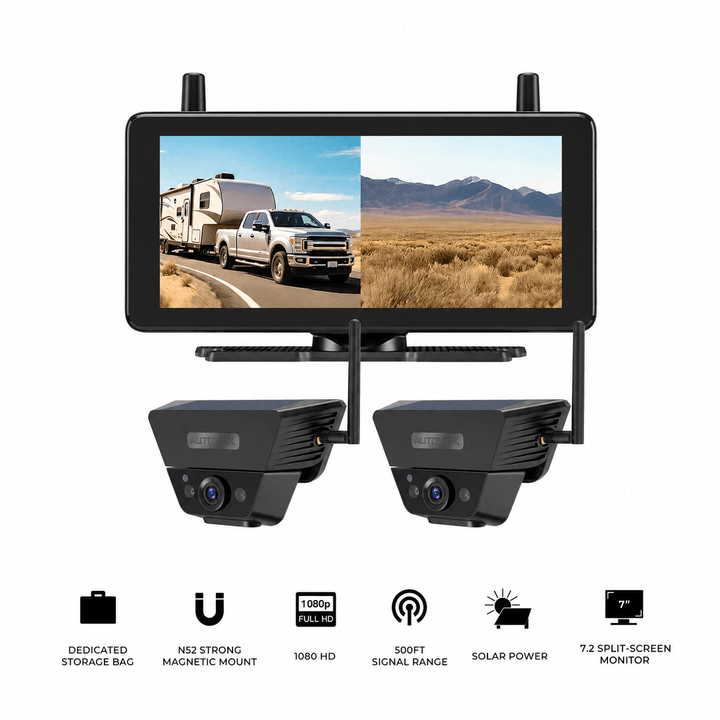
Prices, configurations, and availability may change. Confirm the current product listing and selected package before purchase. The AUTO-VOX products above provide separate camera feeds or split-screen displays. They do not provide a calibrated, stitched bird's-eye image. Most are designed primarily for compatible RVs and trailers; commercial trucks, heavy equipment, and modified vehicles require additional checks for power, mounting, signal, vibration, and operating conditions.
Frequently Asked Questions
What is the difference between a 360° truck camera and a multi-camera monitor?
A true automotive 360° bird's-eye system combines calibrated camera images into a virtual overhead view around the vehicle. A multi-camera monitor displays separate live images from individual cameras. Both can offer useful perspectives, but a split-screen display does not automatically produce a stitched overhead image.
Can four backup cameras create a bird's-eye view?
Four cameras are a common starting arrangement for true surround-view systems, but camera count alone is insufficient. The system also needs compatible lenses, image-processing hardware, proper mounting geometry, and calibration software. Four independent cameras connected to an ordinary quad-view monitor will typically produce four separate images.
Is a 360 action camera the same as a truck bird's-eye camera?
No. A 360 action camera is designed to capture immersive video that can be viewed or reframed from different angles. A truck bird's-eye parking system combines several vehicle-mounted camera feeds into a live overhead-style image. They serve different purposes and require different hardware.
Does AUTO-VOX offer a stitched 360° bird's-eye truck camera?
The AUTO-VOX multi-camera systems discussed here provide separate rear and side camera views through compatible monitors. CampSync D1, WF4, CampSync D1 Lite, and Solar5B Dual-Camera Kit do not produce a stitched overhead vehicle image. Their value is in providing distinct selected camera perspectives.
Which system is better for a lifted truck?
A compatible bird's-eye system may be useful for close parking around oversized tires, curbs, and bumpers. Separate cameras may be more useful when the driver wants detailed views of particular areas, such as the front trail approach or rear hitch. Vehicle modifications can affect camera mounting geometry and calibration, so suitability must be checked for the actual truck.
Can a 360° camera system show behind a semi-trailer?
A surround-view system mounted around the tractor cannot automatically show behind a connected full-size trailer. The trailer blocks that view and moves relative to the tractor during turns. A camera positioned at the trailer rear can provide the required rearward perspective. Specialized commercial systems may support additional cameras and trailer-specific processing, depending on their design.
Do bird's-eye camera systems eliminate blind spots?
No. A stitched overhead image can still contain hidden areas, distorted objects, or sections where image processing reduces detail. Tall obstacles, overhangs, camera contamination, and vehicle geometry can affect the displayed scene. Required mirrors, direct observations, and physical clearance checks remain necessary.
Does a 360° truck camera record video?
Recording depends on the system. Some around-view products focus on live parking assistance, while others include recording hardware. Independent multi-camera monitors may also support recording, but it is not universal. Check the supported recording channels, storage, and footage-access method separately from the display type.
Final Thoughts: Know What Image the System Actually Produces
The phrase "360 truck camera" can describe several different products.
A true bird's-eye system uses calibrated cameras and image processing to create a virtual overhead view. This can be useful when positioning a compatible vehicle around close obstacles.
A multi-camera monitor presents separate views from selected camera positions. That can be practical when the driver needs to observe a trailer rear, side lane, hitch, or another specific area.
A 360 action camera is different again, focusing on immersive video capture rather than providing a calibrated vehicle-centered parking image.
Before purchasing a system, confirm:
- Whether the monitor shows a stitched overhead image or independent video feeds.
- Which camera positions are included and what each one can see.
- Whether dedicated image-processing hardware and calibration are required.
- Whether the system fits the vehicle's dimensions and modifications.
- How wired or wireless transmission and power are handled.
- Whether recording or additional detection features are actually included.
- Whether the installation can be tested and maintained under normal operating conditions.
For a pickup parking in tight urban spaces, a properly integrated bird's-eye system may provide useful positioning context.
For an RV, trailer, or larger truck, separate rear and side camera views can provide useful information from locations that matter during towing and maneuvering.
Neither arrangement guarantees complete visibility, and each has installation and operating limits.
Choose the camera system according to the image you need: a calibrated overhead composite for close vehicle positioning, or independent camera views for detailed observation of selected areas around the vehicle.


