


Backing a Ford Transit into a loading bay feels different from reversing a pickup or passenger SUV.
The driver's seat is a long way from the rear doors. Cargo vans may have little or no useful rear-window visibility. Shelving, tools, partitions, and camper conversions can restrict the view even further.
Then there is the shape of the van itself. A high roof makes it easier to overlook low objects directly behind the bumper, while the extended body can make narrow delivery areas, alleyways, and campsite parking more demanding.
A rear camera helps provide visual context, but choosing the right Ford Transit backup camera involves more than finding a lens that fits near the license plate.
Transit vans have distinctive installation details: tall rear doors, high-mounted brake lights, moving door hinges, long interior cable routes, and different factory display configurations. A camera that installs easily on a short passenger van may need a different mounting or wiring approach on an extended high-roof cargo model.
Many Transit models already have a factory rear camera. Others may have older equipment, limited viewing angles, damaged hardware, or a previous owner's aftermarket installation.
The practical starting point is to identify what the van already provides, decide which rear view is missing, and choose an upgrade that works with its actual body and electrical layout.
Quick Navigation
Installation reminder: Camera mounting and wiring must preserve brake lights, rear-door movement, required visibility, airbags, and vehicle electrical systems. Follow the instructions for the exact Transit model and camera. If the installation requires modifications to factory wiring, body panels, or unfamiliar electrical systems, use a qualified installer. Continue using mirrors and direct checks while reversing.
Should You Upgrade the Factory Ford Transit Backup Camera?
Start with the exact Transit you own.
Camera equipment varies by model year, body style, trim, market, and factory options. Ford Transit cargo vans, passenger vans, cutaway models, and E-Transit vehicles can have different rear structures and electrical arrangements.
Transit Connect is also a different vehicle family, so its camera brackets and wiring should not be assumed to fit a full-size Transit.
Check the Camera Already Installed
Many newer full-size Transit vans include a factory rear camera, often displaying the image through the vehicle's infotainment screen.
Ford documentation describes rear cameras positioned below the center high-mounted stop lamp or on a rear cargo door, depending on the configuration.
Some vehicles also provide additional camera features such as:
- fixed parking guidelines
- steering-linked active guidelines
- centerline alignment
- rear-camera zoom
- additional camera views where equipped
Before replacing anything, check whether the existing system shows the area you actually need to see.
For example, a driver who regularly backs toward a loading dock may need a different view from a camper van owner who wants to see the road behind the vehicle while driving.
When the Factory Camera Is Working, an Extra View May Be More Useful
Consider a supplemental camera if the factory image is clear but you want to observe:
- the passenger-side rear corner
- a hitch or towing connection
- a rear-mounted bike rack
- a cargo carrier
- the area immediately below the rear bumper
Adding one selected view may be simpler than replacing the entire factory system.
A separate backup camera monitor can also avoid interfering with the original Ford display.

When the Factory Camera Is Not Working
If the existing rear image is missing, distorted, or intermittent, identify the cause before purchasing a replacement.
Possible issues include:
- dirty or damaged camera lens
- loose or damaged mounting hardware
- water intrusion at a connection
- damaged wiring near a moving rear door
- display or interface problems
- vehicle-specific camera system faults
Ford also notes that camera position matters when rear cargo doors are open. A door-mounted camera can point away from its normal rearward position when the door moves, which may affect the image and guideline behavior.
If the existing Ford system has failed, follow the model-specific diagnostic procedure before modifying factory connectors or replacing components.
Upgrade rule: Keep a usable factory system when it already provides the view you need. Add a supplemental angle for a specific visibility gap, or repair the original equipment when the issue is a system fault.
Best Backup Camera Mounting Positions on a Ford Transit
The rear of a Transit offers several possible camera positions, each with different advantages.
Camera height, rear-door design, lens angle, and the area you want to observe should guide the decision.
| Mounting Position | Main Advantage | What to Check |
|---|---|---|
| Below or near third brake light | High, centered rear perspective | Exact-model bracket fit, brake-light operation, sealing |
| Rear cargo door | Can use a suitable door-mounted location | Door movement, hinges, flexible wiring |
| License plate area | Accessible mounting position | Lower viewing angle, plate clearance, door location |
| Rear bumper area | Close view of the bumper or hitch zone | Road spray, impact exposure, limited farther-rear context |
| Additional side-rear position | Selected rear-corner or adjacent-side context | Camera alignment, mounting security, power and signal |
High-Mounted Camera Near the Third Brake Light
For a full-size Transit, a camera positioned high at the rear can provide a useful view of the roadway behind the van.
The elevated position can help show:
- the area behind the rear doors
- loading-bay approaches
- parking-space boundaries
- vehicles or objects farther behind the van
Ford has used camera locations below the center high-mounted stop lamp on certain Transit configurations.
Aftermarket manufacturers have also developed Transit-specific third-brake-light camera assemblies. Some designs replace the original lamp assembly with a combined lamp and camera unit.
This approach can create a clean installation, but compatibility must be checked for the exact model year and roof/body configuration.
A third-brake-light camera designed for an older Transit should not automatically be assumed to fit a newer model.
The installation must preserve:
- third brake light operation
- proper weather sealing
- lamp and camera mounting security
- vehicle wiring compatibility
- rear-door and roof clearance
The camera angle also deserves attention. A high-mounted camera may provide useful overall rear context while making very close objects near the bumper appear differently than they would from a lower camera.
Rear-Door-Mounted Cameras
Many Transit cargo vans use two side-hinged rear doors.
Mounting a camera to one of those doors introduces a moving installation point.
That affects both the image and the wiring.
When the door opens, the camera's view can shift away from the normal rearward direction. Depending on the installation, the camera may point sideways or toward the van body rather than directly behind the vehicle.
For a permanently wired door-mounted camera, the cable must also accommodate repeated door opening and closing.
Check the complete door movement, including wider-opening positions where equipped.
The cable should remain protected from:
- hinge movement
- pinching
- sharp metal edges
- abrasion
- water entering the door cavity
Existing manufacturer-approved flexible harness routes may be useful, but do not force additional wiring into an unsuitable or overcrowded boot.
A rear-door camera needs to remain secure and maintain its intended view after the doors have been opened and closed repeatedly.

License Plate and Bumper Cameras
A license-plate camera is often easier to reach for installation and cleaning.
It can work well when you want a practical close rear view without modifying the upper body.
The tradeoff is its lower position.
Compared with a high-mounted camera, the image may contain more of the area immediately behind the bumper and less of the farther roadway.
Low positions can also receive more road spray, mud, and debris.
A bumper-level camera may be useful for a hitch-specific view, although it should be positioned where normal loading, towing, or bumper contact is unlikely to damage it.
Remember that a cargo van may have a license plate mounted on a moving rear door. That creates the same door-movement considerations as other door-mounted cameras.
Camera Placement for Camper Conversions and Work Vans
A converted Transit may carry equipment that changes the usable rear view.
Examples include:
- rear ladder
- bike rack
- cargo carrier
- spare-tire carrier
- roof rack
- rear storage box
A camera mounted before those accessories are installed may later become partially obstructed.
Plan the finished vehicle layout before choosing the permanent camera angle.
For example, a camera aimed downward from the high rear roof area may show a bike rack prominently while providing less information about the road behind it.
One solution is to choose a different rear mounting point. Another is to add a second selected camera angle when the first view remains useful.
Neither camera provides exact physical clearance measurements. Continue checking the full accessory footprint directly.
Placement rule: High-mounted cameras generally provide broader rear context, while lower cameras can emphasize close-range areas. Rear-door movement and external accessories must be considered before the final camera position is chosen.
Wired vs. Wireless Camera Installation on a Long Ford Transit
The length and construction of the Transit make wiring one of the most important parts of the installation decision.
A short van with a dedicated dashboard monitor is relatively straightforward.
A long-wheelbase high-roof cargo van with a full partition, shelving, and rear-door-mounted equipment can require much more planning.
Wired Installation: Reliable Route Planning Matters
A traditional wired camera uses a physical video connection from the rear camera to the display in the cab.
On a Transit, the route may run through protected body cavities or along suitable interior sections toward the front of the vehicle.
Depending on the van, the installation may involve:
- rear-door or rear-roof cable entry
- existing grommets
- upper interior trim
- roof-side cable routing
- bulkhead or partition clearance
- front cab trim
- monitor or factory-screen interface
Choose a route that keeps wiring away from sharp edges, moving hardware, heat sources, and areas used for loading cargo.
Do not route wiring through airbag deployment areas or interfere with seat belts, safety systems, and factory electrical equipment.
If drilling through body metal is necessary, the location needs to be checked from both sides. The opening must be protected against abrasion, corrosion, and water intrusion.
Once the camera is installed, verify that all rear doors and interior panels operate normally.
Wireless Installation: Less Video Cable, Still Some Power Planning
A wireless backup camera reduces the need to run a long video cable from the rear of the van to the cab.
There are two main approaches.
Fixed wireless camera: The video signal is wireless, while the camera uses an approved vehicle electrical connection.
Rechargeable wireless camera: The camera carries its own battery and sends video wirelessly to the monitor.
The fixed approach can suit a work van where the camera needs to operate whenever the reverse circuit or another supported power source is active.
The rechargeable approach can reduce installation work, particularly when drilling and permanent wiring are undesirable.
Solar-assisted charging on rechargeable cameras is supplemental. It does not remove the need to monitor battery status and recharge when required.
How the Transit's Metal Body Affects Wireless Signal
A wireless camera mounted at the rear has to communicate with a monitor near the front of the van.
The signal path can be affected by:
- the long metal body
- cargo partitions
- metal shelving
- equipment racks
- loaded cargo
- camera and antenna position
Published wireless ranges are useful reference specifications, but they are often measured under favorable conditions.
Test the camera on the actual Transit before finalizing the installation.
Keep the rear doors closed and the monitor in its normal location during the test.
If the van regularly carries large metal equipment or a full cargo load, repeat the signal test in a representative loaded configuration where practical.
Signal stability is particularly important for an extended-body Transit, where the camera and monitor may be separated by the vehicle's full length.

Power Source and Reverse Activation
Camera power should match the intended use.
If the rear image is needed only while reversing, a supported reverse-triggered installation may be appropriate.
If the driver wants a rear view during forward driving, the system must support the intended operating mode and power arrangement.
A reverse-light-powered camera generally receives power only when the reverse circuit is active.
Continuous rear viewing may therefore require a different manufacturer-approved power arrangement.
Avoid connecting aftermarket devices to unknown factory circuits or control modules.
For E-Transit models, aftermarket work must also respect the vehicle's high-voltage system restrictions. High-voltage components and orange cables should only be handled by appropriately qualified personnel.
| Installation Type | Main Advantage | What Requires Attention |
|---|---|---|
| Factory camera repair or replacement | Maintains original display integration | Exact-model parts, harness, calibration and diagnosis |
| Wired aftermarket camera | Dedicated video connection | Long cable route, door hinges, trim and weather sealing |
| Fixed wireless camera | Reduces front-to-rear video wiring | Rear power connection and real-world signal |
| Rechargeable wireless camera | Minimal permanent wiring | Mounting security, battery charging and signal |
Installation rule: A wired system needs a protected physical route. A fixed wireless camera still needs a suitable power source. A rechargeable system reduces permanent wiring but adds battery and mounting considerations.
How to Choose the Right Ford Transit Camera Upgrade
Once mounting and power are understood, choose the display and camera configuration according to how the Transit is used.
Dedicated Monitor vs. Factory Screen
Using the original Ford display can create a clean integrated result, but aftermarket compatibility must be confirmed.
A camera designed for a generic monitor may not connect directly to the original infotainment unit.
Depending on the Transit year and equipment, integration may require vehicle-specific hardware or programming.
A standalone monitor avoids much of that complexity.
It can be especially practical when the existing Ford camera still works and the owner wants another camera angle.
A rearview mirror backup camera provides another display format. It can suit drivers who prefer viewing the rear image around the traditional mirror position.
However, some cargo vans have limited optical rear-mirror usefulness, and mirror brackets or factory mirror electronics can vary. Check mounting compatibility and available space before choosing a mirror display.
Single Rear Camera or Dual-Camera System?
A single rear camera is often sufficient when the main task is backing into parking spaces or loading areas.
A second camera becomes useful when the Transit carries:
- a trailer
- a hitch-mounted cargo carrier
- a bike rack
- equipment extending behind the rear doors
- accessories affecting the normal rear view
A dual-camera system can provide one main rear image plus another selected view, such as a passenger-side rear corner or hitch area.
For a long van, a larger monitor can also make split-screen images easier to read.
Choose Around the Van's Real Working Routine
| Transit Use | Camera Priority | Installation Approach to Consider |
|---|---|---|
| Delivery cargo van | Reliable rear view for frequent backing | Factory repair or fixed rear-camera system |
| Contractor / service van | Rear visibility around equipment | Fixed camera with protected mounting and wiring |
| Camper conversion | Rear view around racks and accessories | Portable rear or dual-camera setup |
| Passenger van | Clear rear view with suitable monitor placement | Factory system or compatible standalone display |
| Transit towing a trailer | Hitch and selected rear/trailer views | Supplemental or dual-camera configuration |
For an backup camera for truck or van application, the most useful choice depends on whether the van needs permanent everyday coverage or a flexible camera used for specific tasks.
Frequent commercial use generally favors a consistent mounting and power arrangement. Occasional parking or camper use may place greater value on easy installation and the ability to move a camera.

Before Finalizing the Installation
Test the system in a clear, controlled area.
Confirm:
- the rear image is correctly oriented
- the rear bumper or a suitable vehicle-edge reference is visible
- guidelines match the actual camera position
- the display is readable in daylight and low light
- the image remains stable with both rear doors closed
- all doors can open fully without disturbing the installation
- the camera remains secure during normal driving
- the monitor does not obstruct the windshield, mirrors or controls
Parking guidelines should be treated as visual references. If the camera position changes, recheck their alignment rather than assuming the previous calibration is still appropriate.
Selection rule: A delivery Transit may benefit from a permanent, automatically available rear view. A camper or occasional-use van may gain more flexibility from a rechargeable camera or dual-view kit.
AUTO-VOX Camera Options for Ford Transit Vans
AUTO-VOX offers several camera designs suited to different installation preferences.
The following options illustrate the tradeoffs between a fixed wireless camera, a rechargeable rear camera, and a flexible dual-camera setup.
| Product | Setup | Transit Use Case |
|---|---|---|
| W7 Pro | Fixed wireless camera + 5" monitor | Rear-camera retrofit with vehicle power |
| Solar3A Plus Max | Rechargeable camera + 7.2" monitor | Longer van, larger screen and optional dual view |
| Solar5B | Magnetic rechargeable camera + 7.2" monitor | Flexible rear view for camper or occasional-use van |
| Solar5B Dual-Camera Kit | Two magnetic cameras + 7.2" monitor | Main rear plus another selected angle |
Fixed Wireless: W7 Pro
W7 Pro uses a fixed rear camera with wireless video transmission to a 5-inch monitor.
The camera connects to a supported vehicle power source, while the monitor uses its own accessory power connection.
This removes the need for a long video cable from the back of the Transit to the dashboard, while keeping a permanent rear-camera position.
The published wireless range is up to 44 feet under suitable conditions. Check actual signal performance through the van's metal body before finalizing the installation.
Rechargeable Wireless: Solar3A Plus Max
Solar3A Plus Max uses a rechargeable camera with solar-assisted charging and a 7.2-inch IPS anti-glare monitor.
The larger display can be useful when the monitor sits farther from the driver or when a second camera is added for split-screen viewing.
The camera can be installed without connecting to the reverse-light circuit, provided the mounting position is compatible with the product.
Solar charging remains supplemental. Check battery status and use the supported charging method as needed.
Portable Rear and Dual Views: Solar5B
Solar5B uses a rechargeable magnetic camera and a dedicated 7.2-inch monitor.
It can suit a Transit camper or other van where the owner wants a flexible rear-camera position and minimal permanent wiring.
The Solar5B Dual-Camera Kit adds a second magnetic camera.
Depending on the van and mounting surfaces, one camera can cover the main rear area while the other is positioned toward another selected rear or side-rear reference point.
Magnetic cameras must be attached to suitable surfaces and checked for secure retention. A high-roof Transit can also make charging or repositioning a roof-level camera less convenient, so choose a location that remains safely accessible.
Ford Transit Backup Camera Upgrade Options


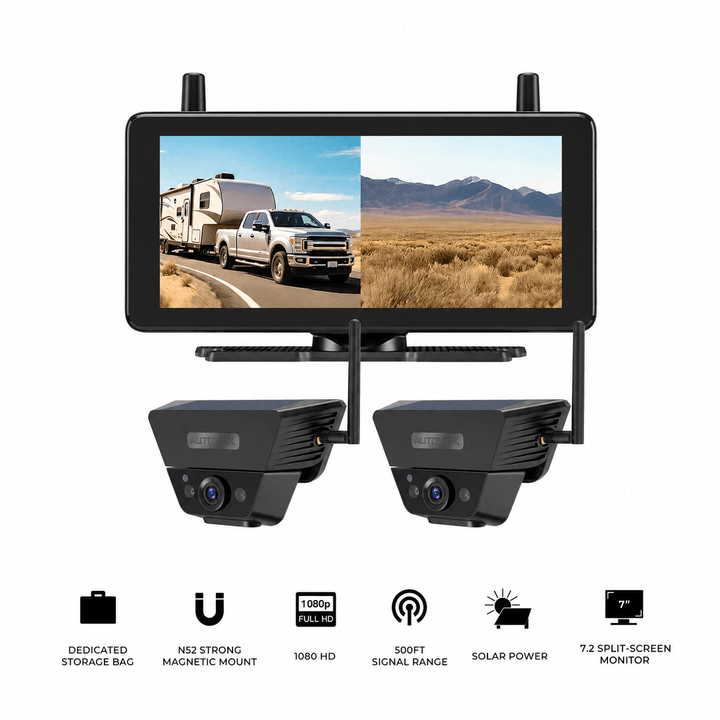
Prices and configurations may change. Confirm the current product page, exact vehicle compatibility, mounting position, monitor power, and wireless performance before purchase. These are aftermarket camera options; they should not be assumed to connect directly to the Ford factory display.
Frequently Asked Questions
Do Ford Transit vans come with backup cameras?
Many newer Ford Transit vans include a factory rear camera, but equipment and features vary by model year, body style, trim, and market. Check the exact van's specifications and owner's manual before purchasing an aftermarket upgrade.
Where is the factory backup camera on a Ford Transit?
Ford documentation describes camera positions below the center high-mounted stop lamp or on a rear cargo door, depending on the vehicle configuration. The exact location should be confirmed on the van, particularly when replacing factory hardware.
Can I install a backup camera in the Ford Transit third brake light?
Transit-specific third-brake-light camera assemblies exist, but fitment depends on the exact model year and body configuration. The installation must maintain proper brake-light operation, mounting security, weather sealing, and electrical compatibility. Do not assume a kit designed for one Transit generation fits another.
Is a wireless backup camera reliable on a long Ford Transit?
Wireless systems can work on long vans, although performance depends on camera-to-monitor distance, metal body construction, cargo, and interference. Test the camera with the rear doors closed and the monitor in its normal driving position. A published open-condition range does not guarantee identical performance inside every Transit.
Can I connect an aftermarket backup camera to the Ford factory screen?
Some integrations are possible with suitable vehicle-specific hardware, but compatibility depends on the Ford infotainment system, model year, wiring, and camera interface. A standalone monitor is often simpler when adding a supplementary camera. Confirm requirements with a qualified installer before modifying factory electronics.
Should I choose a high-mounted camera or a license-plate camera?
A high-mounted camera can provide a broader rearward perspective, while a license-plate camera may be easier to access and better suited to a close rear or bumper-focused view. The right position depends on rear-door movement, cargo accessories, mounting compatibility, and the area you need to observe while reversing.
Final Thoughts: Match the Camera to the Transit Body and Daily Use
A Ford Transit backup camera upgrade works best when it is planned around the actual van.
A factory rear camera may already provide adequate visibility. A damaged factory system may need diagnosis and repair. A cargo van with shelving or a camper conversion may benefit from a different camera position or a supplementary angle.
For a permanent installation, the main decisions are where to mount the camera, how to protect the wiring, and whether the original display will be reused.
For a rechargeable wireless system, focus on mounting security, battery access, monitor placement, and stable reception through the Transit body.
Before buying, confirm:
- The exact Transit year, body style, roof height, and factory camera equipment.
- The rear area you need to observe during parking, loading, or towing.
- Whether the preferred camera position is fixed to the body or a moving rear door.
- Whether a wired or wireless connection is practical for the van's length and layout.
- How the camera will receive power and how the image will be displayed.
- Whether doors, cargo accessories, safety equipment, and service access remain unobstructed.
Finally, test the complete system with the rear doors closed, the camera securely mounted, and the monitor in the driver's normal viewing position.
Start with the factory equipment and the missing rear view. Then choose a mounting location and wired or wireless setup that fits the Ford Transit's body, door movement, and daily working routine.


