


You're backing into a parking space when someone walks behind your vehicle. An AI backup camera may highlight the person on its display and sound a warning. A parking sensor may also beep, but for a different reason.
The AI camera is attempting to recognize a person in its video image. The parking sensor is responding to a nearby object based on its detection technology and operating range.
Now replace that person with a low concrete curb.
The result can change. An AI reversing system designed to identify people and vehicles may not recognize the curb as an alert target. An ultrasonic parking sensor might detect the curb if its height, shape, and position fall within the sensor's coverage, but it may also miss it.
That distinction explains why AI backup camera alerts and parking sensors should be evaluated separately.
Quick Answer: An AI backup camera with object-recognition features analyzes the camera image and can warn about supported types of objects within its designated detection area. Ultrasonic parking sensors estimate proximity to detectable obstacles using reflected sound waves. AI recognition does not automatically provide distance measurements, while ultrasonic sensors generally do not identify whether an object is a person, vehicle, animal, or curb.
The capabilities also vary significantly between products.
Some commercial AI camera platforms recognize several road-user categories using multiple exterior cameras. More narrowly focused consumer reversing systems may recognize only people and vehicles within a specific rear-camera warning area.
Understanding the difference helps when choosing an aftermarket system for a passenger car, pickup, cargo van, RV, or trailer.
This guide explains how both technologies work, what they can and cannot detect, why alerts may fail, and when combining a camera with parking sensors provides useful additional information.
Quick Navigation
Reversing safety reminder: Object-recognition alerts, ultrasonic sensors, and camera images are driver-assistance features. No system can guarantee detection of every person, child, animal, vehicle, or obstacle. Check the area around the vehicle before reversing, keep children and pets clear, use mirrors and direct observations, and stop whenever visibility or an alert is uncertain. The systems discussed here should not be assumed to apply the brakes automatically.
How Do AI Backup Camera Alerts and Parking Sensors Work?
AI camera alerts and ultrasonic parking sensors can both produce warnings during reversing.
What triggers those warnings is fundamentally different.
AI Camera Alerts: Recognizing Objects in Video
A camera-based AI reversing system begins with a live video image.
Software analyzes that image to identify objects belonging to categories the system is designed to recognize.
Depending on the product, those categories may include people, cars, trucks, bicycles, or other road users.
When a supported object appears within a designated warning area, the system may:
- draw a box or other visual indicator around the object
- display a warning symbol
- produce an audible alert
- highlight a particular camera view
The exact response depends on the product and display mode.
For example, AUTO-VOX Solar5B AI uses Smart Reversing Assist to recognize people and vehicles within the parking-guideline area.
Its intended recognition categories and warning area are specific to that product. They should not be expanded to include every object that appears in the video.
Recognition also depends on image quality and whether enough of the object is visible for the software to classify it.
A person partially hidden behind another vehicle may not be identified reliably. An object outside the camera's field of view cannot be analyzed by that camera.
Ultrasonic Parking Sensors: Measuring Reflected Sound
Conventional parking sensors use ultrasonic sound waves rather than video images.
Small sensors mounted in the bumper emit high-frequency sound pulses.
When those pulses reflect from an object, the system uses the returning echoes to estimate its proximity.
As the vehicle gets closer to a detected obstacle, the warning may change from intermittent beeps to faster beeps or a continuous tone.
Some parking systems also display approximate distance information or a graphic representing the detected object's position.
The sensor generally does not know what caused the reflection.
A wall, parked vehicle, trash bin, or person can all produce detectable echoes under suitable conditions.
The system responds according to signal characteristics, detection range, and its programmed warning rules.
A conventional ultrasonic sensor is therefore concerned primarily with proximity, while an AI camera with recognition features is concerned with supported object categories and their location in the camera image.
AI Recognition Is Different From Distance Measurement
An AI system may draw a box around a vehicle that appears inside its warning area.
That does not automatically mean it knows the exact distance between the vehicle and the rear bumper.
Some sophisticated camera-based systems use additional sensors, stereo vision, or depth-estimation methods. Those capabilities are not universal.
Likewise, ordinary colored parking guidelines are visual references. They are not proof that the camera measures physical clearance.
For a system such as Solar5B AI, the recognition feature should not be described as an ultrasonic distance sensor.
What About Radar and Automatic Emergency Braking?
These are separate technologies.
Automotive radar uses radio signals to detect objects within its supported monitoring area. It is commonly used for applications such as blind-spot monitoring and rear cross-traffic detection.
Rear automatic emergency braking is another driver-assistance function that can apply the vehicle's brakes under specified conditions.
A camera with AI alerts and a parking sensor kit do not automatically include radar detection or automatic braking.
When comparing products, check whether the system provides:
- live video only
- AI visual recognition
- audible object alerts
- ultrasonic proximity measurement
- radar-based detection
- automatic braking
Each capability should be verified independently.
Core distinction: AI recognition can identify supported object categories in a camera image. Ultrasonic sensors estimate proximity to detectable objects. An audible warning does not mean the two systems are using the same detection method.
What Can AI Backup Cameras and Parking Sensors Actually Detect?
The clearest way to understand the difference is to compare specific objects.
For this comparison, the AI column refers to a people-and-vehicle recognition system such as AUTO-VOX Solar5B AI, rather than every AI camera product on the market.
| Object or Situation | AI Camera Alerts (Solar5B AI Type) | Ultrasonic Parking Sensors |
|---|---|---|
| Adult pedestrian | Designed to recognize people within the active guideline warning area; detection is not guaranteed | May detect the person's physical presence within range, but cannot identify them as a person |
| Child | May recognize a visible child as a person; small size or partial obstruction can affect detection | May detect a child, but size, clothing, position, and movement can affect reliability |
| Passenger car or truck | Designed to recognize vehicles within the supported warning area | Can generally respond to suitable vehicle surfaces within the sensor's range |
| Dog, cat, or other animal | Animal detection is not supported | May respond to an animal as an obstacle, but detection is not reliable or species-specific |
| Low concrete curb | No supported curb-recognition alert | May detect a sufficiently high curb; low curbs can be missed |
| Thin pole or wire | Not a supported recognition category | Thin objects can be missed because of their size, angle, or weak echoes |
| Branch or bush | Not a supported recognition category | Detection varies with shape, surface, and position |
| Bicycle or shopping cart | Not a separately confirmed recognition category for this product | May detect suitable surfaces, but cannot identify the object type |
| Obstacle outside the camera image | Cannot recognize an object it cannot see | May detect it if it falls inside a sensor's separate coverage area |

People and Vehicles: Where AI Recognition Can Add Value
Imagine backing out of a driveway when a pedestrian enters the rear camera's view.
A conventional camera shows the person, but the driver must notice them on the screen.
An AI camera designed for pedestrian recognition may add a visual highlight and an alert when the person enters its supported warning area.
This can draw attention to a relevant object in the image.
However, several conditions still matter:
- the person must be within the camera's field of view
- the system must have a usable image
- the object must be recognizable by the model
- the person must be within the configured detection area
- the applicable display and alert mode must be enabled
A camera can show a person without necessarily triggering an alert.
This distinction matters particularly with children, whose smaller size or partial visibility may make recognition more difficult.
Drivers should always confirm that children and pets are clear of the area before reversing.
Animals, Curbs, and Small Obstacles: Different Limitations
A dog walking behind a vehicle may be visible in the rear-camera image.
That does not mean a people-and-vehicle recognition system will classify it as an alert target.
Solar5B AI does not support animal detection.
The same principle applies to:
- low curbs
- parking blocks
- small rocks
- branches
- thin posts
- other objects outside its supported recognition categories
The live camera may still display these objects when they are visible.
Ultrasonic parking sensors can provide a different type of information.
A sufficiently large object at bumper height may reflect sound and trigger a proximity warning, regardless of whether it is a wall, car, or another material.
However, sensors also have physical limits.
Low curbs, narrow poles, soft materials, and objects positioned outside the detection pattern can be missed.
Vehicle manufacturers explicitly warn about these limitations. For example, Kia's parking-distance warning guidance explains that thin objects, sound-absorbing materials, small obstacles, pedestrians, and animals may not always be detected.
Neither System Provides Complete Object Coverage
It is useful to separate three questions:
- Is the object visible? This depends on camera placement, field of view, and image conditions.
- Will AI recognize it? This depends on the supported object categories, warning area, and recognition performance.
- Will a parking sensor detect it? This depends on the object's position, physical properties, and sensor range.
These questions can produce different answers for the same object.
A curb might be visible on screen but produce no AI alert.
A wall might trigger ultrasonic beeps even though it is not a supported AI recognition category.
A person might be visible to the camera but outside the AI warning area.
And an obstacle may fall outside both the camera image and the sensor's detection zone.
Detection rule: Seeing an object, recognizing its category, and measuring its proximity are three different capabilities. Do not assume that one feature provides all three.
Why Do AI Alerts and Parking Sensors Miss Objects or Warn Unexpectedly?
Every detection system has operating limits.
When a warning fails to appear, it may be caused by the object's position, the environment, system configuration, or the technology itself.
An unexpected warning may have different causes depending on whether it comes from image recognition or reflected sound waves.
AI Camera Limitations: Lighting, Angle, and Obstruction
Camera-based recognition depends on the quality of the video image.
Conditions that may affect recognition include:
- very low light
- headlight glare
- direct sunlight
- heavy rain or snow
- water droplets or dirt on the lens
- a person partially obscured by another object
- an object appearing very small in the frame
- camera vibration or unstable mounting
Some backup cameras use infrared night vision to provide an image in darkness.
That can make the scene more visible, but the presence of night vision does not guarantee that AI recognition will succeed in every low-light condition.
The camera must also be aimed appropriately.
A camera mounted too high and tilted toward distant traffic may provide less detail of an object immediately below the rear bumper.
A camera aimed too far downward may show the parking area clearly but have a limited view farther behind the vehicle.
For a magnetic camera, always confirm the final mounting angle and security after repositioning.
Ultrasonic Sensor Limitations: Shape, Material, and Weather
Ultrasonic sensors do not need visible light, which can be useful in dark parking garages.
They can still be affected by the surrounding environment.
Common limitations include:
- mud, snow, or ice on the sensor
- water flowing over the bumper
- thin or sharply angled objects
- soft and sound-absorbing materials
- incorrect mounting height or angle
- objects too close to a sensor
- interference from other ultrasonic sources
Some objects may be detected at one distance but become difficult to detect as they move closer or fall below the sensor's measurement area.
Likewise, towing equipment or accessories near the bumper can affect the warnings.
A persistent beep should not be ignored simply because no obstacle is immediately obvious in the camera image.
Stop and investigate the actual surroundings.

AI False Positives vs. Missed Recognition
Two terms are useful when evaluating AI camera alerts.
False positive: The system indicates a supported object or hazard when the actual scene does not justify that classification.
False negative: A relevant object is present, but the system does not provide the expected recognition alert.
For example, an AI system might misinterpret part of a background image. Alternatively, it might fail to recognize a partially hidden pedestrian.
The exact causes depend on the software and image conditions.
Ultrasonic systems can also produce unnecessary warnings or miss detectable objects, but their errors arise from different physical measurements and detection rules.
When comparing equipment, do not rely solely on claims such as "smart detection" or "AI accuracy."
Look for documented information about:
- supported object categories
- warning-area boundaries
- operating modes
- audio and visual alerts
- low-light performance
- known exclusions
Parking Guidelines and Camera Calibration Matter
Some AI reversing systems associate their detection behavior with a visible parking-guideline area.
This makes camera placement and guideline configuration important.
A camera installed higher, lower, or off-center can change the relationship between the displayed guidelines and the actual vehicle.
If the camera is moved, recheck the guideline settings using the manufacturer's procedure.
Solar5B AI provides six levels of adjustable parking lines.
Its Smart Reversing Assist is designed to recognize people and vehicles within the guideline area when that function is enabled.
These lines remain approximate visual references.
Adjusting the overlay should not be treated as a way to turn the camera into a precise distance-measuring sensor or to guarantee recognition of every object in the vehicle's path.
Troubleshooting rule: If an AI alert fails, check the camera image, detection category, guideline area, and active viewing mode. If an ultrasonic warning behaves unexpectedly, check sensor cleanliness, bumper accessories, mounting, and the surrounding objects.
Should You Choose AI Camera Alerts, Parking Sensors, or Both?
The best system depends on which information the driver is currently missing.
AI camera recognition can be useful when the driver wants additional attention drawn to supported objects in the rear image.
Ultrasonic sensors can be useful when the driver wants proximity warnings about nearby detectable obstacles.
Both can provide complementary information when the equipment and vehicle are suitable.
| Primary Need | Useful Technology | Why |
|---|---|---|
| Seeing what is behind the vehicle | Backup camera | Provides live visual context |
| Highlighting people or vehicles in a defined rear area | Compatible AI recognition camera | Can add visual and supported audible recognition alerts |
| Estimating proximity to a wall or parked vehicle | Ultrasonic parking sensors | Provides distance-related warnings for detected obstacles |
| Parking around varied objects | Camera + suitable sensors | Combines visual information with proximity cues |
| Large truck or RV reversing | Properly mounted rear camera, with additional assistance as needed | Helps observe selected areas farther behind the vehicle |
| Frequent commercial vehicle operation | System matched to the vehicle and duty cycle | Installation, power, coverage, and operating conditions are critical |

Cars and SUVs: Recognition vs. Close-Range Distance
For a passenger car, a conventional backup camera may already provide a useful image behind the bumper.
If the driver regularly parks close to walls or other vehicles, compatible ultrasonic sensors can provide additional proximity information.
If the main concern is noticing people or vehicles in the camera view, an AI-assisted camera may offer a different type of alert.
However, recognizing supported object categories does not replace the need to check curbs, posts, shopping carts, or other obstacles.
The driver should continue using the live image as a whole instead of watching only for AI warning boxes.
Pickup Trucks, RVs, and Trailers: Camera Position Comes First
Large vehicles introduce additional viewing challenges.
A camera mounted at the back of a pickup shows a different area from a camera mounted on the rear of an attached trailer.
For a backup camera for truck installation, choose the mounting location according to the area the driver actually needs to see.
If a trailer is attached, bumper-mounted ultrasonic sensors on the tow vehicle do not automatically provide obstacle coverage behind the trailer.
A rear-mounted trailer camera may therefore provide useful information that the tow vehicle's parking sensors cannot.
For an RV backup camera system, a dedicated monitor and suitable rear-camera placement can also make the image easier to use during campsite parking.
Before selecting an AI-assisted camera, verify the recognition area, screen modes, mounting requirements, and supported vehicle type.
Chevy Express and Other Cargo Vans
For a cargo van such as the Chevy Express, the main visibility problem may be the long distance between the driver's seat and the rear doors.
Partitions, shelving, cargo, and solid rear-door panels can further limit direct rearward sight.
An aftermarket camera can provide an additional view behind the van.
Ultrasonic sensors can provide close-range warnings if the chosen system is suitable for the van and installed correctly.
When evaluating either technology, consider:
- rear-door or license-plate camera placement
- moving door wiring
- vehicle body length
- monitor location
- existing factory parking equipment
- accessories attached to the rear bumper
For commercial delivery use, a consistently available rear image may be more important than adding a recognition feature that addresses only particular object categories.
Product compatibility must be checked for the actual vehicle configuration.
Using AI Alerts and Parking Sensors Together
Combining the technologies can provide two kinds of feedback during the same maneuver.
For example, imagine backing slowly toward a parking space with a wall behind it.
The rear camera shows the wall and the general parking area.
Ultrasonic sensors may provide proximity beeps as the bumper approaches the wall.
If a person enters the supported AI warning area, an AI-assisted camera may also highlight that person and provide an applicable alert.
The driver now has visual context, proximity information, and supported recognition cues.
These features do not have to be integrated into one system to be useful, although independent equipment may have separate displays, controls, and warning behavior.
More alerts can also become distracting if they are poorly configured.
Choose a setup that the driver can understand quickly and use without taking attention away from the road.
Buying rule: Choose AI camera alerts when supported object recognition adds value to your rear view. Choose ultrasonic sensors when close-range proximity feedback is the missing function. Use both when the combination adds useful information without unnecessary complexity.
AUTO-VOX Smart Reversing Assist: What the Alerts Really Do
AUTO-VOX Solar5B AI provides a useful example of the difference between camera-based recognition and conventional parking sensors.
Its Smart Reversing Assist is specifically designed to identify people and vehicles within the parking-guideline warning area.
The feature is available as part of the Solar5B AI camera system and works with the compatible monitor and camera configuration.
Single-Screen vs. Dual Split-Screen: An Important Difference
The alert behavior changes according to the viewing mode.
| Display Mode | Visual Recognition Boxes | Audible Warning | Condition |
|---|---|---|---|
| Single full-screen | Available for supported detected people and vehicles | Available | Reversing guideline function enabled and object within the warning area |
| Dual split-screen | Available for supported detected people and vehicles | Not triggered | Visual framing only in split-screen mode |
In single full-screen mode, the system can highlight a detected person or vehicle and provide an audible warning.
In dual-camera split-screen mode, the monitor can display recognition boxes, but the active audible warning is unavailable.
If audible Smart Reversing Assist is needed, switch the selected camera to single full-screen mode and confirm that the reversing guidelines are enabled.
The system also does not support animal detection.
It should not be relied upon to recognize every curb, branch, small object, bicycle, or other obstacle behind the vehicle.
Its assistance feature does not control the vehicle's steering or braking.
Why Camera Compatibility Matters
The original Solar5B and the Solar5B AI are separate product systems.
The original Solar5B components are not cross-compatible with the newer Solar5B AI camera and monitor system.
Owners should not assume that purchasing an AI camera alone will add Smart Reversing Assist to an older Solar5B monitor.
Use the compatible camera and display configuration specified for the AI system.
Solar5B AI also offers:
- 1080P rear-camera video
- 7.2-inch IPS display
- infrared night vision
- six-level adjustable parking lines
- rechargeable battery with supplemental solar charging
- magnetic mounting
- optional dual-camera configuration
- loop recording with compatible microSD storage
The microSD card is sold separately.
These features support the overall rear-camera experience, but only the documented Smart Reversing Assist conditions determine when AI recognition alerts occur.
AI Recognition vs. Standard AUTO-VOX Cameras
Other AUTO-VOX camera systems provide live visual assistance without the Solar5B AI recognition function.
For example:
| Product | Camera Viewing Function | AI People/Vehicle Alerts |
|---|---|---|
| Solar5B AI | Rear view, adjustable guidelines, supported Smart Reversing Assist | Yes, within documented operating conditions |
| Solar5B | Rear view, adjustable guidelines, optional dual-camera viewing | No Solar5B AI recognition function |
| Solar3A Plus | Compact rear view, adjustable guidelines, compatible dual-channel support | No Solar5B AI recognition function |
| Solar5B Dual-Camera Kit | Two selected camera views on one monitor | No Solar5B AI recognition function |
The regular Solar5B is a useful option when the driver wants a large rear display, magnetic mounting, and adjustable parking guidelines without requiring AI recognition.
Solar3A Plus provides a compact 5-inch monitor and rechargeable rear camera.
Solar5B Dual-Camera Kit adds a second selected viewing angle, which can be practical for a trailer, rear corner, or another mounting position.
Two-camera viewing and AI detection are different features. A product offering split-screen images should not be assumed to recognize people or vehicles automatically.
AI-Assisted and Standard Backup Camera Options


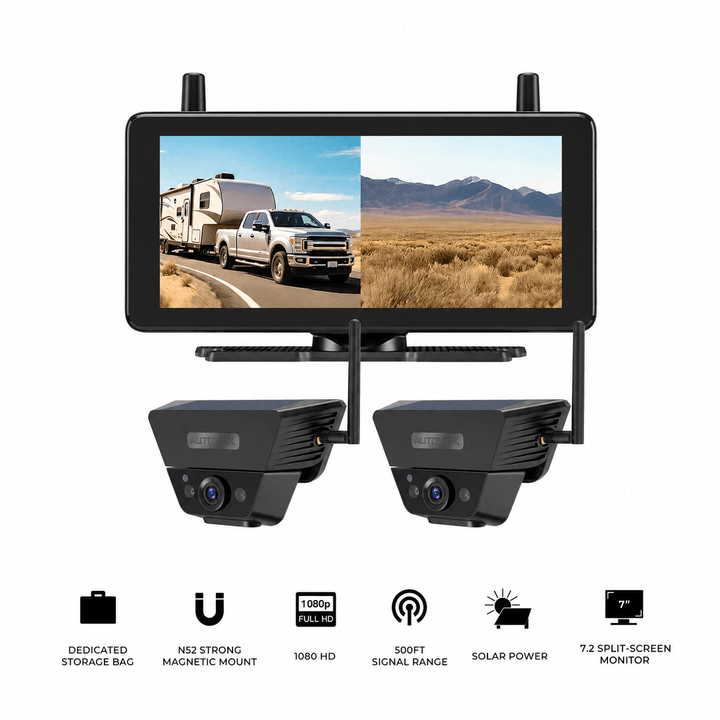
Prices and configurations may change. Confirm the current product page, selected package, monitor and camera compatibility, vehicle mounting requirements, and available alert functions before purchase. The standard Solar5B, Solar3A Plus, and Solar5B Dual-Camera Kit do not offer the Smart Reversing Assist recognition function of Solar5B AI. None of these products should be treated as a conventional ultrasonic parking sensor kit or an automatic emergency braking system.
Frequently Asked Questions
What does an AI backup camera detect?
Detection depends on the product. AUTO-VOX Solar5B AI is designed to recognize people and vehicles within its reversing guideline warning area. Other commercial AI systems may support additional categories. A camera's live image can show objects that its recognition software is not designed to classify.
Can AI backup cameras detect children and pets?
A people-recognition system may identify a visible child as a person, but detection is not guaranteed, particularly when the child is small, partly hidden, or outside the warning area. Solar5B AI does not support animal detection, so its alerts should not be relied upon to identify dogs, cats, or other pets. Always physically check the area before reversing.
Can AI backup camera alerts measure how close an obstacle is?
Object recognition and distance measurement are different functions. Solar5B AI uses supported recognition within a parking-guideline area, but it is not an ultrasonic distance sensor. Conventional parking guidelines are approximate visual references and do not provide exact clearance measurements.
Why does an AI camera detect a person but not a curb?
The AI software may be designed to recognize particular categories, such as people and vehicles. A curb is outside those supported categories for Solar5B AI. It may still appear in the live camera image, allowing the driver to see it directly, even without an AI warning.
Does Solar5B AI provide an audible warning in split-screen mode?
No. In dual split-screen mode, Solar5B AI can show recognition boxes around supported detected people and vehicles, but the active audible warning is unavailable. To receive the supported audible alert, select single full-screen mode and make sure the reversing guidelines are enabled.
Can the older Solar5B be upgraded with a Solar5B AI camera?
No. The previous Solar5B camera and monitor components are not cross-compatible with Solar5B AI. Use the compatible Solar5B AI system components if Smart Reversing Assist is required.
Are ultrasonic parking sensors better than AI camera alerts?
They perform different functions. Ultrasonic sensors can provide proximity warnings for detectable obstacles regardless of whether those obstacles belong to a particular visual category. AI camera alerts can draw attention to supported objects in the video image. Neither detects every hazard, and both may be useful when their capabilities match the vehicle's needs.
Will an AI backup camera automatically stop the vehicle?
An AI warning feature does not automatically include braking control. Solar5B AI provides supported visual and audible reversing assistance but does not operate the vehicle's brakes or steering. Rear automatic emergency braking is a separate function found on certain appropriately equipped vehicles.
Final Thoughts: Understand What Triggers the Warning
AI backup camera alerts and ultrasonic parking sensors can both help drivers notice potential problems during reversing, but they work through different detection methods.
AI recognition analyzes a camera image and can identify supported object categories within a defined area. Ultrasonic sensors estimate the proximity of obstacles that reflect their sound pulses.
This creates different strengths and limitations.
A person may trigger a supported AI alert. A nearby wall may trigger an ultrasonic proximity warning. A curb may be visible in the camera image even when neither system produces an alert.
Before choosing an aftermarket system, confirm:
- Which objects the AI camera is designed to recognize.
- Where the AI warning area is located within the camera image.
- Whether visual and audible alerts work in every viewing mode.
- Whether distance measurement is actually supported.
- Which objects and conditions can affect ultrasonic sensor detection.
- How camera placement, weather, and vehicle accessories affect coverage.
- Whether the system is compatible with your vehicle and intended use.
For a vehicle that already has a clear rear camera, proximity sensors may provide useful additional distance feedback. For drivers who want supported people-and-vehicle recognition, an AI-assisted camera adds a different type of visual attention cue.
The two technologies can complement each other, provided their operating limits are understood.
The useful question is not which warning system sounds smarter. It is what the system actually detects, when it warns, and which hazards still require the driver's own observation.


